
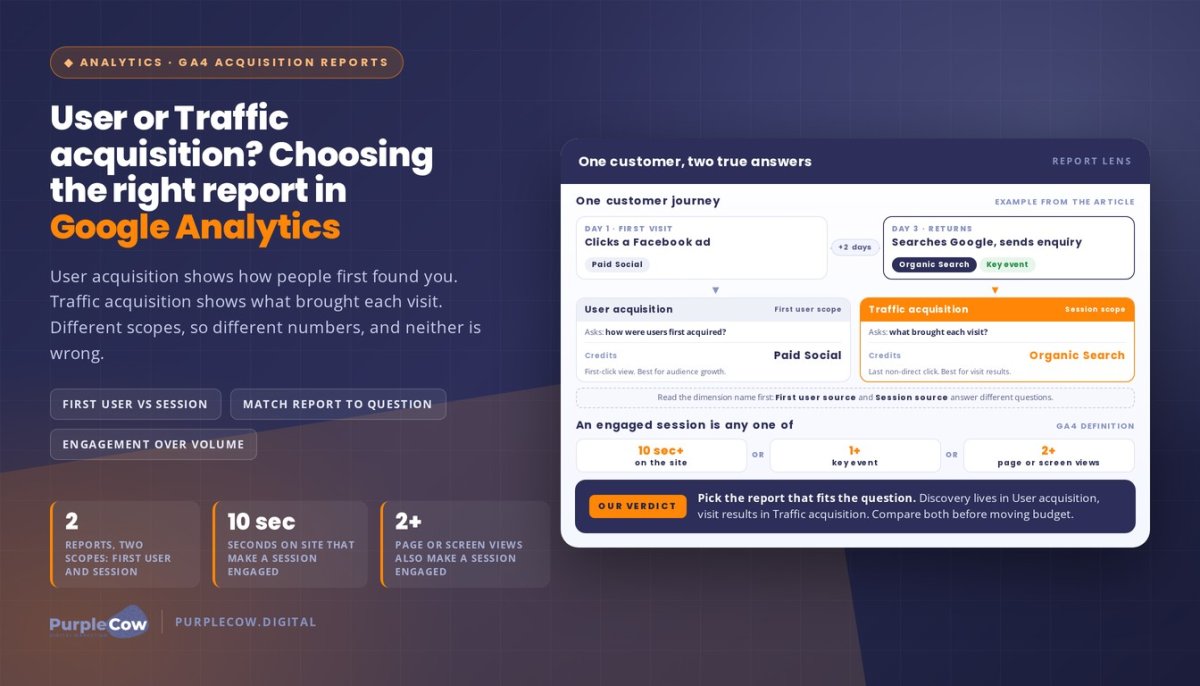
The channel that first brought a customer to your website and the one that brought them back tell different stories. Understanding user acquisition reports in Google Analytics means separating those stories: User acquisition shows how users were first acquired, while Traffic acquisition shows where each session came from, whether the visitor is new or returning. Because the reports use different scopes, their channel figures can differ without either being wrong.
It’s easy to assume the report with the most conversions tells you which channel deserves the credit. But a customer might click a Facebook ad, then return through Google Search two days later to convert. User acquisition can show the initial source; Traffic acquisition can show the source of the converting session.
This guide explains how to choose the right report for your question, how channels and metrics shape what you see, and why “First user” and “Session” dimensions matter. You’ll also find a practical comparison and decision guide to help you interpret acquisition data and make clearer marketing decisions for your Australian business.
Key Takeaways
- Use User acquisition to understand how people first found your site, and Traffic acquisition to see what brought each visit.
- Read “First user” and “Session” dimensions carefully: the scope changes what a channel’s results represent.
- Compare channels such as Organic Search, Paid Search, Referral and Email alongside source and medium for a clearer picture of traffic.
- Assess engagement as well as visits. An engaged session lasts at least 10 seconds, includes a key event, or has at least two page or screen views.
- Choose the report that matches your decision: first-touch discovery for audience growth, or session-level performance for evaluating visits and conversions.
Organic search, display, direct, referral, paid search, social, email and other traffic
Acquisition reports connect traffic sources with engagement and conversions. User acquisition shows how users were first acquired; Traffic acquisition shows the source of each session, including visits from returning users.
Watch Google Analytics explain where users come from and how the two acquisition reports differ.
Direct and Referral Traffic
Direct traffic is attributed when visitors enter your website address in a browser, while referral traffic comes from clicks on other websites, excluding search engines. For example, a visitor arriving from an industry directory is referral traffic; someone entering your web address is direct. Compare First user source for the original source and Session source for the current visit.
Email and Other Traffic
Email identifies visits attributed to email campaigns, while other default channel groups include Affiliates, Video, Display, Paid Social, and Organic Social. Google Analytics groups traffic by channel, then uses source to add detail, such as the referring website or search engine. Consistent campaign tagging helps distinguish a newsletter click from other visits and makes its source clearer.
Organic Search represents unpaid search results; Paid Search includes CPC campaign traffic. Display traffic comes from clicks on ads shown on other websites. Social traffic may be paid or organic, so use the channel distinction to compare campaigns with unpaid social activity. These labels show how people arrived, not whether the visit produced value.
Assess quality with engagement and conversion measures, not traffic volume alone. In GA4, an engaged session lasts at least 10 seconds, includes a key event, or has at least two page or screen views. Bounce rate can also indicate traffic quality. For example, compare the average engagement and key events from Organic Search with those from Paid Social before shifting campaign effort.
| Report option | Scope | Best question | Useful comparison |
|---|---|---|---|
| User acquisition | First user | How were users first acquired? | New-user sources |
| Traffic acquisition | Session | What brought each visit? | Session engagement and conversions |
Choose User acquisition to assess initial discovery, or Traffic acquisition to evaluate individual visits and their outcomes.
For Australian businesses working with agencies like PurpleCow Digital, consent choices and privacy settings can affect which activity is collected or available in GA4 reports. Use consent notices that clearly explain relevant data collection, and interpret channel totals in light of your site’s consent setup.
To share a User acquisition report, open it in GA4, set the date range and comparisons, then use the share or export controls. Export the report for a file-based review, or share report access with colleagues who need to view the same data.
GA4 distinguishes the attribution used by its acquisition reports: User Acquisition uses first-click attribution, while Traffic Acquisition uses last-click, non-direct attribution. This distinction helps align the report with the question: the first concerns how users were first acquired, while the second concerns the source of each session. Read attribution alongside the engagement and conversion measures available in acquisition reports.
Acquisition, behaviour and conversion metrics
Metrics answer different questions: who arrived, how they behaved, and whether they completed a valuable action. Compare User acquisition with Traffic acquisition only after checking the scope of each metric.
Acquisition Metrics
Acquisition metrics connect users or sessions with channels, sources, and campaign activity. In User acquisition, First user medium identifies the method used to acquire users, such as organic search or email. Traffic acquisition focuses on sessions, so it can show the source of a later visit. Match the report to your question: initial discovery or session-level results.
Use the default channel dimension to group traffic, then add source or medium for more detail. For example, Organic Search groups unpaid search visits, while a source can identify the search engine. A campaign dimension can help distinguish tagged activity within a channel. Compare like with like by using the same date range and metric when reviewing a campaign’s contribution across reports.
User and Engagement Metrics
Total users counts unique user IDs that triggered any events. Returning users have initiated at least one earlier session, whether or not that session was engaged. These user measures describe audience reach, while engagement metrics describe activity. A user can arrive through organic search, return through another channel, and generate sessions that appear differently across the reports.
GA4 classifies a session as engaged if it lasts at least 10 seconds, includes at least one key event, or contains at least two page or screen views. Use those criteria to interpret engagement, not session count alone. For example, a session with two page views qualifies even if it lasts less than 10 seconds and records no key event.
Compare engagement metrics across reports with care. User acquisition connects behaviour to the user’s first source; Traffic acquisition connects it to the session source. If Organic Search has more engaged sessions but another channel records more key events, each report answers a different performance question. Check which dimension appears beside the metric before drawing a conclusion.
For a practical review, start with a question, then select the matching report and dimensions:
- Audience discovery: compare users by First user source or First user medium.
- Visit quality: compare sessions, engagement, and key events by session channel.
- Conversion contribution: review key events alongside campaign and source details.
Don’t treat a high user total as proof of strong engagement, or a busy session channel as proof of more new users. Read the scope, metric definition, and outcome together to keep channel comparisons meaningful for your next marketing decision.
Differences between channels and source/medium
A channel groups traffic into broad categories, while source and medium provide more specific acquisition details. Compare both levels to see which sources engage visitors and contribute to conversions.
To compare channels in GA4, choose the same date range, add a conversion or key-event metric, then break results down by channel and source. Look for sources that combine meaningful engagement with conversions, rather than ranking them by traffic volume alone.
Channels and Source-Medium Combinations
A channel gives you a summary, such as Referral or Organic Search. A source/medium combination adds detail, such as a directory name paired with referral or a search engine paired with organic. In the Traffic acquisition report, use Session source and Session medium to compare visits. This helps identify which referring sites or search sources are associated with engaged sessions and conversions.
Engagement rate is useful for comparing sources, but read it alongside key events. For example, a source with fewer sessions may produce more enquiries than a busier source. Check the landing pages and actions associated with each source before judging performance. A high engagement rate indicates engaged sessions relative to sessions, not necessarily business value or conversion quality.
Paid Campaigns and UTM Parameters
UTM parameters label campaign links so GA4 can attribute visits to a source, medium, or campaign. For example, a tagged email link can distinguish a newsletter campaign from other email traffic. Consistent naming matters: variations in spelling or capitalisation can split activity across separate rows, making campaign comparisons harder.
Use campaign parameters consistently across paid links, then review the Traffic acquisition report. Compare campaign, session source, and session medium with engagement and conversions. A tagged social advertisement may appear under a different source or medium if its parameters don’t follow your naming convention. Keep a shared naming guide so your team classifies campaign links consistently.
To identify high-performing sources, compare the same outcome across channels and source/medium rows. Review engaged sessions, key events, and conversion results together, then inspect landing pages for sources that attract visits but few valuable actions. This helps distinguish traffic volume from meaningful contribution.
Use these checks before changing campaign decisions:
- Keep the date range and selected outcome consistent across channel comparisons.
- Use Session source and Session medium to find the specific traffic origin.
- Apply consistent UTM names to campaign links, then review the campaign dimension.
- Compare engagement and conversions together before shifting effort between sources.
Session-level last-click attribution can hide earlier channel contributions. For example, a user clicks a Facebook ad two days before converting through a Google search, so the later search receives the session-level credit despite the earlier social interaction. Consider the user’s path across channels as well as the source associated with the converting session. Google Analytics defines First user medium as the method used to acquire users to a website or application, offering a separate view of initial acquisition.
Engagement measures also need context. In the hypothetical social-channel example, organic-search users spend an average of two minutes on the site, while social users leave after eight seconds. In GA4, a session qualifies as engaged if it has 2+ pageviews, even if it does not meet the other listed criteria. Comparing these measures with key events can help distinguish time spent or page activity from outcomes that matter.
First-user and session-scoped dimensions
GA4 marks acquisition dimensions by scope: User acquisition uses “First user”, while Traffic acquisition uses “Session”. That label tells you which part of the customer journey a row describes.
Attribution settings can change how key-event credit is assigned across eligible channels. They don’t turn a First user dimension into a session dimension or change what that dimension represents.
Use First user dimensions to examine how people initially found your website or app. First user source represents the publisher or inventory source where traffic originated, while First user medium describes the method used to acquire users. For example, a visitor’s first recorded arrival from a search engine can remain associated with that initial source in later reporting.
Session dimensions describe the source associated with a particular visit. Someone might first arrive through an organic search result, then return in a later session through an email link. User acquisition focuses on initial discovery; Traffic acquisition lets you inspect the later visit’s source. These reports aren’t competing versions of the same answer. They measure different scopes.
To read a report, check the dimension name before interpreting its values. GA4’s “First user source” and “Session source” may display similar source names, but they answer different questions. “First user medium” identifies the acquisition method for the user; “Session medium” describes the method associated with that session. Don’t compare totals as if both rows represent the same population or visit.
For a practical example, imagine a trades business attracting a new visitor through organic search. The visitor later returns through a tagged email campaign and submits an enquiry. First user dimensions describe the initial acquisition; session dimensions describe the return visit. Comparing both helps distinguish channels that build discovery from those that bring people back to act.
Tag marketing campaigns consistently, and use the matching scope when reviewing results. To assess the first channel associated with users, select a First user dimension. To investigate the source of visits during a reporting period, use a Session dimension. This simple check prevents a browser’s first recorded source from being mistaken for the source of every later session.
- First user: use for questions about initial acquisition and audience discovery.
- Session: use for questions about a visit’s source and session performance.
- Attribution: review key-event credit separately from the scope label on the dimension.
Before acting on a channel comparison, note the dimension, metric, and attribution view together. This gives you a clearer basis for interpreting marketing campaigns without blending first-touch discovery with session-level activity.
User acquisition report scope and purpose
User acquisition answers a focused question: which source first brought users to your site or app? Its value is strategic, not merely descriptive. In GA4, compare first-user channels to see which sources introduce people to your business, then assess whether those users later trigger key events.
The first-touch view helps explain discovery. A search engine may introduce a visitor through Organic Search, while a display advertisement may introduce another. User acquisition keeps the initial source in focus, even when someone returns through a different channel. This makes it useful for evaluating awareness and the channels that attract new users.
Traffic acquisition answers a different question: what source brought each session? Someone who first arrived through Paid Search could return later through Direct traffic. The session report reflects the source associated with each visit, helping you examine visit-level behaviour and outcomes. Comparing both reports separates initial discovery from the channels that bring people back.
The reports also frame attribution differently. User acquisition is commonly described through first-click attribution, which assigns initial credit to the first interaction. Traffic acquisition is commonly described through last-click, non-direct attribution, which credits the last eligible non-direct source for the session. A key event may therefore appear against different sources across these views.
Use the report that matches the decision in front of you:
- Audience growth: review User acquisition to identify first-user sources introducing people to your site.
- Session performance: review Traffic acquisition to assess the source associated with visits.
- Channel comparison: compare both reports when you need to distinguish discovery from return traffic.
- Key-event analysis: check attribution context before assigning conversion credit to a channel.
For example, a user could click a social advertisement, then convert through Google Search two days later. User acquisition highlights the initial social source; Traffic acquisition shows the search source for the converting session. Neither view tells the whole journey, so compare them to understand each channel’s role.
Keep your purpose consistent when reviewing channels such as Display, Paid Search, or Organic Search. To decide where new users first discover your business, use first-user dimensions. To investigate which session source accompanied a key event, use session dimensions. This scope-first habit turns acquisition reporting into a clearer decision tool, rather than a contest over which channel has the biggest number.
PurpleCow Digital: Website Design
PurpleCow Digital can help when your acquisition data points to a website that isn’t turning visits into enquiries. Our Website Design considers how visitors move from landing pages to useful next steps, while Search Engine Optimisation can support organic visibility. If your site needs ongoing attention, Website Maintenance helps keep it updated.
For example, if GA4 shows that organic search brings visitors but few key events, review whether the landing page answers their needs and makes the next action clear. Acquisition reports show where to investigate; your website experience shapes what visitors can do next. Explore our Website Design service to see how we approach building a website around your business goals.
If you’d like to discuss your website and marketing goals, contact PurpleCow Digital or visit purplecow.digital.
Turn your acquisition data into a clear next step
Understanding user acquisition reports in Google Analytics is most useful when it helps you make a clear business decision. Before your next review, write down the question you need answered, the action you’re considering, and the result that would inform your next move. This keeps reporting connected to practical priorities instead of making your analytics dashboard another task to manage.
A useful habit is to record decisions alongside their context. Note what you changed, why you changed it, and what you’ll review later. As you deepen your understanding of user acquisition reports in Google Analytics, this record can help you distinguish a meaningful pattern from a short-term fluctuation and make your next team discussion more focused.
If your reporting isn’t giving you a clear way forward, we can help connect analytics insights with your website and marketing priorities. Bring the question you’re trying to answer, and we can discuss a practical next step for your business.
Your data doesn’t need to dictate every move. Use it to ask better questions, make thoughtful decisions, and keep building towards the results that matter to your business.
Frequently Asked Questions
How do I change dimensions and date ranges in the GA4 User acquisition report?
Set the report’s date range, then use a First user dimension such as First user source or First user medium to review initial acquisition. Compare reports using the same date range and metric.
Why does GA4 show Unassigned, Direct, or missing source data in User acquisition reports?
Direct traffic is attributed when visitors enter your website address in a browser. Consistent campaign tagging helps distinguish campaign traffic, but the material gives no explanation for Unassigned or other missing source data.

Article by
Angie Neal
Angie Neal is the founder and CEO of PurpleCow Digital, a full-service digital marketing agency based on Queensland's Redcliffe Peninsula. With deep expertise in SEO and web design, as well as a certification as a GoHighLevel Admin. Angie helps small-to-medium businesses build scalable growth systems through AI-powered automations, CRM workflows, and smart digital strategy. She's also passionate about building a community of like-minded agency owners at the After Party — sharing insights, solving real problems, and helping others grow. Whether it's search visibility, lead management, or end-to-end automation — Angie's focus is always on helping businesses scale sustainably.
Disclaimer
This page may contain affiliate links. If you sign up for software through our links, we may earn a commission at no extra cost to you. We only recommend tools we use and trust – software that is the backbone of our agency.