
Are you tired of throwing money at Meta Ads and hoping for the best while your website remains a black hole of data? It’s frustrating to feel blind to which channels actually drive your phone calls and form enquiries, especially when you’re trying to figure out how to track conversions with google tag manager without breaking your site. We agree that you shouldn’t need to be a developer to understand your own business performance. Most Australian business owners feel the same way, stuck between messy GA4 reports and a fear of touching the code.
This guide will show you how to set up a clean GTM installation that clears the confusion between GA4 and Meta Pixels while ensuring your setup is ready for Consent Mode v2. You’ll learn to use the latest 2026 visual tagging features to turn your website into your best salesperson. We’ll give you a practical foundation to scale your SEO and advertising with total confidence in your numbers. Let’s stop the beige marketing and start building a remarkable, data-driven strategy that actually grows your bottom line and delivers real results.
Key Takeaways
- Understand why Google Tag Manager is the “brain” of your digital marketing and how it differs from the data warehouse of Google Analytics 4 (GA4).
- Learn the correct way to install GTM on your WordPress site to ensure every visitor interaction is captured without breaking your website code.
- Discover exactly how to track conversions with google tag manager by setting up precise triggers for high-value actions like phone calls and form enquiries.
- Master the use of Preview Mode to test your tracking logic before it goes live, ensuring your marketing data stays clean and accurate.
- Build a professional tracking foundation that allows you to scale your Meta Ads and SEO strategies with real results you can actually measure.
What is Google Tag Manager and Why It Matters for Your Business
Most business websites are lazy. They sit there looking pretty but fail to tell you which marketing efforts are actually putting money in the bank. If you’re tired of “beige” marketing that blends into the background, you need a way to see exactly what’s working. This is where What is Google Tag Manager (GTM) becomes your most powerful asset. It’s a centralised control centre that manages all your website tracking codes in one place, allowing you to stop guessing and start measuring.
Learning how to track conversions with google tag manager isn’t just a technical chore; it’s about taking control of your business growth. Instead of waiting weeks for a developer to hard-code a new tracking pixel, you can deploy tags yourself in minutes. It’s the difference between flying blind and having a high-definition radar for your digital performance.
To better understand how this tool fits into your strategy, watch this helpful video:
The Business Benefits of Using a Tag Manager
Speed is everything in the Australian market. A bloated website with twenty different tracking scripts slows down your load times, which frustrates users and hurts your search rankings. GTM solves this by consolidating those scripts into a single container. This means your site stays fast while you gather more data than ever before.
We see too many SMEs held hostage by expensive developer hours for simple tracking updates. By using GTM, you reduce that reliance and save significant costs. It also ensures your data is accurate across all platforms. Whether you’re measuring the success of Meta Ads or your latest SEO services, you’ll have a single source of truth for your return on investment (ROI).
GTM vs. GA4: Clearing the Confusion
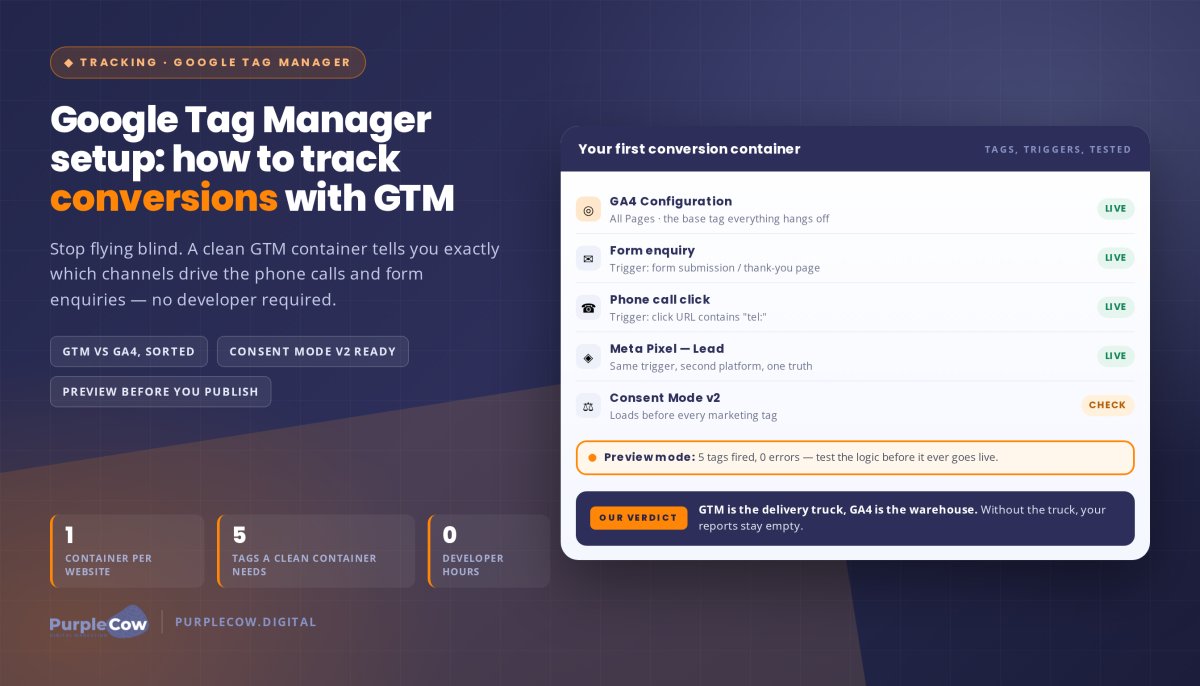
It’s easy to get confused between GTM and Google Analytics 4 (GA4), but they serve completely different roles. Think of GTM as the delivery truck and GA4 as the warehouse. GTM’s job is to pick up information from your website, such as a contact form enquiry or a phone call click, and deliver it safely to the warehouse. GA4 is where that data is stored, organised, and analysed.
You need both to get a clear picture of your customer journey. Without GTM, your GA4 warehouse stays mostly empty, only tracking basic page views. With a proper setup, you can see exactly which buttons users click and where they drop off. This transforms your website from a static brochure into your best salesperson, working 24/7 to show you precisely how to track conversions with google tag manager for real-world results.
Creating Your GTM Account and Web Container
Setting up your GTM account is the first step toward reclaiming your marketing budget from the void of guesswork. You’ll need to sign in to the Google Tag Manager portal using a dedicated business Google account. We always recommend using a business email rather than a personal one to keep your professional assets secure and separate. If you’re looking for a more granular step-by-step tutorial on the basic interface, Coursera offers excellent foundational resources, but our focus is on the strategic setup that drives real results for Australian businesses.
Learning how to track conversions with google tag manager properly starts with a clean account structure. You should create one account for your business and then one “container” for each website or domain you own. This keeps your data from different projects from bleeding into each other, ensuring your analytics remain pristine. When you’re ready to scale, you can easily grant access to your digital marketing services partner without ever having to share your master password, which is a much safer way to collaborate.
Setting Up Your Account Structure
Organisation is your best friend when managing multiple tracking codes. Use a clear naming convention like “Company Name – Website” for your account and container names. This makes it easy to find what you need when you’re managing several projects or handing off the reins to a specialist. Keeping things professional from day one prevents a messy dashboard that causes confusion later on.
During the setup, you’ll be asked to select a platform target. For your primary business site, you must choose “Web.” This ensures Google generates the correct version of the tracking code for your website’s environment. You’ll also need to review and accept the Data Processing Terms. In the era of modern privacy standards and Consent Mode v2, these steps aren’t just red tape; they’re essential for keeping your business compliant while you gather valuable data.
Configuring Your Web Container
The GTM dashboard might look like a flight deck at first, but it’s built on three simple pillars: Tags, Triggers, and Variables. Tags are the “what” (the tracking code itself), Triggers are the “when” (the action that fires the code), and Variables are the “details” (the specific information being captured). Understanding these basics is essential when you’re mastering how to track conversions with google tag manager for your business.
One of the best features of GTM is the “Workspace” concept. This allows you to draft changes, test them, and refine your tracking logic without breaking the live website. It gives you the freedom to experiment with new tracking strategies before they go public. If you’re feeling overwhelmed by the technical setup, you can always chat with our team about your tracking goals to ensure your foundation is rock solid from the start.
Installing GTM on Your WordPress or Custom Site
Once your account is ready, you’ll see your unique GTM container ID, usually formatted as GTM-XXXXXX, in the top right corner of your dashboard. Clicking this ID opens a window with two snippets of code that act as the tracking foundation for your entire digital strategy. Getting this right is the backbone of how to track conversions with google tag manager effectively. Your website shouldn’t just look good; it should be a high-performing lead machine that captures every interaction.
Correct placement of these scripts is vital for data accuracy. If the code is buried at the bottom of your page, a user might bounce before the tag even has a chance to fire. This leads to “ghost” traffic where you know people are visiting, but you have no idea what they’re doing. We want to ensure your tracking is active from the millisecond the page starts loading to capture the full customer journey.
Manual Installation for Custom Websites
The first script goes as high in the <head> of your site as possible. The second script is the “noscript” tag, which sits immediately after the opening <body> tag. This acts as a backup for users with JavaScript disabled or those using older browsers. It ensures you don’t lose data from a segment of your audience just because of their browser settings.
If you’re managing a custom site or prefer manual control, you’ll need to find your header.php file. Be careful here; a misplaced character can cause the “white screen of death,” taking your site offline. For businesses using strategic WordPress sites, we often recommend this method for peak performance. It keeps your site lean and mean by avoiding extra plugin bloat.
Using Plugins for a Stress-Free Setup
For many Australian SMEs, a practical, code-free solution is the way to go. We recommend using a plugin like GTM4WP (Google Tag Manager for WordPress) because it’s reliable and handles the technical heavy lifting for you. You simply enter your GTM ID into the plugin settings, and it automatically injects the code across every page of your site. This method is perfect for owners using page builders like Bricks Builder or Elementor who want to stay focused on their business rather than theme files.
While manual installation is often faster, plugins offer several advantages for growing businesses:
- Ease of use: No need to touch sensitive theme files or hire a developer for every update.
- E-commerce integration: Many plugins come with built-in support for tracking sales and cart actions.
- Safety: Lower risk of breaking your site layout during the installation process.
Choosing the right method depends on your technical confidence and your long-term goals. Either way, a working GTM installation is the first step in mastering how to track conversions with google tag manager to drive real results for your business.
Configuring Your First Tag and Testing with Preview Mode
GTM acts as the remote control for your website’s data. You’ve already done the hard work of installation; now it’s time to give the system its first set of instructions. If you want to master how to track conversions with google tag manager, you must understand the relationship between Tags and Triggers. A Tag is the piece of code that sends data, while a Trigger is the specific logic that tells GTM exactly when to fire it.
The first step for any serious business is setting up the basic tracking that records every visit. We start with a simple ‘All Pages’ trigger. This ensures that no matter where a visitor lands, their session is captured. It’s the foundation of a data-driven approach that stops your marketing from being beige and forgettable.
Connecting Google Analytics 4 (GA4)
To get started, you’ll need to find your GA4 Measurement ID in your analytics property settings under Data Streams. In the 2026 GTM interface, you’ll create a “Google Tag” and map it directly to this ID. This method is far superior to pasting the GA4 code directly into your website header because it centralises your control. You can update your tracking logic in GTM without ever needing to touch your website code again, which is essential for scaling your marketing strategies for small business.
Using Preview Mode to Verify Success
The golden rule of GTM is simple: never hit publish until you’ve verified your changes. Preview Mode, also known as Tag Assistant, is your secret weapon for accuracy. By entering your URL into the Preview window, you can watch your tags fire in real-time as you click through your site. It’s a secure debug environment that shows you exactly what Google sees.
If you see a tag listed as ‘not fired’ when it should have captured an action, don’t panic. This is the perfect time to troubleshoot common errors like incorrect trigger conditions or variable mismatches. Testing ensures that when you finally go live, your data is pristine and your ROI calculations are based on facts, not hope. This is a critical step in learning how to track conversions with google tag manager for real results.
Professional Tracking Strategies to Scale Your ROI
Basic page views are the vanity metrics of the digital world. They might make you feel popular, but they don’t pay the bills. To build a business that stands out, you must move beyond surface-level data and start measuring the actions that actually impact your bank balance. Knowing how to track conversions with google tag manager at a professional level means identifying every phone call, form enquiry, and high-intent button click that occurs on your site.
This data doesn’t just sit in a vacuum. It feeds directly into your local SEO strategies, showing you exactly which regions or suburbs are driving the most profitable leads. When you see that a specific service page is generating calls from your target area, you can stop guessing and start scaling what works. This level of clarity is what separates a remarkable brand from the beige marketing that plagues your competitors.
Tracking Conversions that Drive Results
Start by setting up triggers for ‘Click to Call’ and ‘Click to Email’ buttons. These are immediate signals of intent from potential clients who are ready to buy. If you’re running a high-performing WordPress website, tracking these micro-conversions helps you understand the full web funnel. You can see if users are watching your videos or scrolling to the bottom of your case studies before they reach out. This insight allows you to refine your content and build a path that leads every visitor toward a conversion.
Don’t overlook the ‘thank you’ page. Tracking visits to the page a user sees after submitting a form is the most reliable way to measure lead quality. It confirms a successful submission and gives you a clean data point to optimise your Meta Ads. By focusing on these high-value milestones, you ensure your marketing budget is building a foundation for long-term growth rather than just chasing clicks.
Maintaining Your GTM Container
A professional tracking suite isn’t a “set and forget” project. Websites evolve, and software updates can occasionally break your carefully crafted triggers. We recommend website care plans to ensure your tracking remains accurate and functional as your site grows. Auditing your tags every six months is a practical way to remove ‘zombie’ scripts that might be slowing down your site speed and hurting your SEO performance.
There comes a point where DIY-ing your data becomes a bottleneck for your growth. When you’re ready to stop playing with code and start seeing real results, hiring a team of experts is the smartest move you can make. At PurpleCow Digital, we help SMEs turn raw numbers into a strategic roadmap. We don’t just show you how to track conversions with google tag manager; we build the engine that helps your business scale and dominate your local market.
Turn Your Website into a High-Performing Lead Machine
Stop letting your marketing budget disappear into a black hole of guesswork. You now have the roadmap to transform your website from a quiet brochure into a high-performing salesperson that reports back with every success. By mastering how to track conversions with google tag manager, you’ve moved past the beige marketing that holds most Australian businesses back.
You’ve learned to separate the warehouse of GA4 from the delivery truck of GTM, installed your container safely, and verified your first tags. Now, it’s time to use those insights to scale. Our team of expert WordPress developers focuses on results measured in leads and revenue, not just vanity clicks. We’re here to ensure your Australian-focused strategy is built on a foundation of rock-solid data and strategic discipline.
Your business deserves to be a market leader, not just another face in the crowd. Don’t settle for being invisible when you could be indispensable. Take the leap and start making decisions based on real-world results today.
Frequently Asked Questions
Do I need a developer to set up Google Tag Manager?
You don’t always need a developer to get started with Google Tag Manager. While the initial code injection into your website’s header requires some technical comfort, many Australian SMEs use plugins to handle the heavy lifting. However, if you want to build a remarkable tracking suite that captures complex user journeys, hiring a team of experts ensures your data remains accurate without the risk of breaking your site’s layout or performance.
Is Google Tag Manager free for small businesses?
Google Tag Manager is a free tool for almost every small-to-medium business in Australia. There is an enterprise version called GTM 360, but the standard free version provides all the power you need to track contact form enquiries and Meta Ads performance. You only incur costs if you choose to implement server-side tagging through a cloud provider, which typically starts around A$30 per month depending on your website traffic and processing needs.
Will Google Tag Manager slow down my website?
GTM actually helps optimise your website speed by consolidating multiple tracking scripts into a single, asynchronous container. Instead of your site loading ten different pieces of code one by one, it loads the GTM container, which then manages the rest. This prevents beige marketing scripts from bloating your site. We recommend auditing your tags every six months to remove any old, unused scripts that could eventually impact your load times or search engine performance.
Can I use GTM to track phone calls on my site?
You can definitely use GTM to track phone calls by setting up Click to Call triggers on your mobile site. This is a vital part of learning how to track conversions with google tag manager because it proves your website is actually generating leads. By capturing every time a potential client clicks your phone number, you gain a clear picture of which marketing channels are driving the most direct enquiries to your business.
What happens if I have both GTM and the old Google Analytics code on my site?
Having both the GTM container and a separate hard-coded Google Analytics script will likely cause double-tracking. This inflates your session data and makes your bounce rate look artificially low, which ruins your ability to make data-driven decisions. Once you’ve successfully migrated your GA4 configuration into GTM, you should remove the old standalone code. This keeps your data pristine and ensures your website remains your best salesperson with accurate, reliable reporting.
How do I give my marketing agency access to GTM?
You can safely grant access to your marketing partner through the Admin tab in your GTM dashboard. Simply select User Management and add your agency’s business email address. This allows our team to build your tracking logic without you ever needing to share your master Google password. It’s a secure, professional way to collaborate on your growth strategy while maintaining full ownership of your data and your digital assets.
Does GTM help with my SEO rankings?
GTM doesn’t directly change your rankings, but it provides the data you need to improve them. By showing you exactly how users interact with your content, you can refine your service pages to keep people on-site longer. Faster load speeds from script consolidation also provide a better user experience, which is a key factor in search engine optimisation (SEO). It’s about moving away from average results and building a site that search engines notice.
What is the difference between a tag and a trigger?
Think of a tag as the what and a trigger as the when of your tracking system. A tag is the specific piece of code, like a Meta Pixel, that sends information to a platform. A trigger is the rule that tells GTM when to fire that tag, such as an enquiry form submission. Understanding this relationship is essential when you’re mastering how to track conversions with google tag manager for your business.

Article by
Angie Neal
Angie Neal is the founder and CEO of PurpleCow Digital, a full-service digital marketing agency based on Queensland's Redcliffe Peninsula. With deep expertise in SEO and web design, as well as a certification as a GoHighLevel Admin. Angie helps small-to-medium businesses build scalable growth systems through AI-powered automations, CRM workflows, and smart digital strategy. She's also passionate about building a community of like-minded agency owners at the After Party — sharing insights, solving real problems, and helping others grow. Whether it's search visibility, lead management, or end-to-end automation — Angie's focus is always on helping businesses scale sustainably.
Disclaimer
This page may contain affiliate links. If you sign up for software through our links, we may earn a commission at no extra cost to you. We only recommend tools we use and trust – software that is the backbone of our agency.