
What if your most reliable new team member worked directly inside Slack, never took a sick day, and handled your daily digital admin without complaint? If you are weighing up whether to hire a Viktor consultant, you likely want straight answers about how an artificial intelligence (AI) employee operates, what tools it connects with, and how to train it to deliver real results.
Unlike basic chatbots that simply answer questions, Viktor is an autonomous AI employee built to live inside your team’s communication channels. It connects directly with your day-to-day software stack to complete practical tasks such as drafting weekly reports, updating customer relationship management (CRM) records, executing client follow-ups, and managing routine workflows. The secret to success is not just turning the tool on, but training it to fit your actual operational rhythm.
In this guide, you will learn what an experienced consultant does, how we implement and train AI staff, and how to assess technical fit for your business. We also examine how an AI team member works alongside broader business automation, CRM management, and operational workflows. At PurpleCow Digital, we help ambitious Australian small-to-medium enterprises (SMEs) cut through digital clutter, eliminate repetitive busywork, and build high-performing operations that stand out.
Key Takeaways
- A Viktor consultant designs, trains, and implements an autonomous AI employee inside Slack to handle real administrative and operational tasks.
- Successful implementation requires mapping real business processes, establishing data access boundaries, and configuring task permissions before deployment.
- Viktor connects directly to core business software such as CRMs, calendars, email, and project management boards to run multi-step actions.
- Training an AI employee mirrors onboarding a human team member, using clear operating procedures, feedback loops, and human-in-the-loop approvals.
- Australian SMEs achieve the highest return on investment (ROI) by targeting repeatable bottlenecks like lead triage, quote follow-ups, and weekly reporting.
What Does a Viktor Consultant Do for Your Business?
Are your senior staff spending valuable hours chasing quote updates, manually logging client communications, or preparing internal summaries across disconnected tools? When operational busywork piles up, bringing in an AI employee can transform daily productivity. However, configuring an autonomous agent requires clear structure, disciplined scoping, and deep operational understanding.
A Viktor consultant is a specialist who scopes, builds, trains, and integrates your Viktor AI employee into your company workflow. Rather than leaving you to experiment with prompts in isolation, a consultant treats Viktor as an incoming digital staff member. They define its job description, set up its digital workplace within Slack, connect its tools, and configure guardrails so it acts safely and accurately.
The consultant’s role spans discovery, systems integration, skills configuration, staff training, and ongoing performance tuning. During discovery, we evaluate the exact administrative bottlenecks costing your team time. In the build phase, we connect Viktor to your business systems, write custom skill instructions, and run private simulations. Finally, during handover, we guide your human team on how to delegate work effectively to their new digital coworker.
This process ensures your AI initiative delivers measurable commercial value rather than becoming another unused piece of software. If you have been curious about how digital team members function in practice, our guide on AI employees for business explains what to expect during initial deployment.
What specific business problems can an AI employee solve?
An AI employee like Viktor excels at repetitive, context-rich tasks that require cross-referencing multiple applications. It does not replace strategic human thinking; instead, it eliminates the operational drag that pulls your team away from high-value client work.
Consider common service industry friction points: unlogged sales calls, forgotten follow-up emails, missed calendar invites, or weekly performance reports that take hours to compile manually. Viktor reads incoming notifications in Slack, checks connected software databases, drafts tailored responses, and asks for confirmation before sending. It turns fragmented multi-app chores into conversational, one-click approvals.
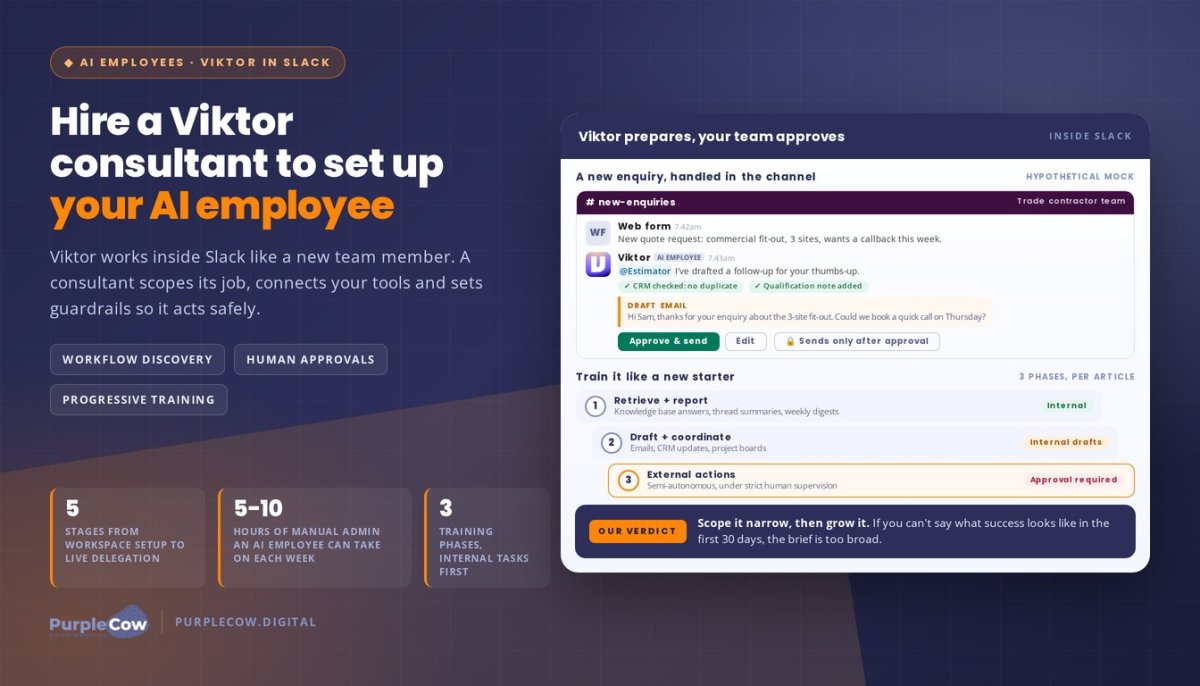
Hypothetical example: A commercial trade contractor handles fifty customer enquiries each week across phone, web forms, and email. Staff often take two days to update lead statuses in their CRM and send initial qualification summaries to project estimators. With Viktor configured inside their team Slack channel, Viktor instantly receives the new enquiry details, checks the CRM for duplicate contacts, drafts a preliminary qualification note, and tags the estimator in Slack with a proposed follow-up email ready for a quick human thumbs-up.
How does a consultant differ from a software vendor?
Software vendors sell access to a platform and leave the implementation up to you. In contrast, a consultant takes ownership of the operational outcome. Setting up an AI colleague involves far more than clicking an install button; it demands workflow engineering, data security protocols, and behavioural prompting.
A qualified consultant looks closely at your standard operating procedures (SOPs). They determine what authority Viktor should have, where human approval is mandatory, and how data flows between your systems. This operational focus prevents common pitfalls such as hallucinations, incorrect data entry, or confused team members who do not know how to interact with the bot.
How Viktor Integrates into Your Slack Workspace and Tech Stack
Deploying an AI employee should feel natural to your existing team, not like learning another complicated software interface. Viktor works where modern teams already talk: inside Slack. By participating in public channels and direct messages, it functions as an accessible coworker ready to assist on demand.
A consultant ensures this integration is seamless, secure, and aligned with your operational permissions. Moving from an initial software concept to an active, dependable digital employee follows a structured five-stage pathway:
- Workspace setup and channel architecture: Establish dedicated channels for Viktor, defining where it monitors conversations, where it posts administrative alerts, and where team members delegate private tasks.
- Software stack authentication: Securely connect Viktor to your business tools, including your CRM, Google Workspace or Microsoft 365, calendars, project management boards, and documentation repositories.
- Skill definition and prompt choreography: Program Viktor’s core skills using your business SOPs, brand tone, communication rules, and validation checks.
- Supervised sandbox testing: Run mock scenarios in a private staging channel to confirm that Viktor retrieves correct data, formats responses accurately, and requests human confirmation appropriately.
- Team onboarding and live delegation: Introduce your staff to Viktor, teaching them how to assign tasks, provide feedback, and supervise outputs with confidence.
This staged approach ensures your team never feels overwhelmed. By the time Viktor begins answering queries in active channels, every integration point has been tested against real operational scenarios.
Which business tools can Viktor connect with?
An AI employee derives its power from its connectivity. Inside Slack, Viktor acts as the central intelligence hub, reading information from one application and writing actions to another based on conversational instructions.
Typical integrations managed by a consultant include your customer relationship platform, email accounts, cloud storage folders, customer support desks, and invoicing software. If you manage sales pipelines through GoHighLevel in Australia, Viktor can be configured to read contact tags, update pipeline stages, and trigger automated lead nurture sequences directly from a brief Slack message.
By connecting your communication channel directly to your operational back-end, your staff spend far less time toggling between dozens of browser tabs. They simply ask Viktor for an update or instruct it to complete an action, keeping their focus on client service.
How do security permissions and guardrails protect company data?
Handing administrative tasks to an AI tool naturally raises valid questions about security, privacy, and data governance. A dedicated consultant builds clear boundaries around what Viktor can see, read, and execute.
We configure read-only permissions for sensitive financial records while granting write permissions only for specific fields in your CRM or project board. Furthermore, critical external actions—such as sending an email to a VIP client or deleting an existing record—are locked behind mandatory human verification loops. Viktor prepares the work and presents it inside Slack, but an authorised staff member must click approve before the action runs live.
How to Assess a Viktor Consultant Without Guesswork
Choosing the right partner to implement your AI workforce requires looking beyond technical jargon. You need a partner who understands real-world Australian SME operations, team culture, and commercial ROI. An AI implementation fails if staff find it awkward to use or if the outputs create more work than they save.
When assessing a consultant, examine how deeply they analyse your manual workflows before discussing software features. The table below outlines the primary areas to evaluate when choosing a partner to train and deploy your AI staff.
| Evaluation Area | What Good Looks Like | Warning Signs |
|---|---|---|
| Workflow Discovery | Audits current manual bottlenecks, SOPs, and user roles before configuring skills. | Jumps straight into installing tools without reviewing your daily processes. |
| Tool Integrations | Demonstrates secure API connections with your CRM, email, calendar, and task boards. | Relies on isolated prompts without connecting your live software stack. |
| Safety & Governance | Implements clear human-in-the-loop approvals for external emails and data updates. | Gives the AI unsupervised write access to sensitive client databases. |
| Team Training | Runs structured sessions showing your staff how to assign work and prompt effectively. | Hands over a login and leaves your team to figure out how to use the tool. |
| Ongoing Optimisation | Reviews weekly task logs, refines skill prompts, and expands capabilities gradually. | Treats the rollout as a one-time project with no post-launch review. |
What indicators prove an AI project has been scoped properly?
A well-scoped AI project targets a narrow, clearly defined set of tasks with measurable completion criteria. It avoids vague goals like “make marketing faster” in favour of actionable briefs like “draft first-response emails for inbound website quotes within ten minutes of enquiry submission.”
Look for clear documentation that lists the exact triggers, data inputs, decision steps, and expected outputs for every skill assigned to Viktor. If a consultant cannot clearly define what success looks like for an AI employee’s first thirty days, the scope is too broad. To explore how practical autonomous assistants operate across local companies, read our review of AI agents in Australia.
How do you measure the ROI of an AI employee?
Measuring the return on an AI hire follows the same logic as evaluating a human operational hire: compare the investment against capacity gained, turnaround speed, and reduced human error. When an AI employee handles five to ten hours of manual administration each week, your senior team gains that time back for billable client work, business development, and staff leadership.
Beyond time saved, consider responsiveness metrics. How much faster do inbound leads receive a qualified response? How consistently are customer notes logged in your CRM? Fast, consistent follow-up directly influences conversion rates, making a well-trained AI employee a powerful driver of top-line revenue.
How to Prepare a Viktor Implementation Brief for Your Business
A thorough implementation brief allows your consultant to hit the ground running. Before configuring software, gather your team’s real-world processes, existing documentation, and operational pain points. Preparing these details ensures Viktor is tailored to your business from day one.
What belongs in a practical AI employee brief?
You do not need an exhaustive technical specification to get started. Focus on documenting the repetitive administrative tasks that consume your team’s time each week:
- Target tasks and workflows: List the recurring tasks you want Viktor to handle, such as meeting prep, quote status checks, CRM data sanitisation, or daily task briefings.
- Software stack inventory: Outline the exact tools your team uses daily, including Slack workspace details, CRM platforms, email providers, and document storage.
- SOPs and company guidelines: Provide existing checklists, email templates, brand voice rules, and customer service standards that guide your staff.
- User permissions and delegation roles: Identify which team members will assign tasks to Viktor, who reviews draft outputs, and who holds administrative oversight.
- Success milestones: Define what a successful first month looks like, such as zero unlogged CRM leads or two hours saved per employee each week.
Hypothetical scenario: Imagine an Australian commercial landscaping and maintenance company with ten field supervisors and three office administrators. The office team spends two hours every morning compiling weather reports, reviewing yesterday’s job logs, and notifying clients of scheduled arrivals. In their implementation brief, they specify that Viktor should connect to their scheduling tool and Slack. Each morning at 7:00 AM, Viktor reads the day’s roster, drafts tailored SMS notifications for property managers, and posts a consolidated briefing inside the operations Slack channel for the office manager to review with a single click.
How do you establish progressive training for an AI employee?
Just as you would not expect a new junior staff member to manage your entire business on their first afternoon, an AI employee should be trained progressively. Start with low-risk, internal-facing skills before assigning tasks that communicate directly with clients.
Phase one should focus on information retrieval and internal reporting. Train Viktor to answer questions from your internal knowledge base, summarise project threads, and produce weekly activity digests. Once your team trusts its accuracy, move to phase two: internal drafting and workflow coordination. Here, Viktor drafts emails, updates internal CRM records, and pre-populates project boards. Finally, phase three introduces semi-autonomous external actions under strict human supervision.
Use code ANGIE100OFF for a $100 discount.
Implement Your AI Employee with PurpleCow Digital
At PurpleCow Digital, we believe technology should give you back your time, not create extra headaches. Ambitious business owners do not need more complicated dashboards or generic AI novelties. You need practical, dependable digital systems that eliminate operational bottlenecks, protect your margins, and empower your team to excel.
We work closely with Australian SMEs across trades, outdoor living, and professional service sectors to bridge the gap between emerging AI capabilities and daily business operations. Our approach combines digital business process management, deep CRM expertise, and hands-on AI training to turn Viktor into a productive, dependable member of your team.
When you partner with PurpleCow, we do not simply configure software and walk away. We analyse your operating rhythm, build robust guardrails, train your staff to delegate work effectively, and refine your AI workflows over time. The result is an agile, tech-enabled operation that works faster, communicates better, and stands out in a crowded market.
Connecting AI employees to your broader digital strategy
An AI employee delivers maximum value when integrated into a mature, cohesive digital ecosystem. If your inbound lead capture is sluggish, your website is outdated, or your customer follow-ups are inconsistent, deploying an AI agent is only one part of the solution.
We look at your complete operational pipeline. By connecting your Viktor workflows to high-converting web assets, automated lead pipelines, and strategic CRM architectures, we help you build an end-to-end digital engine. Every enquiry is captured cleanly, processed swiftly, and nurtured professionally without slipping through the cracks.
What happens during your initial consultation?
Our initial discussion is a collaborative, plain-English exploration of your business operations. We ask about your team structure, current bottlenecks, daily software stack, and growth goals. You do not need to bring technical specifications; simply bring an honest breakdown of the tasks that slow your business down.
Together, we identify high-impact workflows where an AI employee can deliver immediate relief. We outline what integrations are needed, how permissions will be structured, and what training your staff will require. From there, we design a clear, staged rollout plan tailored to your commercial priorities.
Build the Right AI Workflow for Long-Term Growth
Hiring an AI employee is one of the smartest ways to scale your business capacity without instantly inflating your payroll. By bringing a tool like Viktor into your Slack workspace, you eliminate repetitive administrative friction and empower your staff to focus on the high-touch customer relationships that drive profitability.
However, true operational excellence requires more than software subscriptions; it demands structured implementation, thoughtful skill design, and dedicated human training. Working with an experienced Viktor consultant ensures your digital coworker is securely integrated, thoroughly tested, and adopted enthusiastically by your human team.
At PurpleCow Digital, we help Australian businesses reject beige, average operations and build remarkable digital foundations. Bring us the manual tasks that slow your team down, and let us help you turn everyday digital chaos into an automated, high-performing operational machine.
Frequently Asked Questions
What does a Viktor consultant do?
A Viktor consultant designs, sets up, and trains your Viktor AI employee inside your Slack workspace. They audit your daily workflows, connect Viktor to your business software like CRMs and email, write custom skill instructions using your SOPs, and establish security guardrails. They also onboard your human team, teaching them how to delegate tasks, review drafts, and supervise outputs to achieve dependable operational results.
What is Viktor and how does it work inside Slack?
Viktor (found at viktor.com) is an autonomous AI employee built specifically for team collaboration. Rather than functioning as a standard chatbot, it operates as an active coworker within Slack channels and direct messages. It understands natural language requests, reads updates across connected business apps, drafts documents and communications, updates databases, and executes multi-step administrative workflows under human supervision.
How do I know whether my business needs an AI employee?
Your business can benefit from an AI employee if your staff spend hours each week copying data between software tools, drafting repetitive customer follow-ups, or compiling internal operational reports. If your team struggles to maintain consistent CRM hygiene or loses billable hours to administrative friction, Viktor provides immediate capacity relief by handling routine digital tasks around the clock.
What tools can a Viktor consultant integrate with Slack?
A consultant can connect Viktor to your core operational stack. This includes customer relationship managers, Google Workspace or Microsoft 365 email and calendars, project management platforms like Asana or ClickUp, and support ticketing software. By linking these tools directly to Slack, Viktor can read customer data, update project statuses, and schedule appointments based on simple conversational instructions from your staff.
Is my company data secure when using an AI employee?
Yes, provided your implementation is configured with strict security boundaries. A qualified consultant establishes granular access permissions, ensuring Viktor only reads data relevant to its assigned skills. Critical external actions—such as emailing clients or altering core database records—are locked behind human-in-the-loop approvals in Slack, meaning nothing is sent or changed without a team member’s explicit confirmation.
How long does it take to train and implement Viktor?
A focused implementation typically takes two to four weeks from initial workflow audit to live deployment. The first stage covers discovery, channel architecture, and tool integrations. The second stage configures core skills and runs private tests in a sandbox environment. The final phase involves supervised live testing and staff training, ensuring your team feels fully supported as they delegate their first tasks.
What happens after Viktor is deployed in our workspace?
Following deployment, your consultant monitors Viktor’s initial task logs and feedback to fine-tune prompt accuracy and response formatting. Handover includes comprehensive documentation of all custom skills, operational rules, and escalation protocols. As your business grows, your consultant can introduce advanced skills, connect additional software integrations, and expand Viktor’s role to support new operational departments.

Article by
Angie Neal
Angie Neal is the founder and CEO of PurpleCow Digital, a full-service digital marketing agency based on Queensland's Redcliffe Peninsula. With deep expertise in SEO and web design, as well as a certification as a GoHighLevel Admin. Angie helps small-to-medium businesses build scalable growth systems through AI-powered automations, CRM workflows, and smart digital strategy. She's also passionate about building a community of like-minded agency owners at the After Party — sharing insights, solving real problems, and helping others grow. Whether it's search visibility, lead management, or end-to-end automation — Angie's focus is always on helping businesses scale sustainably.
Disclaimer
This page may contain affiliate links. If you sign up for software through our links, we may earn a commission at no extra cost to you. We only recommend tools we use and trust – software that is the backbone of our agency.