
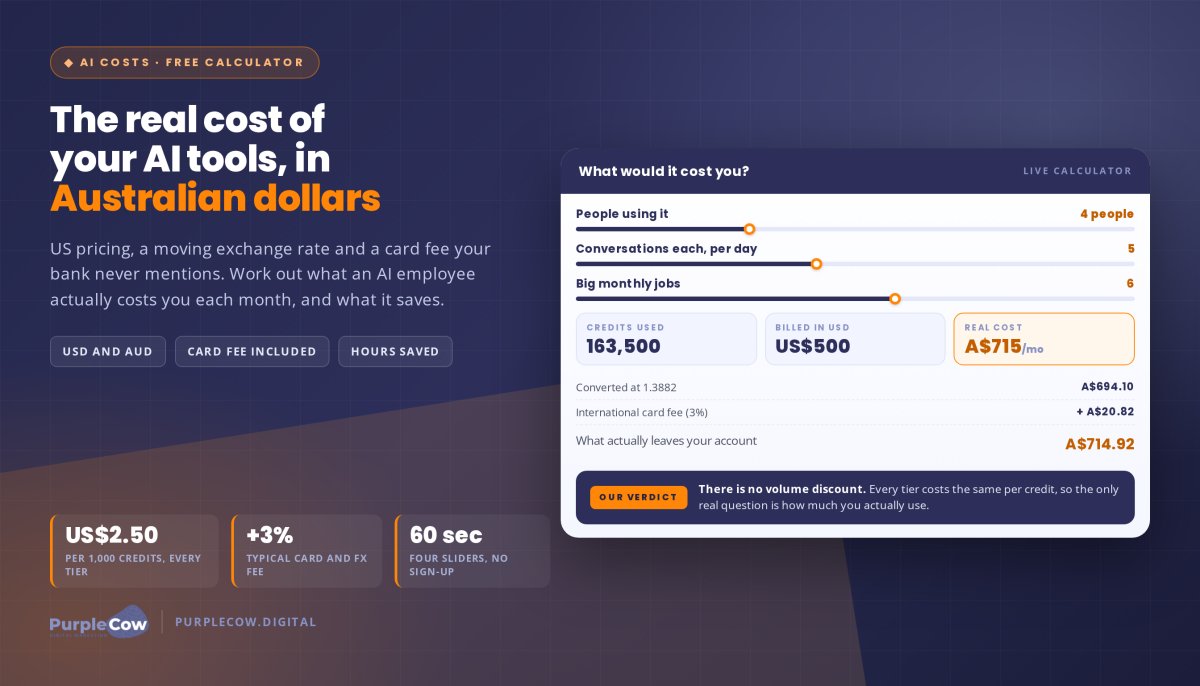
Did you know that many businesses underestimate the true cost of their AI tools, leading to unexpected expenses and under-utilised potential? It’s a frustrating reality for any Australian business owner investing in innovation. You’ve likely signed up for AI subscriptions like Viktor and wondered if you’re truly getting value for money. The complex pricing models and feature sets can feel like a maze, and we know you don’t have time to meticulously track every cent while running your business. Using our Viktor calculator from PurpleCow Digital, we’ll help you work out the real cost of these AI tools and how much budget might be going to waste.
We believe your AI tools should be powerful accelerators for your business, not a drain on your resources. Our promise at PurpleCow Digital is simple: we’ll help you identify, track, and optimise your AI tool spend before it impacts your bottom line. You’ll gain a clear understanding of your AI investment so you can stop unexpected overspending and start seeing tangible ROI from your digital tools.
We’ll preview the exact steps to take to truly understand and optimise your AI tool expenditure. You’ll learn how to distinguish between essential features and costly extras, giving you the confidence to decide when to scale up, scale down, or switch providers. Let’s get your AI strategy noticed for its efficiency and ensure you’re investing wisely for all the right reasons.
Key Takeaways
- Learn how to use our viktor calculator to quantify exactly how much revenue your business is losing due to hidden technical glitches.
- Understand why “Page Indexing” errors are the single biggest threat to your visibility and how to ensure your service pages actually show up for customers.
- Discover the direct link between site speed and conversion rates, and why smoothing the customer journey is essential for keeping your digital salesperson active.
- Get a practical, step-by-step checklist to prioritise your Google Search Console errors so you can focus on fixes that deliver the best results.
- Shift from a “set and forget” mindset to a proactive maintenance strategy that keeps your website remarkable and protected against future algorithm updates.
Google Search Console Errors: Why Your Business ROI is at Risk
Google Search Console (GSC) acts as the direct line of communication between your website and the world’s biggest search engine. It’s your digital hotline. When GSC flags an error, it means Google is struggling to see, read, or trust a specific part of your site. For an Australian SME, these errors are more than technical glitches. They’re barriers preventing potential customers from finding your services.
Ignoring these notifications is like having a "closed" sign on your shop door while you’re actually inside waiting for customers. You’re ready to work, but the door is locked from the outside. This is exactly why we developed the viktor calculator concept. It allows you to work out the exact cost of these missed opportunities and see the real impact on your bottom line.
To better understand how technical tools can impact your lead generation and business logic, watch this helpful video:
The Difference Between Errors, Warnings, and Good News
Understanding the GSC traffic light system is the first step toward reclaiming your traffic. It’s not all doom and gloom, but you need to know where to focus your energy.
- Errors (Red) mean the page is not indexed. It won’t appear in search results at all, making it invisible to your market.
- Warnings (Yellow) mean the page is indexed but has issues that might limit its performance or visibility.
- Valid (Green) pages are healthy. They’re ready to be shown to your target audience and start generating leads.
Why Aussie SMEs Should Care About GSC Health
A healthy GSC profile ensures your remarkable content actually gets noticed in a crowded paddock. You wouldn’t leave a broken fence on your property; don’t leave broken code on your site. Fixing errors protects your investment in search engine optimisation (SEO) and paid advertising. It ensures every dollar you spend on marketing has the best chance of returning a profit.
Think of GSC as an early-warning system for your best salesperson: your website. Recent 2026 crawl data reveals that 34% of URLs analysed had technical failures that completely blocked their ranking potential. If you aren’t using our **viktor calculator ** to audit these risks, you’re likely losing revenue to a competitor who is. Real results require a foundation that Google can actually read and trust.
Fixing Indexing Errors: Why Your Service Pages Aren’t Showing Up
Indexing errors are the ultimate roadblock for your online presence. An indexing error is a technical failure that prevents Google-bot from adding a URL to its searchable database. If your page isn’t in the index, it simply doesn’t exist to your potential customers. You can’t get noticed if you aren’t even on the list.
Many Aussie businesses see their organic traffic vanish after a site refresh or a content update. This usually happens because old links weren’t handled properly during the transition. By applying a **viktor calculator ** approach to your site audit, you can identify exactly which high-value service pages have dropped out of the search results and stopped generating leads. It’s about protecting your digital real estate.
Server Errors (5xx) and Redirect Issues
5xx errors suggest your hosting is struggling or your website code has a conflict. It’s essentially your server saying it’s overwhelmed or confused. Redirect errors occur when a page points to another missing page or creates an infinite loop that confuses Google’s crawlers. Both issues stop the search engine in its tracks.
These issues are frustrating but solvable with the right eyes on the problem. They often require a quick chat with your website maintenance provider. Keeping these technical gears greased ensures your site remains remarkable and reliable for every visitor. Don’t let a server hiccup stand between you and a new enquiry.
Not Found (404) and Soft 404 Errors
A standard 404 means the page is gone and nothing was put in its place. A "Soft 404" is more deceptive. The page looks empty or irrelevant to Google, but the server tells the search engine everything is fine. Both are bad news for your search visibility and user experience.
Fix these by redirecting old service pages to your current, relevant offerings. For example, if you’ve moved from "General Landscaping" to "Luxury Garden Design," make sure the old URL points to the new, high-value page. Don’t let 404s pile up. They signal to Google that your site is neglected and "beige," which eventually pushes your rankings down. It’s better to be proactive than to let your site’s reputation slide.
If you’re seeing a spike in these errors, it’s time to take action. You can reach out to us for a clear plan on how to clean up your index and get your best pages back in front of the right people.
Experience and Usability: Smoothing the Customer Journey
Google prioritises sites that offer a fast, safe, and easy experience for human users. It’s not just about pleasing an algorithm; it’s about respecting your customer’s time. Usability errors might not always wipe you from the search results, but they’ll certainly drag your rankings into the dirt. For Australian trades and service businesses, the stakes are even higher. Most of your customers are searching on their phones while on the go, often in high-stress situations. A site that’s a headache to use on a mobile device will never be the "PurpleCow" in its field.
Think of your website as a physical shopfront. If the door is stuck or the lights are off, people won’t struggle to get in; they’ll just walk to the next shop. This loss of traffic is a silent profit killer. We use our **viktor calculator ** perspective to help you understand that every second of friction is a direct hit to your bottom line. If your site isn’t easy to navigate, you’re essentially handing your leads over to the competition on a silver platter.
Mobile Usability Errors
Common issues like "text too small to read" or "clickable elements too close together" are more than just minor annoyances. These errors frustrate users and cause them to bounce back to the search results to find a competitor who actually values their experience. In 2026, over 65% of all website traffic comes from mobile devices. We ensure our website design projects are mobile-first to avoid these common pitfalls. Your website should be a helpful tool for a busy customer, not an obstacle course that makes them give up.
Core Web Vitals: Speed and Stability
Speed is synonymous with leads. Research from 2026 shows that 53% of mobile visitors will abandon a site if it takes longer than three seconds to load. Even a tiny 100-millisecond improvement in mobile page load speed can increase retail conversions by 8%. Slow sites lose leads, and a one-second delay can drop your conversion rate significantly. It’s a brutal reality of the modern web.
Core Web Vitals are a set of three specific metrics Google uses to score the real-world user experience of a page. These metrics look at how quickly content appears, how soon a user can interact with the page, and whether the layout jumps around while loading. We focus on these technical foundations to ensure your site is stable and fast. By applying the logic of the **viktor calculator **, we can see that a faster site isn’t just a technical win; it’s a direct driver of ROI and growth.
A Practical Checklist for Prioritising and Fixing GSC Errors
Fixing Google Search Console (GSC) errors requires a methodical approach. You don’t want to break something else while trying to fix a minor glitch. Start by exporting your error list into a spreadsheet to see the full scope of the problem. This allows you to sort by the number of affected URLs or the potential impact on your traffic. Gaining this bird’s-eye view is essential for anyone using a **viktor calculator ** mindset to assess their digital health. It’s about being smart with your resources. Always back up your website before making technical changes or altering your robots.txt file. It’s a safety net you can’t afford to skip. Fixing these issues is a key part of our search engine optimisation (SEO) services for Australian SMEs who want real results.
Step 1: Identify and Prioritise
Most online guides treat every error like a five-alarm fire, but that’s just not practical for a busy business owner. You need to address "Red" errors first. Prioritising these is the smartest move because they represent pages currently invisible to your customers. Specifically, look at those affecting your main service pages and your homepage. These are the pages that drive your leads and revenue. Concentrate on the URLs that lead to enquiries, as these are the ones that actually pay the bills.
You can safely ignore errors on pages that shouldn’t be indexed anyway. Thank you pages, admin folders, or internal staging URLs don’t need to be in the search results. By focusing on the highest-traffic areas of your site, you ensure your time and budget are spent where they’ll have the biggest impact on your ROI. Don’t waste energy on "beige" errors that don’t move the needle for your business.
Step 2: Implement the Fix and Validate
Once you’ve identified the priority, it’s time to act. This might mean correcting a broken URL, updating a redirect, or fixing a mobile layout issue that’s annoying your visitors. After the fix is live, head back to GSC and click the "Validate Fix" button for that specific error. This tells Google that you’ve done the work and are ready for a re-evaluation. Re-crawling will then occur to confirm the problem is resolved. This process isn’t instant and can take a few days, so don’t panic if the red box doesn’t disappear immediately.
Using a **viktor calculator ** approach means you’re checking the data and ensuring every fix contributes to a healthier, more visible website. We often see businesses give up too early because they don’t see instant feedback from Google, but patience is part of the strategy. Monitoring the status of these validations ensures that your technical foundation remains solid while you focus on scaling your operations.
Proactive Website Maintenance: Staying Remarkable in the Paddock
Search engine optimisation is not a "set and forget" task. It requires ongoing attention to stay ahead of the competition. As you add new content or Google updates its algorithm, new errors will inevitably appear. A remarkable business knows when to focus on their core craft and when to bring in a partner to handle the technical heavy lifting. We help you stand out in the paddock by managing these complexities so you can focus on running your business.
Think of your website like a high-performance vehicle. You wouldn’t drive it for years without a service and expect it to win races. Our **viktor calculator ** approach highlights that the cost of neglect often far outweighs the price of regular upkeep. When technical errors pile up, your visibility drops, and those valuable leads start going to the guy down the road instead. Staying on top of your Google Search Console (GSC) health is the only way to ensure your digital salesperson stays on the clock 24/7.
The ROI of Proactive Website Maintenance
Regular check-ups prevent small errors from turning into a total loss of search visibility. It’s much easier to fix a single redirect issue today than to recover from a 62% traffic drop caused by a neglected site launch error. Our website care plans include consistent GSC monitoring to catch issues before they bite your bottom line. We’ve seen that proactive care is always more cost-effective than a "fire drill" fix when your leads suddenly disappear.
By monitoring your site’s performance against 2026 standards, we ensure you don’t fall behind. For instance, with 91% of sites failing at least one Core Web Vitals threshold, being in the healthy 9% makes you an immediate leader. We use the logic of the viktor calculator to prove that a fast, error-free site is a direct driver of growth. You aren’t just paying for maintenance; you’re investing in a reliable lead-generation machine that doesn’t quit when things get busy.
Ready to Stop Being Beige?
If your GSC dashboard is full of red and you aren’t sure where to start, let’s chat. We specialise in turning average technical setups into high-performing digital assets that get noticed. You don’t need to spend your weekends learning about canonical tags or server header responses. We take that burden off your plate so you can focus on what you do best: serving your customers and scaling your trade.
Take the first step toward real results and get a free audit from our team today. We’ll show you exactly where your site is leaking revenue and how to plug those holes. Don’t settle for a beige online presence when you could be the most remarkable player in your industry. Let’s get your website back on track and ensure your search rankings reflect the quality of your work.
Take Control of Your Digital Sales Funnel
Technical errors in Google Search Console are the silent profit killers of the digital world. We’ve shown you how indexing failures and poor mobile usability can turn your best salesperson into a liability. By using the viktor calculator approach, you can finally quantify the revenue leaking through these technical cracks and take decisive action to plug them before your competitors pull ahead.
We’re experts in the Australian SME sector, specifically for trades and service industries where every lead counts. Our focus is always on tangible revenue outcomes, not just climbing a ranking table for the sake of it. You’ll receive no-nonsense, jargon-free reporting that tells you exactly what’s happening and how we’re fixing it to keep you remarkable in your paddock.
Get a free SEO audit and fix your GSC errors today
Don’t let your website stay beige and invisible while you’re busy on the tools. It’s time to reclaim your search visibility and ensure your business gets the attention it deserves from high-paying clients. We’re ready to help you build a high-performing asset that delivers real results day after day.
Frequently Asked Questions
How often should I check Google Search Console for errors?
You should check your Google Search Console profile at least once a month. If you’re adding new content or running a campaign, a weekly check is even better. Many Australian business owners wait until their leads dry up before looking at the data. Using our viktor calculator logic, we see that catching an error in week one is far cheaper than finding it three months later when you’ve already lost dozens of potential enquiries.
Will Google Search Console errors hurt my rankings immediately?
Red errors impact you immediately because they stop Google from showing those specific pages in search results. If your main service page has an indexing error, it’s essentially invisible. While your whole site might not drop overnight, the loss of high-value traffic starts the moment the error occurs. It’s a silent leak in your revenue stream that only gets worse the longer you ignore the red boxes in your dashboard.
What is the most common error in Google Search Console for SMEs?
Indexing errors and mobile usability issues are the most frequent headaches for Aussie SMEs. We often see "Page with redirect" or "404 not found" errors after a business tries to refresh their site without a proper plan. Mobile-specific problems, like text being too small to read on a smartphone, are also incredibly common. These errors make your site look beige and unprofessional, driving potential customers straight into the arms of your competitors.
Can I fix Google Search Console errors myself without a developer?
You can handle basic issues like simple 404 redirects if you’re comfortable using a WordPress plugin. However, complex server errors (5xx) or deep Core Web Vitals issues usually require a specialist. Time-poor business owners often find that trying to DIY technical fixes leads to more broken pages and wasted hours. Bringing in an expert to handle the heavy lifting ensures your site remains a high-performing asset while you focus on your craft.
How long does it take for Google to validate a fix in Search Console?
Validation isn’t an instant process. Once you click the "Validate Fix" button, Google puts your site in a queue for re-crawling. This typically takes anywhere from a few days to a couple of weeks depending on how often Google visits your site. You’ll receive an email notification once the process is complete. We use the viktor calculator perspective to monitor these timelines, ensuring your site returns to full health as quickly as possible.
Why does Google Search Console say my page is "Discovered – currently not indexed"?
This status means Google has found the URL but hasn’t actually crawled it yet. It often happens when Google’s crawlers are busy or if they’ve decided the page isn’t a high priority. This can be a sign that your site’s internal linking is weak or that the content isn’t remarkable enough to warrant immediate indexing. Improving your site structure and content quality is the best way to nudge Google into finishing the job.
Do I need to fix every single error in Google Search Console?
No, you don’t need to fix every single glitch. Focus your energy on errors that affect your homepage, service pages, and high-converting blog posts. Errors on "thank you" pages, admin folders, or old staging URLs can often be ignored as they don’t impact your leads or revenue. A smart strategy involves prioritising the fixes that move the needle for your business rather than chasing perfection across every obscure corner of your website.
What is the difference between a 404 and a 410 error?
A 404 error tells Google a page is "Not Found," which implies it might return in the future. A 410 error is more definitive, telling the search engine the page is "Gone" permanently. While both remove the page from search results, a 410 is a faster way to tell Google to stop trying to crawl a URL you’ve intentionally deleted. Most SMEs find that a standard 301 redirect to a relevant page is a much better solution for their ROI.
Disclaimer
This page may contain affiliate links. If you sign up for software through our links, we may earn a commission at no extra cost to you. We only recommend tools we use and trust – software that is the backbone of our agency.
Disclaimer
This page may contain affiliate links. If you sign up for software through our links, we may earn a commission at no extra cost to you. We only recommend tools we use and trust – software that is the backbone of our agency.
Disclaimer
This page may contain affiliate links. If you sign up for software through our links, we may earn a commission at no extra cost to you. We only recommend tools we use and trust – software that is the backbone of our agency.

Article by
Angie Neal
Angie Neal is the founder and CEO of PurpleCow Digital, a full-service digital marketing agency based on Queensland's Redcliffe Peninsula. With deep expertise in SEO and web design, as well as a certification as a GoHighLevel Admin. Angie helps small-to-medium businesses build scalable growth systems through AI-powered automations, CRM workflows, and smart digital strategy. She's also passionate about building a community of like-minded agency owners at the After Party — sharing insights, solving real problems, and helping others grow. Whether it's search visibility, lead management, or end-to-end automation — Angie's focus is always on helping businesses scale sustainably.
Disclaimer
This page may contain affiliate links. If you sign up for software through our links, we may earn a commission at no extra cost to you. We only recommend tools we use and trust – software that is the backbone of our agency.