
What if your busiest campaign channel brings in clicks, but not the enquiries your business needs? Learning how to measure marketing campaign success with GA4 starts with looking beyond traffic to track the actions that matter.
If GA4 shows activity without making the business impact clear, you’re not alone. Results are useful only when tracking is set up consistently and you can compare channels fairly. For example, a plumbing business might track completed quote-form submissions as a key event, then use campaign tags to see which email or paid campaign brought visitors who submitted the form.
This guide will help you choose meaningful campaign goals, check that events record the right actions and find GA4 reports that show where traffic comes from and what visitors do next. You’ll also learn why GA4 and Google Ads can report different conversion numbers, and how to use the evidence to guide your next marketing decision. The aim isn’t a prettier dashboard. It’s a clearer view of which campaigns contribute to business outcomes.
Key Takeaways
- Start with a clear business goal, then choose GA4 events that show whether a campaign is helping you reach it.
- Use consistent UTM parameters to identify each campaign’s source, medium and name in your reporting.
- Learn how to measure marketing campaign success with ga4 by looking beyond clicks to enquiries, lead quality and other relevant business outcomes.
- Compare campaigns fairly by checking dates, goals, channels and context, and validate your tracking before drawing conclusions.
- Turn findings into a practical next step: improve the page, message or audience, or fix gaps in your measurement setup.
How to Measure Marketing Campaign Success with GA4: Start with the Outcome
GA4 can show sessions, clicks and page views, yet still leave you wondering whether a campaign brought in useful work. To judge performance, start with the business result you want, then use relevant evidence to assess whether the campaign contributed to it.
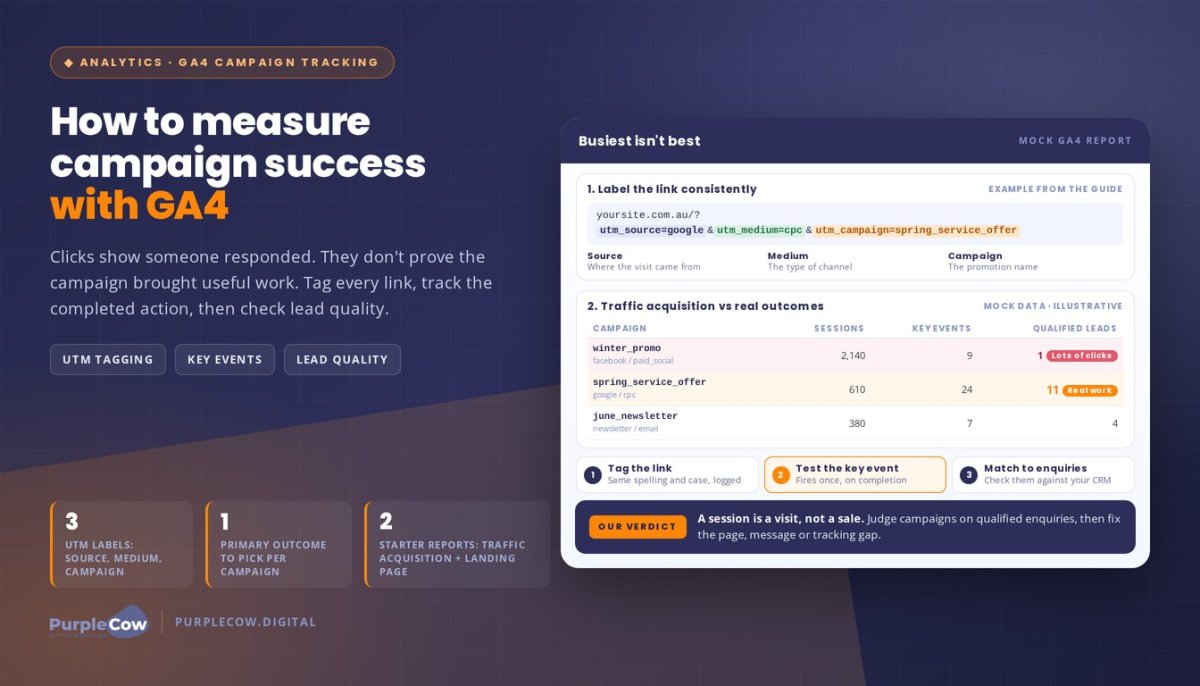
Campaign success means progress towards a stated business goal, measured with evidence that fits that goal. A session is a visit, not a sale. For practical web analytics, connect activity data to outcomes such as qualified enquiries, purchases or booked appointments. Treat engagement measures as clues along the way, not proof of business impact.
For a quick look at campaign reporting and manual campaign dimensions in GA4, watch this tutorial from Loves Data:
Choose a campaign goal before opening GA4
Choose one primary outcome before reviewing reports. It might be a qualified enquiry for a trade service, a purchase for an online shop or a booked appointment for a service business. Match the goal to the campaign’s audience, offer and intended next step.
Then identify supporting actions that indicate progress, without counting every interaction as a result. A visitor viewing a service page or starting an enquiry form may be showing interest, but neither action automatically counts as a qualified lead. A GA4 key event is an action you’ve marked as important to your business, so you can assess whether campaigns contribute to it.
Select measures that reflect real business progress
Pair the primary outcome with context, such as the traffic source, campaign and landing page. Impressions show that an ad appeared, clicks show that someone responded, and sessions show visits. These are useful signals, but they don’t prove that the campaign generated a valuable enquiry or sale.
Illustrative trades example: A plumbing business runs a campaign promoting a specific service. It could review visits to the campaign’s landing page alongside completed enquiry forms, then check with its team whether those enquiries were relevant and led to follow-up. The example shows what to measure, not a promised result.
Knowing how to measure marketing campaign success with ga4 also means recognising the limits of the data. GA4 can inform your decisions, but it can’t independently confirm that a campaign caused every sale. People may interact with several channels or contact your business another way, so combine analytics with real-world lead and sales information.
Set Up GA4 Campaign Tracking: From UTM Parameters to Key Events
Campaign reports are only as useful as the tracking behind them. A consistent setup helps you distinguish a campaign that attracted visits from one that brought meaningful enquiries, making comparisons more dependable.
Use this workflow to build a practical foundation for how to measure marketing campaign success with ga4. The right event options depend on your website and current Google Analytics 4 (GA4) setup, so check what’s already being recorded before adding anything new.
Label campaign links consistently with UTM parameters
Urchin Tracking Module (UTM) parameters are labels added to campaign links. They help GA4 identify source (where the visit came from), medium (the type of channel) and campaign (the promotion or activity name).
For example, a link in a Google paid search campaign might use utm_source=google, utm_medium=cpc and utm_campaign=spring_service_offer. This is a naming example, not a performance result. Keep spelling, capitalisation and separators consistent, and record campaign names in a shared log so your team can compare like with like.
Track and test the actions that matter
Identify website actions that represent meaningful progress, such as a completed enquiry form or confirmed booking. Where appropriate, mark the relevant event as a key event in GA4. A click on a submit button alone may not prove the form was successfully sent, so define the event around the completed action where your setup allows it.
Test the whole journey: open a tagged campaign link, complete the action and check whether GA4 records the expected event. Confirm that it fires once, at the right point, rather than firing early or duplicating. Use GA4 Insights as a supplementary guide to GA4 concepts, then verify that any advice fits your property’s current configuration.
Connect website activity with enquiry follow-up
GA4 can show that a visitor submitted an enquiry, but website data alone may not tell you whether that enquiry was suitable, received follow-up or became a customer. Compare campaign signals with your business’s enquiry or sales records for a fuller picture.
For example, note which campaign brought the enquiry, then record its status through your usual follow-up process. If you’re planning campaigns across channels, our digital marketing services page explains how we bring marketing activity together. If you’d like to discuss your campaign measurement needs, get in touch with our team.
Read GA4 Campaign Results Without Mistaking Clicks for Success
A campaign can attract attention without producing qualified enquiries. To see the difference, compare traffic details with key event activity and, where possible, the outcomes recorded by your business. That’s more useful than judging performance by clicks alone.
Which GA4 campaign reports help answer the main questions?
Start with GA4’s Traffic acquisition report to compare sessions by source, medium and campaign. These dimensions show where visits came from and which tagged campaign brought them. Use the Landing page report to check which page visitors first reached, then consider whether its content matches the promise made in the ad, email or other campaign.
Compare those details with key event evidence. For example, if a campaign brings visitors to a relevant service page but few complete an enquiry, that may point to a page or journey worth reviewing. It doesn’t establish the cause by itself, but it gives you a focused question to investigate.
| Measure type | Examples | What it helps you assess |
|---|---|---|
| Attention | Impressions, clicks, sessions | Whether people saw or visited from the campaign |
| Engagement | Page views, interaction with campaign content | Whether visitors explored or engaged |
| Enquiry | Form submissions, calls or bookings tracked as key events | Whether visitors took a meaningful next step |
| Downstream business | Qualified leads, sales or revenue in business records | Whether enquiries progressed towards business outcomes |
How should you interpret attribution and conversion differences?
Attribution is the method used to assign credit for a key event across interactions in a customer journey. Different models can credit those interactions differently, so attribution helps interpret the path, but it isn’t a perfect account of what caused someone to buy.
GA4 and advertising platforms can report different conversion totals because they may use different attribution methods, reporting windows and counting dates. Consent choices, tracking gaps and configuration can also affect what each system records. Treat a mismatch as a prompt to check definitions and settings, not automatic proof that one report is wrong.
Use GA4 to spot patterns, then compare them with lead and sales records before making claims about revenue impact. No single channel report proves that its campaign generated incremental sales. For a wider view of how channels work together, explore our marketing strategies for small business.
A Practical GA4 Campaign Review: Validate Data and Decide What to Change
A change in campaign results doesn’t always mean the campaign itself has changed. Before shifting budget or rewriting an ad, check that the data is sound, compare equivalent periods and goals, and look for context that could explain the difference.
Use this review sequence to make how to measure marketing campaign success with ga4 a repeatable business habit:
- Confirm tracking: check the date range, campaign labels, event setup and report filters.
- Compare goals: review the same business outcome across comparable periods.
- Inspect sources: identify which channels and campaigns contributed to recorded activity.
- Assess lead quality: compare recorded enquiries with your business records.
- Record an action: note what you’ll change, who owns it and when you’ll review the evidence.
Check whether the data is fit for a decision
Compare like with like: use consistent campaign dates, goals and channel groupings, and note relevant context such as changes to an offer or landing page. Check for missing campaign labels, duplicate form submissions or recent tracking changes. If GA4 enquiries don’t match your actual records, investigate the gap before drawing conclusions about performance.
Turn the report into a practical next step
Separate measurement problems from genuine changes in audience response. If an event stopped recording after a website update, fix the tracking before judging the campaign. If tracking checks out but visitors aren’t taking the intended next step, choose one testable action, such as reviewing whether the landing page clearly matches the campaign message.
Write down the insight, decision, owner and follow-up check. Decide in advance what evidence would support keeping, changing or pausing the activity. A single movement in a report is a reason to investigate, not automatic proof that a channel caused a change in sales.
Keep reporting clear for a time-poor business owner
Lead with the business question, the outcome you observed, the evidence behind it and the action you recommend. A concise table or dashboard can help, but only if it answers a real decision question. Explain acronyms, leave out vanity metrics that don’t inform the decision, and distinguish an attribution signal from verified revenue impact.
If organic search is part of the review, compare relevant landing pages and enquiries alongside search activity. Our search engine optimisation services page explains how we approach SEO as part of business growth.
Use GA4 Insights to Improve Your Next Marketing Campaign
A report matters when it helps you make a better next move. Use a simple loop: measure, validate, learn, act and check again. That keeps campaign decisions connected to business goals instead of reacting to every change in clicks or sessions.
Prioritise changes that match the evidence
Start by checking the measurement. If a form event is missing or recording too early, fix that gap before judging campaign performance. Then look for the page or step most closely linked to your chosen outcome.
For example, if campaign visitors reach a relevant service page but don’t complete an enquiry, review whether the page answers their questions and makes the next step clear. If the page works as intended but the message attracts the wrong audience, assess the campaign targeting or offer instead. Choose one change you can assess, and define what evidence would support keeping or revising it.
Be cautious with limited data. A small number of enquiries can offer useful clues, but may not be enough to establish a reliable pattern or a clear cause. Treat early findings as questions to investigate, not certainty.
Know when you need broader marketing support
Campaign results can reflect several connected factors: the audience, campaign message, landing page experience and what happens after someone enquires. If you’re assessing a landing page, consider whether its content and design make the campaign’s next step clear. Our website design services page explains how we approach the website experience.
Looking across channels can also help you understand how campaign activity fits into your wider marketing plan. Explore our digital marketing services to see how we support Australian businesses across marketing activity. We focus on clear reporting and business outcomes, without promising a particular result.
Choose your next step with confidence
To apply how to measure marketing campaign success with ga4, bring your campaign goal, current tracking and the reporting question you’re trying to answer. We can discuss how the website journey, channel activity and enquiry follow-up fit together, and where clearer measurement may help your next decision.
Make Your Next Campaign Decision Count
Campaign measurement gets more useful when you start with a business goal, not a busy dashboard. Choose an outcome such as qualified enquiries, purchases or booked appointments, then make sure your campaign labels and GA4 events help you assess progress towards it.
Use source, medium, campaign and landing page evidence to understand what visitors did, but don’t treat clicks or attributed conversions as proof of revenue caused by a single channel. Check that tracking is working, compare like with like, and use your enquiry or sales records to add real-world context.
That’s the practical approach behind how to measure marketing campaign success with ga4: measure, validate, learn, act and check again. PurpleCow Digital focuses reporting on leads, sales and revenue rather than vanity metrics. We aim to make the evidence clear without guaranteeing rankings or business results.
Bring us your campaign goal, tracking questions or reporting challenge. We’ll help you explore what the data can tell you and where a clearer view could support your next decision.
One well-informed next step is a stronger foundation for your next campaign.
Frequently Asked Questions
How do I measure a marketing campaign in GA4?
Measure a campaign in Google Analytics 4 (GA4) by comparing its activity with a clear business goal. Decide whether you want qualified enquiries, purchases or booked appointments, then check whether campaign visitors completed the relevant tracked action. Review the traffic source, campaign label and landing page for context, and compare GA4 results with your enquiry or sales records before deciding what to change.
Which GA4 metrics show whether a campaign is successful?
The most useful measures depend on your campaign goal. For an enquiry campaign, review tracked form submissions or calls, then assess lead quality using your business records. Sessions, clicks and page views can help explain how people reached or explored your site, but they aren’t success by themselves. Compare them with the outcome you care about, such as qualified enquiries or completed purchases, and interpret the results alongside the campaign’s landing page and source.
How do I track a marketing campaign in GA4?
Use consistent Urchin Tracking Module (UTM) parameters on campaign links to label the source, medium and campaign name. Check that GA4 receives those labels, then confirm that relevant website actions, such as a successfully submitted enquiry form, are recorded as events. Test the journey from campaign link to completed action, checking that the event fires at the right point and isn’t duplicated. The exact setup depends on your website and current tracking configuration.
What is the difference between an event and a key event in GA4?
An event records an interaction on your website or app, such as a page view or form submission. A key event is an event you’ve identified as important to your business, such as a completed booking or purchase. That distinction helps you focus campaign reporting on meaningful actions rather than every interaction. Mark an event as a key event only when it represents progress towards a business goal, not simply because it’s easy to track.
Why do GA4 and Google Ads show different conversion numbers?
Different conversion totals are common because GA4 and Google Ads may use different attribution methods, conversion windows and counting dates. They also answer different questions: Google Ads reports on ad interactions, while GA4 can show activity across multiple channels and a broader website journey. Check that you’re comparing the same conversion action and date range, then use each platform for its intended purpose rather than expecting identical totals.
Can GA4 tell me which campaign generated a sale?
GA4 can associate a recorded purchase or key event with campaign interactions, giving you evidence about the customer journey. It can’t prove on its own that a campaign caused the sale. A customer may have interacted with several channels or completed a purchase after another influence. For a fuller view, compare GA4 attribution with your sales records and consider whether campaign activity contributed, rather than treating one report as definitive proof.
How often should I review campaign performance in GA4?
Choose a review rhythm that fits the campaign’s duration, activity and decision cycle. For an active campaign, regular checks can help you catch tracking problems or notable changes; a deeper review can compare outcomes over a more meaningful period. Avoid changing direction based on a short-term fluctuation or very few enquiries. Record what you observed, what you changed and when you’ll check the evidence again.
Do I need Google Tag Manager to measure campaigns in GA4?
No, Google Tag Manager isn’t always required to measure campaigns in GA4. Campaign links can use UTM parameters, and website events may be set up through different methods depending on your site and existing configuration. Tag Manager can help manage certain tracking tags, but it’s one possible tool, not a requirement for every setup. Check how your current events are implemented before adding another tracking method, to reduce the risk of duplicate data.

Article by
Angie Neal
Angie Neal is the founder and CEO of PurpleCow Digital, a full-service digital marketing agency based on Queensland's Redcliffe Peninsula. With deep expertise in SEO and web design, as well as a certification as a GoHighLevel Admin. Angie helps small-to-medium businesses build scalable growth systems through AI-powered automations, CRM workflows, and smart digital strategy. She's also passionate about building a community of like-minded agency owners at the After Party — sharing insights, solving real problems, and helping others grow. Whether it's search visibility, lead management, or end-to-end automation — Angie's focus is always on helping businesses scale sustainably.
Disclaimer
This page may contain affiliate links. If you sign up for software through our links, we may earn a commission at no extra cost to you. We only recommend tools we use and trust – software that is the backbone of our agency.