
A website can look perfectly fine while an outdated plugin quietly puts your enquiry form, customer data or sales at risk. Effective website maintenance isn’t a stack of technical chores to tackle when you have time. It’s ongoing care that helps protect a part of your business that customers rely on.
If you’re unsure which updates matter, when to back up your site or whether its security has been checked, you’re not alone. You’ve got a business to run, and WordPress maintenance can quickly become another job on an already full list. For example, testing your contact form after an update can catch a problem before a potential customer reaches a dead end.
This guide explains what website maintenance covers, which tasks to prioritise and how to organise the work. We’ll look at updates, backups, security, hosting and performance, plus ways to manage the technical workload. At PurpleCow Digital, we treat maintenance as practical, ongoing care for your WordPress site and the business goals it supports.
Key Takeaways
- Think of website maintenance as ongoing business protection, not a list of unrelated technical chores.
- Understand how updates, backups, security, hosting and site checks help keep your WordPress site current and recoverable.
- Compare planned care with reactive fixes to decide what suits your workload and need for predictability.
- Build a practical routine that checks key website functions and periodically reviews forms, content and customer journeys.
- See how PurpleCow Digital’s managed WordPress hosting, updates, security, backups and care plans can ease the technical workload.
What Website Maintenance Means for a Small Business Website
Your website may appear to work until an update breaks a page, an error appears or an enquiry form stops sending. That’s frustrating when you’re busy running the business and customers rely on your site to find the next step.
Here’s a short overview of the work involved in keeping a business website in good shape:
Website maintenance is the ongoing work that keeps your site current, supported and fit for purpose. It helps your website remain useful and reliable after launch. The idea is similar to software maintenance: work continues after something is built so it can adapt, recover from issues and stay useful.
Maintenance isn’t the same as a redesign, which changes your site’s structure or appearance, or a new feature build, which adds a capability. Updating a service page or replacing a staff photo is a content change. These jobs can sit alongside maintenance, but they don’t replace routine technical care.
What does website maintenance include?
Website maintenance can include software updates, security checks, backups, hosting and technical support. Updates keep the site’s software current; security checks look for issues that may need attention; and backups provide a recovery point if something goes wrong. Hosting keeps the site’s files available online, while technical support helps investigate faults.
The right scope depends on how your website is built and what your business needs it to do. For example, a WordPress site that introduces your services and collects enquiries needs its key pages and contact form checked, as well as its software and backups. A site with more complex functions may need different care. Focus on the tasks that support the features your site depends on.
Why does website maintenance matter to business outcomes?
A dependable site makes it easier for potential customers to understand what you offer, find practical details and send an enquiry. If a service page has outdated information or a form fails silently, someone may leave without reaching you. The issue isn’t just technical; it can interrupt the path between a customer’s question and your response.
Regular care can help you spot problems before they become harder to diagnose, but it can’t guarantee rankings, enquiries, sales or uninterrupted service. It gives you a clearer way to manage avoidable risks and keep your site aligned with how your business works. If you’d rather not handle every technical task yourself, explore our website care plans.
The Website Maintenance Tasks That Keep WordPress Running Well
Good care is more than clicking “update” and hoping for the best. WordPress website maintenance brings together updates, backups, security, hosting and function checks to keep your site supported and easier to recover if something goes wrong.
Updates, backups and security checks
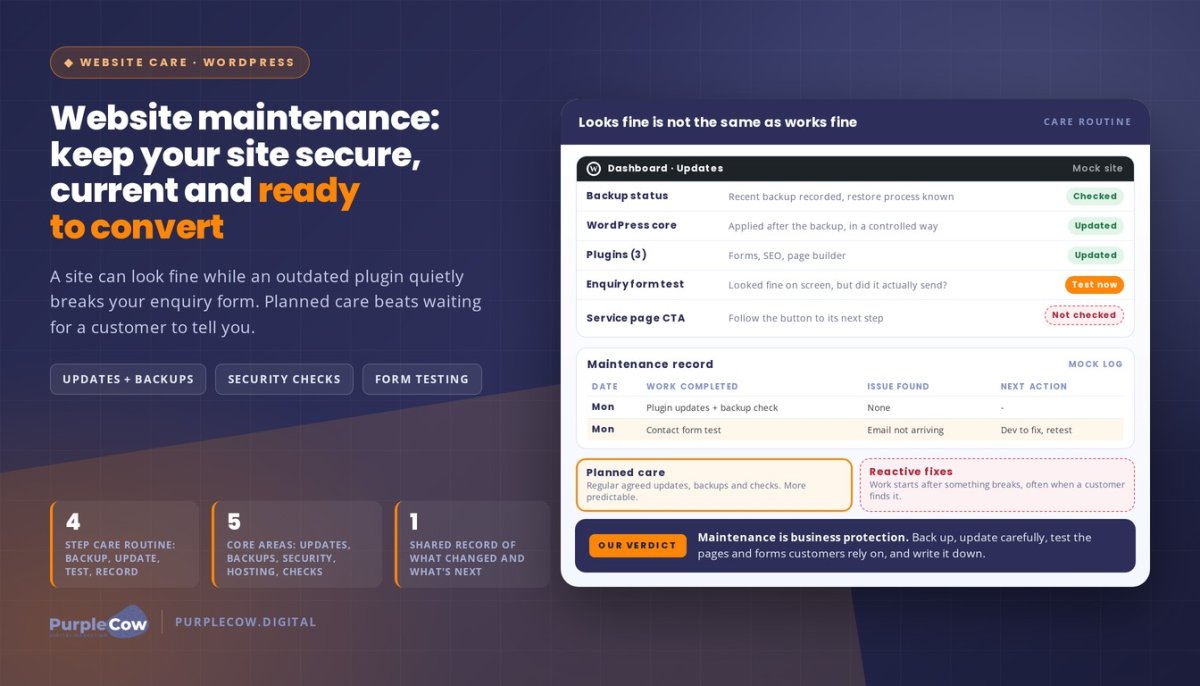
WordPress core, themes and plugins need attention as their developers release updates. These can include fixes and improvements, but changes can also affect how parts of your site work. Take a careful approach: confirm you have a current backup, apply updates in a controlled way, then check that key pages and features still work as expected.
A backup is a saved copy of your website that gives you a recovery point if an update, error or other issue affects the live site. Backups are most useful when they’re recent and can be restored, so don’t assume that a backup exists or that recovery will be straightforward. Know where its status is recorded and how restoration is handled.
Security checks involve ongoing attention to your site’s software and activity. They can help identify concerns that need investigation, but no check can promise a site will never be compromised. If an issue is found, clear response and recovery steps matter.
Hosting, performance and functionality checks
Hosting provides the server environment where your website’s files are stored and served to visitors. Managed WordPress hosting supports the technical upkeep of the site and helps bring hosting and maintenance into a clearer plan. Performance checks can flag pages that feel slow or don’t load as expected, giving you a reason to investigate rather than guess.
Check the parts of the site customers rely on, not just the homepage. For a trades or service business, that could mean opening a key service page, testing the enquiry form and following the main call to action to its next step. If a form appears on screen but doesn’t send, customers may not realise their enquiry hasn’t reached you.
Make these checks part of a repeatable routine, especially after changes. The right scope depends on your website and how your business uses it. An enquiry-focused site has different priorities from one with more complex functionality. If you’d prefer ongoing technical care, explore our managed WordPress care plans.
Planned Website Maintenance vs Reactive Fixes: What Suits Your Business?
A website can look fine and still have outdated software, a form that no longer works or a backup that hasn’t been checked. Planned care makes time to review and maintain your site before a problem demands attention. Reactive fixes begin after something goes wrong.
| Consideration | Planned maintenance | Reactive fixes |
|---|---|---|
| Scope | Regular agreed care, such as updates, backups and checks. | Work focused on a specific fault after it appears. |
| Your workload | Ongoing tasks are part of a routine or support arrangement. | You may need to identify the issue and organise help when it interrupts the site. |
| Predictability | Care tasks are planned, though issues can still occur. | Timing and workload depend on what breaks and what needs fixing. |
| Best suited to | Sites that support regular enquiries, bookings or sales. | Simpler sites with fewer changes and someone ready to manage routine checks. |
When is a managed maintenance plan a practical fit?
Planned support can make sense if your website helps bring in service enquiries, accept bookings or sell online. The more your business relies on those functions, the more useful it is to have routine care instead of waiting for a customer to report a problem.
It can also suit you if your team is short on time or no one feels confident managing WordPress updates and backups. You don’t need to become the site’s technical caretaker to keep it on the business agenda. A support arrangement gives the work a clearer place and reduces the number of technical jobs competing for your attention.
When might occasional support be enough?
A simpler website that changes infrequently may suit a lighter approach, particularly if someone in your business can keep an eye on updates, backups and key functions. Consider how often your content changes, whether your plugins need regular attention and how important the site is to day-to-day customer enquiries.
Keep one distinction in mind: a one-off repair addresses a specific problem, but it doesn’t automatically cover ongoing updates or future checks. When weighing up the right level of website maintenance, consider what your site does for customers and who will own its routine care. Talk with our team about website maintenance to discuss an approach that fits your business.
How to Build a Practical Website Maintenance Routine
A useful routine gives website maintenance a clear order, so you’re not left guessing what to check next. Keep technical care distinct from broader reviews of your content and customer journey, then make both part of how you look after the site.
A simple routine for WordPress care
Follow a repeatable sequence and adjust it to your website’s setup and how often things change. If you have a support plan, follow its process so tasks aren’t duplicated or missed.
- Review backup status. Check that a recent backup is recorded and that you know how recovery is handled.
- Review available updates. Check WordPress, themes and plugins, then apply appropriate updates carefully. Don’t treat an update as complete until you’ve checked the site’s key functions.
- Test important pages and actions. Visit your main service pages, follow calls to action and test the enquiry form to confirm each step works as expected.
- Record anything that needs attention. Note an error, unexpected change or task that needs follow-up, and assign a clear next step.
The right schedule depends on the site’s setup, how often it changes and any existing support arrangements. Aim for a routine you can maintain rather than a one-size-fits-all calendar.
What to review beyond software updates
Technical checks won’t tell you whether the website still reflects your business. Periodically review your services, contact details and other important information. If your offer or process has changed, update the relevant pages so prospective customers aren’t acting on outdated details.
Look at the customer journey as well. Can someone understand what you offer, find the information they need and take the next step without confusion? For example, check that a service page’s call to action leads to the right contact option and that the form asks for information relevant to the enquiry.
Site structure shapes that journey. Strategic WordPress website design gives customers a clear path through your content, while regular reviews help you notice when that path no longer fits the business.
A useful maintenance record shows what changed, what was checked and what still needs attention. Keep it in a shared document or task tracker. Include the date, work completed, issues found and the person responsible for the next action. This simple record helps you follow up and gives anyone supporting your website a clearer picture of its care history.
How PurpleCow Digital Makes Website Maintenance Easier to Manage
Website care shouldn’t become another technical job competing with customers, staff and day-to-day decisions. Our Hosting & Maintenance service supports the WordPress systems behind your site, giving upkeep a clear place in the plan while you focus on running your business.
What to expect from a website maintenance partnership
Our support includes managed WordPress hosting, plugin updates, security, backups and care plans. It’s ongoing work, not a one-off repair or redesign. A clear scope helps you understand what’s being looked after and where an issue or future task needs attention.
Communication matters as much as completing technical tasks. We focus on transparent operations and clear reporting, so you can see what’s been done and understand any next steps. For example, a report might note an update, the site functions checked afterwards and a follow-up item that remains outstanding.
The goal is practical: support a website customers can use to understand your services and take the next step. Ongoing care can reduce the technical workload for time-poor owners and keep the site’s needs connected to its role in the business.
How maintenance supports a website built to grow
Maintenance works alongside a website built around your business goals. Strategic WordPress design and development shape the site structure and customer journey. Ongoing care supports the systems those journeys depend on as your site and business change.
Search visibility also relies on clear, useful content and a well-organised site. Our search engine optimisation foundations complement website care, while ongoing maintenance supports the technical side of your website. Neither replaces the need to keep your content relevant to customers.
Start with what your website needs to do for your business, whether that’s supporting enquiries, bookings or clear service information. We can help you plan practical care around your website and priorities.
Keep Your Website Ready for What’s Next
Your website should help customers understand your services and take the next step, not leave you scrambling when something stops working. Website maintenance is ongoing care that helps keep your site current, supported and aligned with the way your business serves customers.
Prioritise the essentials: updates, backups, security checks and testing the pages and forms people rely on. Choose a planned routine that suits your site, and keep a simple record of what’s been checked and what still needs attention.
PurpleCow Digital’s Hosting & Maintenance includes managed WordPress hosting, plugin updates, security, backups and care plans. With clear reporting and a transparent, partnership-focused approach, we help make website care easier to manage while you focus on running your business.
A practical care plan gives you a clearer way to look after your site as your business grows. You don’t have to manage every technical task alone.
Frequently Asked Questions
How often should a website be maintained?
There’s no single schedule that suits every website. The right routine depends on your site’s setup, how often it changes and how much your business relies on it. Plan recurring care rather than waiting for a problem to appear. A managed care arrangement can make updates, backups and checks easier to track, while giving you a clear way to discuss issues and outstanding tasks.
Is website maintenance necessary if my website seems to be working?
Yes. A site that looks fine can still have behind-the-scenes tasks needing attention, such as updates, backup checks or enquiry form testing. A regular care routine helps you keep track of these areas and notice issues that might otherwise go unchecked. It can’t guarantee that problems won’t occur, but it gives you a more consistent approach to caring for the website your customers rely on.
Can I maintain a WordPress website myself?
Yes, you can manage some WordPress tasks yourself if you have the time and confidence to handle them carefully. That may include reviewing updates, checking backups and testing key pages or forms. Updates can affect how a site works, so check important functions afterwards. If technical upkeep keeps taking time away from customers or core business tasks, managed WordPress support is another practical option.
What is the difference between website maintenance and website support?
Website maintenance generally means recurring care, such as updates, backups and security attention. Website support usually refers to help with questions, problems or changes that come up while managing your site. The terms can overlap, so focus on the actual scope rather than the label. A clear plan should explain what work is covered and how completed tasks, issues and follow-up actions are communicated.
Does website maintenance improve SEO?
Maintenance can support a sound technical foundation for search engine optimisation (SEO) by helping keep software current and important pages working. It doesn’t guarantee higher rankings. Search visibility also depends on useful content, site structure and ongoing SEO work. Think of maintenance as one part of your wider website strategy: it supports the site’s upkeep while your content and marketing help customers find and understand your business.
How do I know whether my website needs professional maintenance?
Consider whether you know how updates and backups are handled, and whether someone checks the pages and forms your business depends on. If these tasks are unclear, regularly postponed or outside your technical confidence, professional support can make responsibility easier to manage. Start by listing what customers use your website for, such as finding service details or sending an enquiry, then match the care plan to those priorities.

Article by
Angie Neal
Angie Neal is the founder and CEO of PurpleCow Digital, a full-service digital marketing agency based on Queensland's Redcliffe Peninsula. With deep expertise in SEO and web design, as well as a certification as a GoHighLevel Admin. Angie helps small-to-medium businesses build scalable growth systems through AI-powered automations, CRM workflows, and smart digital strategy. She's also passionate about building a community of like-minded agency owners at the After Party — sharing insights, solving real problems, and helping others grow. Whether it's search visibility, lead management, or end-to-end automation — Angie's focus is always on helping businesses scale sustainably.
Disclaimer
This page may contain affiliate links. If you sign up for software through our links, we may earn a commission at no extra cost to you. We only recommend tools we use and trust – software that is the backbone of our agency.