

What if the biggest problem in your business isn’t a lack of AI, but a workflow that lets enquiries slip through the cracks? A new request might arrive through your website, sit in an inbox, then need to be copied into a spreadsheet or customer system. An AI automation agency should improve that process before adding clever technology.
Repetitive admin takes time away from customers and growth. When systems don’t connect, a promising lead can go quiet while your team moves information from one place to another. The answer isn’t to automate everything. It’s to find the repeatable steps slowing your team down, then decide where automation can make them simpler and easier to track.
In this guide, you’ll learn what an AI automation agency does, which everyday workflows may suit automation, and how a partner should plan, build and measure a solution. At PurpleCow Digital, we connect business automation, lead management and customer relationship management (CRM) to practical business goals, not AI for its own sake. We’ll walk through an example and explain how to assess progress, from fewer missed enquiries to a clearer view of leads moving through your business.
Key Takeaways
- An AI automation agency should map your process and configure suitable tools, not add AI for its own sake.
- Before building, document the task, hand-offs, repeated data entry and delays. Then define safeguards and measures of success.
- Compare approaches by how well they address your workflow, connect systems, keep people involved and report progress.
- Prepare by clarifying your process, data, team roles and desired outcomes. Consistent CRM records help workflows run reliably.
- PurpleCow Digital connects GoHighLevel setup, chatbots, lead management and CRM to defined business goals and practical measures.
What Does an AI Automation Agency Actually Do for a Small Business?
When an enquiry lands in one place, gets copied into another, then waits for someone to follow up, the problem isn’t a shortage of AI. It’s a workflow that needs attention. An AI automation agency maps how work moves through your business, then configures suitable tools to reduce repetitive steps and keep important tasks visible.
For a quick look at the broader idea behind AI, explore What is Artificial Intelligence?. The video below offers another perspective on starting an agency focused on automation.
Keep the goal practical. Workflow automation moves information or triggers a routine action based on defined rules. AI tools, by contrast, can generate or interpret content, such as drafting a reply or categorising an incoming message. A workflow may use both, but you don’t need AI at every step. Start with a clear business task, then choose the simplest approach that helps your team handle it.
What kinds of business work can automation support?
Look first at routine tasks with a clear next step. For example, a website enquiry could be captured in your CRM, assigned to the right person and added to a follow-up process. A chatbot can help with an initial interaction, such as collecting basic details or directing someone to useful information, while staff handle conversations that need personal judgement.
Repeated, rules-based steps are often easier to assess than decisions involving nuance. Sending a confirmation after a form submission has a defined trigger. Deciding whether an unusual customer request needs an exception may call for an employee’s knowledge and discretion.
What an agency contributes beyond software
Software alone won’t show you where a process stalls or why staff use a workaround. An agency brings structure: it learns how the task currently works, plans a suitable solution, configures the tools and tests the workflow with the people who use it. Their day-to-day experience can reveal missed hand-offs and exceptions a process diagram might overlook.
Before launch, your team should know what the workflow will do, what it won’t do and when a person needs to step in. Assign someone to review how it operates and address changes in the process. PurpleCow connects GoHighLevel setup with lead management and CRM workflows, keeping the focus on useful business processes rather than software for its own sake.
- Start with a task: Identify the repeated work you want to improve.
- Keep people involved: Set clear points for staff to review or take over.
- Plan for ongoing ownership: Decide who monitors the workflow after launch.
How an AI Automation Agency Finds the Right Workflow Before Building
A useful automation project starts with observation, not a software demo. An AI automation agency should help you trace a task from beginning to end, find where it slows down, and decide whether a clearer process or automation could help. The best first candidate isn’t necessarily the most impressive one. It’s the task where the business need, process and likely benefit are clear.
How do you spot a strong automation candidate?
Look for recurring work with predictable inputs, outputs and ownership. Record where a task changes hands, where staff enter the same details more than once, and where enquiries commonly wait. Frequency matters, but so does impact: a daily admin task that causes few problems may be less urgent than a less frequent step that risks losing a promising enquiry.
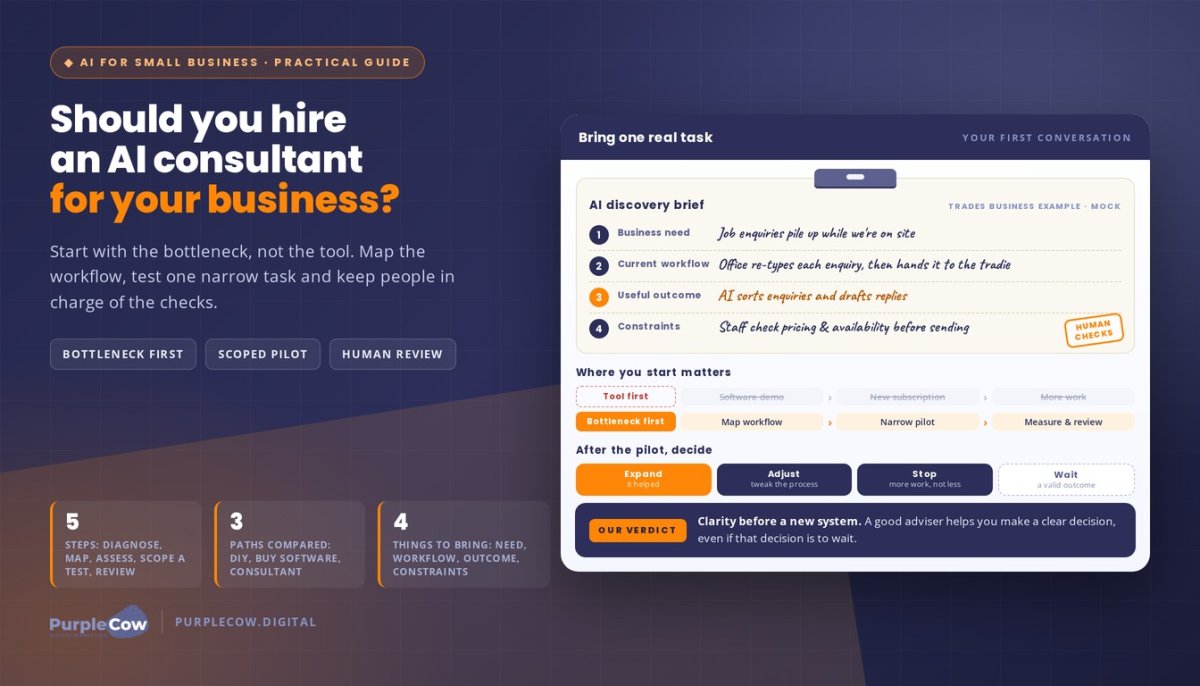
Consider a new enquiry. Someone enters details on your website, but a staff member must manually add them to the CRM before follow-up begins. Recording the enquiry automatically may be a suitable task to assess; deciding how to respond to a complex request may still call for human context. For more examples of practical applications, see our guide to AI in local businesses.
A practical assessment can follow this sequence:
- Map the task. Note what starts it, the steps involved, who handles each one and what “done” looks like.
- Find the friction. Mark delays, repeated data entry, missing details, hand-offs and common follow-up gaps.
- Assess suitability. Check how often the task happens, its effect on customers or staff, and whether the process is consistent enough to automate.
- Define safeguards. Decide what happens when information is missing, a step fails or a person needs to review a request.
- Set measures. Choose a small number of indicators tied to the task, such as response time or follow-up completion.
Set a baseline before implementation
Before changing a workflow, write down how it works now. Include the systems used, staff hand-offs, who owns each step and where delays or errors tend to occur. This gives everyone a shared picture of the process instead of relying on memory or assumptions.
A baseline lets you compare the new process with the old one and judge whether the change improved the task. Choose measures that match the intended benefit. If the aim is quicker enquiry handling, track response time. If the issue is inconsistent follow-up, record whether planned steps are completed. Activity alone doesn’t prove business value.
Once the task and success measures are clear, you can decide whether it’s ready for a practical test. If you’d like support mapping a workflow around your business goals, talk with our team about automation.
How to Compare AI Automation Agencies Without Buying Into the Hype
A polished demo can look impressive and still miss the problem your team needs solved. Compare an AI automation agency by how it understands your workflow, connects the systems you use, keeps staff involved and reports what happens after launch. Tool names matter less than a clear plan for improving a real business task.
Use this framework to distinguish a process-led proposal from one built around broad AI promises:
| What to assess | Process-led approach | Tool-first pitch |
|---|---|---|
| Workflow understanding | Maps the current steps, hand-offs and problem points before recommending a solution. | Leads with a platform or feature before showing how it fits your work. |
| Integration | Explains how information will move between relevant systems and what happens if it doesn’t. | Lists integrations without explaining the workflow they support. |
| Human oversight | Defines when staff review, correct or take over a task. | Suggests automation can handle every situation without describing exceptions. |
| Reporting | Sets out how you’ll see whether the workflow is working as intended. | Focuses on activity or technical features without linking them to the task’s purpose. |
A proposal should also make the practical details clear: what’s included, who is responsible for each part, how testing will work and what the handover covers. You should know who owns the process after launch and how staff can raise an issue. No agency should guarantee rankings, revenue or a particular automation outcome; those results depend on factors beyond a workflow alone.
Questions that reveal an agency’s working approach
Ask how the team will understand your current process before recommending a tool. Find out what happens when an enquiry has missing details, a system fails or a staff member spots an error. Also ask what reporting will show whether the workflow is doing its intended job, not just whether it has been switched on.
Clear answers should help you picture the work from discovery through testing and ongoing review. If the conversation stays at the level of impressive features, bring it back to your team’s actual task.
How to judge proof and transparency
Useful examples explain the business context, the problem addressed and the measures used to assess the work. A platform’s capabilities aren’t the same as a documented client outcome, so look for a clear distinction between what a tool can do and what was achieved in a particular project.
System fit matters, too. Your existing customer records and processes should shape the solution rather than being forced into a tool-led plan. If you’re considering GoHighLevel as part of that mix, our GoHighLevel information for Australian businesses can help you understand its place in a business workflow.
Test a proposed workflow against the table before making a decision. If you’d like a partner to connect automation to a practical business goal, talk with our team about your workflow.
How to Prepare Your Business for AI Automation
Automation is easier to plan when your team can explain what happens now, where the information comes from and what a better outcome would look like. You don’t need every process documented perfectly before working with an AI automation agency, but a few practical notes can help you start with clarity rather than guesswork.
Use this readiness checklist to organise the essentials:
- Process: Name the task, what starts it, its usual steps and what marks completion.
- Data: List the information needed and where it currently lives, such as an inbox, form or CRM system.
- Roles: Identify who owns each step, who needs to know about a change and who should review exceptions.
- Outcome: Describe the problem you want to address, such as delayed follow-up or repeated manual entry.
- Measures: Choose a current measure and a review point so you can assess how the changed process is working.
Clean inputs matter. If customer details are incomplete or recorded differently across systems, a workflow may pass on inconsistent information. Clear source information and consistent CRM records give the process a more dependable starting point and help staff understand what they’re reviewing.
What to document before a project starts
Write down who is involved, how the task usually begins and what needs to happen before it’s complete. Note every hand-off and where staff find or enter the required information. Then list exceptions that need a person’s attention, such as an incomplete request or a situation that calls for judgement. This gives your team and agency a shared reference for planning and testing.
Keep staff in the conversation. Explain which steps may change, what remains their responsibility and when they should review or take over. A workflow should support the people doing the work, not leave them guessing about what the system has handled.
Illustrative example, not a client result: A service business receives booking enquiries through a website form. The team documents which details are required, who follows up and what happens if a preferred time is unavailable. A planned workflow might organise complete requests for follow-up while flagging missing details for staff to review.
Choose useful measures and review points
Before a change, record a practical baseline for the task. Pick measures that connect directly to the problem, such as time from enquiry to first response, whether enquiries receive planned follow-up, or how often staff need to correct a record. Choose measures your team can track consistently, rather than collecting information that doesn’t help with a decision.
Agree on review points after the workflow is introduced. Staff can flag errors, identify new exceptions and suggest adjustments based on everyday use. If the process changes, review the workflow too. Preparation isn’t about predicting every scenario; it’s about giving your team a clear way to notice and respond when something needs attention.
What Working With PurpleCow Digital on Business Automation Looks Like
Business automation should make a real task easier to manage, not give you another platform to maintain without a clear purpose. At PurpleCow, we work with Australian small and medium-sized businesses to connect business goals with practical workflows for enquiries, lead management and customer records.
That starts with understanding what you want to improve and how the process works now. We discuss the steps involved, the people who handle them, the systems in use and the points where information or follow-up can get stuck. From there, we define a workflow and agree on practical measures to review its performance, such as whether enquiries are recorded consistently or follow-up steps are completed.
Where GoHighLevel, chatbots and CRM fit
GoHighLevel can support relevant CRM and lead-management workflows by organising information around the task you want to improve. The right setup depends on how your team manages leads and what needs to happen at each stage. Our GoHighLevel information for Australian businesses explains more about the platform’s place in these workflows.
Chatbots can also support initial enquiry handling by collecting information or directing someone to a useful next step. They don’t need to replace staff: your team can remain responsible for conversations that require context, judgement or a more personal response.
We bring your staff’s knowledge into the planning. They understand the everyday workarounds, customer questions and unusual cases that may not appear in a process diagram. Their input helps shape a workflow around how the business operates, rather than asking people to follow a system that ignores their real-world experience.
From planning to a workflow your team can use
Once the workflow is defined, implementation includes configuration and testing against the agreed task. Testing gives your team a chance to check that expected steps happen, information is handled as planned and exceptions are visible for staff review. It also helps surface gaps before the process becomes part of everyday work.
We treat this as a working partnership, not a software hand-off. Your team should understand what the workflow does, where its boundaries are and who is responsible for reviewing it. After implementation, clear reporting and review can help you see whether the process is functioning as intended and where adjustments may be useful.
To make an initial conversation more useful, bring one repetitive or inconsistent workflow. You don’t need a polished technical brief. A simple description of the task, what you’d like to improve and how you might measure progress is a practical place to begin. We can discuss the goal, the current process and possible measures without promising a specific result.
Make Your Next Automation Step Count
Think of automation as a way to shape how your business works as it grows, not a project that needs to transform everything at once. Choose one task worth improving, then decide what your team should spend the time and attention freed up on. That keeps the focus on better customer experiences and stronger day-to-day operations.
A good AI automation agency will help you make those choices with care, keeping the people behind the process in view. At PurpleCow, automation is part of your wider digital operation, guided by your business priorities and reviewed against meaningful measures, not technology for its own sake.
You don’t need every answer before taking the next step. Bring a workflow that feels harder than it should be, and we can talk through what you want to change and how to approach it practically.
Start with the work that matters most. Small, thoughtful improvements can help you build a business that’s easier to run and ready for what comes next.
Frequently Asked Questions
Can an AI automation agency work with the CRM my business already uses?
An AI automation agency can assess whether your current CRM suits the workflow you want to improve. The answer depends on how your CRM connects with other tools, how your records are structured and what access is available. Start by listing the customer details and sales stages you rely on. Keeping a familiar system may reduce disruption for staff when it suits the task.
Is AI automation suitable for a small business?
Yes, it can suit a small business if the task is clearly defined and worth improving. You don’t need a large team or a major technology project to assess one recurring piece of admin. For example, a business with a small office team might start by organising incoming job requests, while keeping quoting decisions with an experienced staff member. The scope should reflect your capacity to manage and review the workflow.
What tasks should a business avoid automating?
Avoid automating tasks where an incorrect decision could seriously affect a customer, or where the right response depends on context that isn’t captured in your systems. Examples include resolving a complaint that needs empathy or assessing an unusual request using trade-specific knowledge. You can still automate supporting admin, such as collecting relevant details, while leaving the decision with staff. Set clear boundaries so the process flags uncertain cases for human attention.
How long does it take to implement business automation?
There isn’t one reliable timeframe for every project. A workflow involving one well-understood task may need less planning and testing than a process spanning several systems, inconsistent records and multiple staff hand-offs. Timing also depends on agreeing responsibilities, providing access to relevant tools and reviewing test cases. The proposed stages and dependencies become clearer once the workflow is understood.
How can I tell whether automation is working?
Compare the workflow with the problem you set out to address. If staff were spending time chasing incomplete records, review whether those records are now easier to identify and resolve. Check that the intended steps occur, exceptions reach the right person and customers aren’t getting stuck. Agree on a review routine with the people using the process, and adjust it if real cases reveal gaps the original plan missed.
Will an AI chatbot replace my customer service team?
No, a chatbot can support some early interactions, but it shouldn’t replace your team’s judgement or personal service. It may help answer routine questions or collect details before a staff member follows up. Plan a clear handover for complaints, unusual requests and questions the chatbot can’t answer confidently. Review those conversations with staff so you can spot where responses need refinement or a person should step in sooner.

Article by
Angie Neal
Angie Neal is the founder and CEO of PurpleCow Digital, a full-service digital marketing agency based on Queensland's Redcliffe Peninsula. With deep expertise in SEO and web design, as well as a certification as a GoHighLevel Admin. Angie helps small-to-medium businesses build scalable growth systems through AI-powered automations, CRM workflows, and smart digital strategy. She's also passionate about building a community of like-minded agency owners at the After Party — sharing insights, solving real problems, and helping others grow. Whether it's search visibility, lead management, or end-to-end automation — Angie's focus is always on helping businesses scale sustainably.
Disclaimer
This page may contain affiliate links. If you sign up for software through our links, we may earn a commission at no extra cost to you. We only recommend tools we use and trust – software that is the backbone of our agency.