
What if the website bringing in your next enquiry is quietly becoming a risk to your business? Your WordPress site can look fine while outdated plugins, missed backups or a broken enquiry form go unnoticed.
It’s understandable if website maintenance feels like a list of technical jobs you don’t have time or confidence to manage. But it’s more than clicking “update”: it’s ongoing care that helps protect your site and keep it ready to support your business. In this guide, you’ll learn which tasks matter, how to prioritise them and how to choose a support approach that fits your goals.
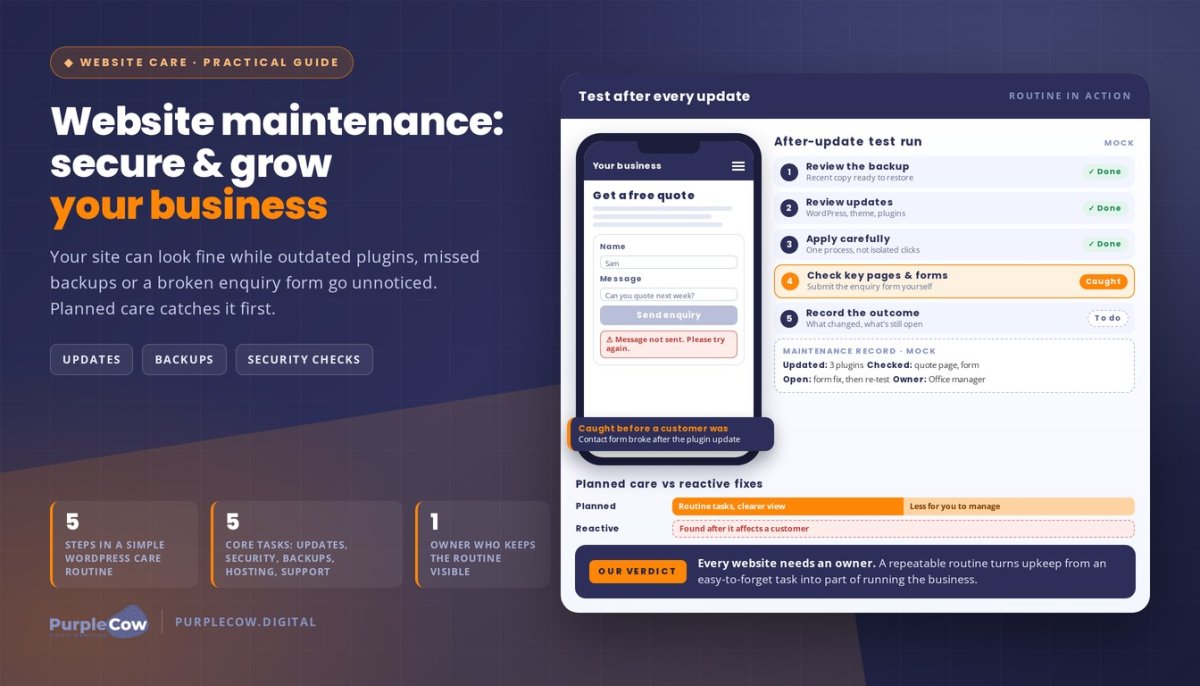
For example, after a plugin update, check that your contact form still works. That simple step can catch an issue before it gets in the way of a potential customer reaching you. We’ll cover updates, backups, security checks and performance, plus how managed WordPress hosting and care from PurpleCow Digital can reduce your technical workload.
Key Takeaways
- Think of website maintenance as ongoing care that keeps your site current, supported and ready to serve its purpose.
- Understand how updates, backups, security, hosting and regular checks help look after your WordPress site.
- Compare planned care with reactive fixes to choose an approach that suits your workload and the role your website plays.
- Build a practical routine: review backups, manage updates and check that important functions, such as enquiry forms, still work.
- Use managed hosting and maintenance support to reduce technical tasks and keep your website aligned with business goals.
What Website Maintenance Means for a Small Business Website
Your website can seem fine until an update breaks a page, an error appears or a potential customer can’t send an enquiry. That’s frustrating when your site is meant to explain what you do and help people take the next step.
Website maintenance is the ongoing care that keeps your site current, supported and fit for purpose. It’s different from a redesign, which changes the site’s look or structure, or a new feature build, which adds a specific capability. Content edits keep information fresh, but they don’t replace the technical care that helps your website keep working.
Treat your website as part of how your business attracts and serves customers, not as a project you finish and forget. A broader small business marketing strategy can connect your website’s role with the outcomes you want it to support.
What does website maintenance include?
The right scope depends on what your website does and how your business relies on it. For a WordPress business site, routine care may include:
- Updates: keeping WordPress, its theme and plugins current, then checking that the site still works as expected.
- Security checks: looking for issues that could put the site or its information at risk.
- Backups: keeping a copy of the site that can help with recovery if something goes wrong.
- Hosting: supporting the server environment where your website lives.
- Technical support: investigating problems when a page or function isn’t behaving as expected.
These tasks work together, but the right checks depend on your site. A business website with service pages and an enquiry form needs those pages and that form to stay usable. An online store has other important functions, such as its product pages and checkout. Build your maintenance routine around what customers actually need to do.
Why does website maintenance matter to business outcomes?
Customers visit your site to answer practical questions: what you offer, who you help and how to get in touch. If key information is outdated or a page doesn’t load properly, they may struggle to take the next step. A dependable experience helps your website do its job, but maintenance alone can’t guarantee rankings, enquiries or sales.
Small problems can have a big effect on a customer’s experience. Imagine someone checking your service details on their phone, only to find the page displays incorrectly or the enquiry form won’t submit. If nobody checks the issue, you may not know a potential customer has hit a dead end.
Ongoing care helps you spot technical and content problems before they become a bigger distraction. The goal isn’t to change your website constantly. It’s to keep it useful, supported and aligned with the work your business needs it to do.
The Website Maintenance Tasks That Keep WordPress Running Well
A WordPress site needs more than an initial setup to keep running well. Its software, hosting and business-critical functions need attention over time. WordPress maintenance brings together updates, backups, security, hosting support and practical site checks.
Each task has a different purpose. Together, they help keep your site supported and make it easier to respond if a change or technical issue causes trouble. Set your routine around how your website is built and what customers need to do on it.
Updates, backups and security checks
WordPress, its theme and its plugins are separate parts of your site. Updates can include improvements and fixes, but a change to one part may affect another. Make updates carefully, then check key pages and functions rather than treating the task as a box to tick.
A backup is a saved copy of your website that can provide a recovery point if an update, error or other issue affects the site. Before making changes, check that a recent backup is available and know where to find information about recovery. A backup doesn’t prevent a problem, but it can help you recover.
Security checks are ongoing care, not a promise that a site can’t be compromised. They help identify issues that need investigation and make sure software updates aren’t overlooked. For a business owner, the practical value is knowing that security is part of regular care, rather than something considered only after a warning appears.
Hosting, performance and functionality checks
Hosting is the service and technical environment that keeps your website available online. Hosting support contributes to your site’s upkeep, while performance checks can flag pages that feel slow or don’t behave as expected. These checks matter because visitors can’t use a service page or submit an enquiry if the relevant part of your website isn’t working properly.
Focus checks on the actions that matter to your business. Open a key service page, follow its call to action and check whether the enquiry form submits correctly. Look for display issues, broken links and outdated details. You don’t need a technical deep dive to notice a problem in the customer journey.
We provide managed WordPress hosting and maintenance, including software updates, security, backups and care plans. If you’d like us to take these tasks off your list, talk with our team about website maintenance.
Planned Website Maintenance vs Reactive Fixes: What Suits Your Business?
A website can look fine on the surface and still need attention behind the scenes. If you wait until something breaks, a plugin conflict or failed form may only become obvious after it affects a customer.
Planned care makes ongoing tasks part of a routine; reactive support deals with issues after they appear. The practical choice depends on what your website does, how much time you can give it and how comfortable you are handling technical tasks.
| Consideration | Planned maintenance | Reactive fixes |
|---|---|---|
| Scope | Recurring care tasks are included in an ongoing approach. | Attention is focused on a specific issue after it appears. |
| Workload | Technical upkeep is handled as planned work, which can reduce what you manage yourself. | You may need to diagnose the issue and organise help while also running your business. |
| Predictability | Regular care gives you a clearer view of what is being looked after. | The work needed can be harder to anticipate because it depends on what goes wrong. |
| Best suited to | Sites that support important customer actions or change regularly. | Simpler sites with fewer changes and owners who can keep an eye on routine tasks. |
When is a managed maintenance plan a practical fit?
Ongoing support can suit you if customers rely on your site to enquire, book a service or buy online. A broken contact form or outdated booking information can get in the way of those actions. A maintenance plan can also be practical if your team has limited time or you’re not confident managing WordPress updates and technical checks.
Not every business needs the same level of support. Consider how important the site is to your day-to-day work and whether someone has the time and skills to maintain it. Choose an approach that matches your needs, rather than following a one-size-fits-all checklist.
When might occasional support be enough?
A simpler website that rarely changes may suit a lighter approach, especially if you can keep key information accurate and review important functions yourself. Consider how often your services, pages, plugins or business needs change. The more often they change, the more useful it can be to plan care instead of waiting until something looks wrong.
A one-off repair addresses a particular issue; it doesn’t automatically cover future updates, backups or ongoing checks. To choose the right level of website maintenance, compare the tasks your site needs with the time you can realistically give them. Talk with our team about website maintenance and we’ll discuss an approach that fits your site and workload.
How to Build a Practical Website Maintenance Routine
A routine makes website maintenance easier to manage because you know what to check, in what order and where to record the results. Start with the tasks that help you make changes carefully, then confirm that the parts customers rely on still work.
A simple routine for regular WordPress care
Use this sequence as a starting point, adjusting it to your website and how often it changes. If you have a support plan, follow its process so you don’t duplicate work or make uncoordinated changes.
- Review the backup. Check that a recent backup is available before making changes, and know where to find recovery information.
- Review available updates. Consider updates for WordPress, your theme and plugins, including whether they could affect other parts of the site.
- Apply appropriate updates. Make changes carefully, following the process used for your site rather than treating every update as an isolated click.
- Check important pages and functions. Visit key pages and try the actions customers use, such as following a call to action or submitting an enquiry form.
- Record the outcome. Note what was updated, what you checked, any issues you found and what still needs attention.
The right schedule varies by website. A site that changes frequently or relies on several important functions may need a different routine from a simple website that rarely changes. Focus on a repeatable process and align it with the way your site is supported.
What to review beyond software updates
Technical checks are only part of keeping a website useful. Review the information customers rely on, including your services, business details and any content that may have changed. If your offer or processes have shifted, make sure the site reflects what customers can expect now.
Check the customer journey from a visitor’s point of view. Can someone find the information they need, understand what to do next and use the relevant form or call to action? For example, a service page may describe an old process while the enquiry form asks for details your team no longer needs. Fixing that mismatch can make the next step clearer.
Strategic WordPress website design gives important information and actions a clear place in your site structure. Regular reviews help you notice when that structure or the content no longer reflects how your business works.
A useful maintenance record shows what changed, what was checked and what still needs attention. Keep notes brief and practical so you or your support partner can understand what happened and follow up without starting from scratch.
How PurpleCow Digital Makes Website Maintenance Easier to Manage
Website care works best as a partnership, not another technical task dropped into your week. We work with you to understand what your site needs to support, so its upkeep stays connected to how your business serves customers.
What to expect from a website maintenance partnership
Ongoing support gives you a point of contact for website decisions that can otherwise be easy to postpone. You can discuss what’s changing in your business, what your customers need from the site and where you’d like more clarity. That shared context keeps the work relevant instead of treating your website as a collection of unrelated technical jobs.
We value clear communication and reporting, so you can understand the work and raise questions without needing to become the technical expert. Our aim is to make website care easier to manage and show how it fits into your wider business priorities.
How maintenance supports a website built to grow
Your website should be able to evolve as your services, customers and goals change. Ongoing care gives you a partner to involve as those needs shift, while strategic design and development help shape the experience you want customers to have. The focus is not just whether the site is online, but whether it’s still useful to the people you want to reach.
For example, if you’re changing how customers enquire, review whether the website guides them towards the right next step. We can help you consider the site’s ongoing needs in the context of those business changes, rather than assuming every business needs the same approach.
If you’d like to talk through the support that would suit your website and workload, we’re ready to have a practical conversation.
Make Your Website Part of the Plan
Your website doesn’t need constant attention from you, but it does need an owner. Decide who is responsible for its ongoing care, how you’ll know when something needs attention and how its role may change as your business grows. That turns website maintenance from an easy-to-forget task into a considered part of running your business.
Start with one practical question: what should your website help customers do next? Use the answer to guide the support and improvements you prioritise, whether that means making it easier to enquire, keeping service information current or preparing for a change in how you work. Your website can evolve with your business instead of becoming a digital asset you revisit only when something goes wrong.
If you’d like a partner to help plan the next step, we’re ready to talk through what would suit your business.
Give your website the care to keep moving forward, and give yourself more room to focus on the work you do best.
Frequently Asked Questions
How often should a website be maintained?
Choose a schedule that fits your site, then assign someone to keep the routine visible. A shared calendar or task board can help prevent upkeep from depending on one person remembering it. Review the schedule when someone takes over website responsibilities or your business changes how it handles enquiries. The useful measure is whether planned tasks have a clear owner and are being followed through.
Is website maintenance necessary if my website seems to be working?
A site looking normal doesn’t tell you whether your business has a clear plan for handling a problem. Decide who should be notified if a customer reports an issue, and make sure that person knows what details to pass on, such as which page they were using and what they expected to happen. A simple reporting path helps your team respond instead of leaving the issue unassigned.
Can I maintain a WordPress website myself?
Yes, if you can give the work a clear owner and keep a reliable record of changes. That’s especially useful when more than one person has website access or responsibilities may pass between team members. Store access details securely, document decisions and note who can approve changes. If this process becomes difficult to manage alongside your main work, managed support may be a practical alternative.
What is the difference between website maintenance and website support?
Maintenance generally refers to planned care, while support can include help responding to questions or requests. The distinction matters when you need a change, not just a repair. For instance, changing wording on an existing page may be handled differently from creating a new page or changing how a form works. A clear scope helps you understand how each request is assessed and communicated.
Does website maintenance improve SEO?
Website maintenance doesn’t replace search engine optimisation (SEO), and it can’t guarantee better rankings. Before a proposed website change goes ahead, note whether it could affect content or page structure. For example, adding a new service may call for both a website update and a separate SEO review. Treating those as related but distinct tasks helps keep decisions aligned with your visibility goals.
How do I know whether my website needs professional maintenance?
Consider whether website responsibilities would stay clear if the person currently handling them were away or changed roles. If nobody else knows what has been done, what is planned or who can approve a change, support can help make the process more manageable. List the tasks your business expects someone to own, then identify any gaps in skills, time or handover information.

Article by
Angie Neal
Angie Neal is the founder and CEO of PurpleCow Digital, a full-service digital marketing agency based on Queensland's Redcliffe Peninsula. With deep expertise in SEO and web design, as well as a certification as a GoHighLevel Admin. Angie helps small-to-medium businesses build scalable growth systems through AI-powered automations, CRM workflows, and smart digital strategy. She's also passionate about building a community of like-minded agency owners at the After Party — sharing insights, solving real problems, and helping others grow. Whether it's search visibility, lead management, or end-to-end automation — Angie's focus is always on helping businesses scale sustainably.
Disclaimer
This page may contain affiliate links. If you sign up for software through our links, we may earn a commission at no extra cost to you. We only recommend tools we use and trust – software that is the backbone of our agency.