
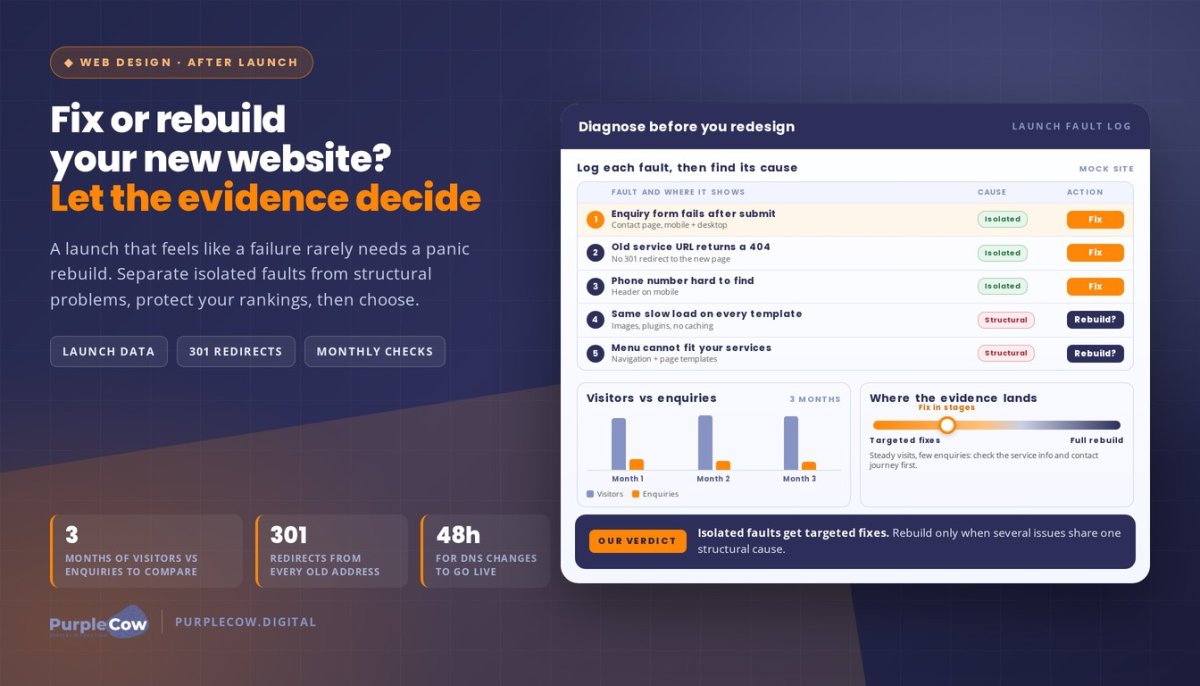
A website launch that feels like a failure doesn’t automatically mean you need a full rebuild. If you’re thinking, “My new website launch was a failure. What now?”, start by separating isolated faults from deeper structural problems.
A broken enquiry form, for example, may need a focused fix. The number of problems alone doesn’t determine whether to repair or rebuild: consider how serious they are, what’s causing them and whether targeted fixes can resolve them. The right choice depends on what’s stopping the site from doing its job, not just whether you like the design.
You’ll learn how to weigh up fixes against a rebuild, what to prioritise after launch, and how to assess the risk to your Google rankings. We’ll also cover how to compare visitors with enquiries over three months, and why keeping your domain, carrying over pages that rank and using 301 redirects can help Google and existing links find the right pages. No panic rebuild. Just a practical way to choose your next move.
Key Takeaways
- Use post-launch performance data to spot whether the problem is visibility, usability or turning visitors into enquiries.
- Protect valuable search traffic by planning URL changes carefully and directing old pages to their relevant new destinations.
- Promote your site with coordinated social posts and email updates that give customers a clear reason to visit.
- Keep launch checks and ongoing maintenance on the schedule, so technical issues don’t quietly undermine your results.
- Choose targeted fixes for isolated problems; consider a rebuild when several issues point to deeper structural weaknesses.
Will I lose my Google rankings with a new website?
A new website doesn’t automatically erase your Google rankings, but changes to your domain, page URLs or content can put visibility at risk. Keeping the domain, carrying over pages that rank and setting up 301 redirects from every old address helps Google and existing links find the right page.
Australian privacy obligations depend on your organisation and the personal information you handle. Consider whether your business needs a Privacy Policy, and review cookie disclosures and accessibility needs for your site, including whether visitors can understand tracking and use key features.
- Compare the launch data with the old site. A professional reviews Google Analytics and Google Search Console, which are free tools for tracking visitors and search performance. They compare available pre-launch and post-launch data, looking for changes in organic visits, landing pages and enquiries. For example, a fall in visits to a previously popular service page gives the review a specific place to start, rather than prompting a site-wide redesign.
- Confirm measurement is recording the right actions. Analytics setup should distinguish useful activity from empty traffic. A professional checks that page views are recorded and configures conversion tracking for actions such as a submitted enquiry form or a tap to call. They test the journey on mobile and desktop, so a completed form is counted as an enquiry, not just a visit to the contact page.
- Inspect the sitemap and indexing status. The professional checks that the XML sitemap contains the current, preferred page addresses and is available to Google Search Console. They review indexing reports and inspect important URLs to identify pages that Google can’t access or hasn’t indexed. If an old service URL now points to a new page, its 301 redirect should lead to the closest relevant destination.
- Check ranking pages and redirects. A professional maps old pages that attracted search visits to their new equivalents, then tests the redirects individually. They look for broken links, chains and redirects that send visitors to an unrelated page. Keeping useful content and matching each old address to the right new page gives Google and visitors a clearer route through the change.
- Improve conversions by fixing the customer journey. To improve conversions and user experience, a professional checks whether mobile visitors can quickly understand the offer, find contact details and complete an enquiry. They may identify friction such as a hard-to-find phone number or a form that fails after submission, then prioritise fixes against the business goal.
- Use visitor feedback to investigate what analytics can’t explain. A professional can collect feedback through a short post-enquiry survey or customer conversations, then group responses around specific issues, such as confusing service descriptions. Comparing those comments with Google Analytics and Search Console helps separate individual preferences from repeated barriers affecting visitors.
So, you’ve launched your new site, now what do you do?
- Plan the announcement around a clear customer action. Start by defining who the launch message should reach and what visitors should do next. For an Australian trade business, that might be checking a service area, calling for a quote or sending an enquiry. Connect the new website to a practical customer benefit, rather than simply announcing that it has changed.
- Coordinate the first social media posts. A professional can prepare launch copy and suitable creative for each social media channel, then schedule one to three shares per network over the space of a week. Each post can highlight a different reason to visit, such as clearer service information, updated project examples or a simpler enquiry path. Keep the message consistent, but tailor the wording to each audience.
- Keep the launch visible beyond launch week. Spread social media announcements across several weeks, then continue sharing useful website updates over the next few months. A professional can build a simple content schedule around new pages, seasonal services or customer questions. This gives existing followers more than one chance to see the news and helps the launch reach people who missed the first post.
- Use your newsletter to bring existing contacts back. A launch email can explain what’s changed and show subscribers how new features help them. For example, a plumbing business might point customers to a clearer emergency service page or an easier enquiry form. Follow-up emails can share useful updates each week, rather than repeating the same announcement without adding value.
- Add the website link to staff email signatures. Professional support can prepare a short, consistent signature line that directs customers to a relevant page, such as a booking form or service overview. Keep the launch link in signatures for two weeks, then review whether it still supports the current campaign. This small placement can put the new site in front of people already contacting your team.
- Measure which promotion brings useful visitors. A professional can tag campaign links and compare visits, enquiries and other tracked actions across email and social media. The aim is to learn which message attracts your target audience, not to chase clicks alone. If a post drives visitors to a page but few enquiries, the page or its call to action may need attention.
- Bring promotion and website changes together. Social media marketing and email activity work best when the destination page matches the promise in each message. A professional can coordinate copy, schedule and landing pages, then adjust the plan as results come in. If you want support shaping your next launch campaign, plan your website promotion with us.
Website launch timelines and ongoing maintenance
- Set a realistic launch timeline. A new website can take anywhere from a few weeks to a few months, depending on its size and how quickly content and approvals are provided. Plan design, development, content and review stages around those dependencies. If approvals stall, the schedule shifts; agreeing who supplies each item helps keep the project moving.
- Allow for domain changes to take effect. After DNS changes or an A record setup, a new website may take up to 48 hours to become live. A professional factors in that transition when planning the launch and checks that the site loads on its domain. Avoid launching during a potentially busy period, when a fault could be harder to address promptly.
- Schedule launch checks before announcing the site. A professional reviews important pages, links and forms, then checks that HTTPS pages load securely. Some browsers indicate a secure connection in the address bar. They also check how the website behaves on mobile and desktop. Don’t plan the launch for a Friday: if a technical issue appears, support and business availability may be less convenient.
- Keep backups separate from the live site. A maintenance routine stores backups securely offsite instead of relying only on files held on the website’s server. That separation matters if the server or site becomes unavailable. Security tools can also monitor for malware, block suspicious login attempts and alert the team to unusual activity.
- Use monthly maintenance to catch quiet faults. A monthly review should include crawl errors and broken links, plus a check that key pages and enquiry routes still work. A 30-minute monthly checklist can provide a practical review window, though the work required depends on the site. For example, a broken service-page link can send a potential customer nowhere.
- Set a weekly rhythm for active updates. For a site publishing news or campaign content, review scheduled updates, check links and confirm that new pages display correctly. Weekly attention is useful when marketing activity is frequent; a quieter website may need a different cadence. The aim is to keep updates accurate, not to publish for the sake of it.
- Plan deeper reviews across the year. Retest the website every six months and review all website content through an annual content audit. These checks can reveal outdated service details, weak customer journeys or pages that no longer support business goals. Turn the findings into a prioritised update plan, and celebrate the launch only once the site has a clear maintenance routine.
Defining your business, audience and customer problem
- State what your business does in one clear sentence. Name the service, audience and outcome without broad claims. For example: “We help homeowners repair leaking roofs before water damages interior rooms.” This gives every website page a practical reference point. If your homepage describes the business differently from your service pages, visitors may struggle to understand what you do.
- Describe the customer you most want to reach. Identify their location, situation and reason for seeking help. A homeowner with an active roof leak needs different information from a property manager planning roof maintenance. These audiences may need separate service pages, calls to action and examples. A site written for everyone can miss the details that help your best-fit customers recognise themselves.
- Pin down the problem behind each enquiry. List what prompts a customer to look for your service, then match it to a page. Someone searching for urgent leak repairs needs clear next steps and relevant service information. Someone comparing planned maintenance needs details about scope and process. When a page answers the wrong problem, more traffic won’t necessarily bring more useful enquiries.
- Explain why your solution fits that problem. Replace general claims such as “quality service” with details your business can support, such as the services you provide or the area you cover. A trades business might explain how its inspection process identifies the source of a leak before repairs begin. Accurate information helps customers judge fit without relying on vague promises.
- Match each important page to a customer decision. Give the homepage a clear role, then use service pages to answer focused questions. A roofing page could explain repair options, while a maintenance page outlines what a planned visit covers. This structure helps visitors find relevant information and gives search engines clearer context about each page’s subject.
- Use search data to test the message. Compare customers’ questions with the wording on your key pages. Google Analytics can show which pages receive traffic, while Google Search Console can show search queries and page impressions. If a page earns visibility but attracts the wrong enquiries, revisit its audience, promise and content before assuming its ranking is the only problem.
- Keep the business goal visible in every page review. Choose the next action you want from each audience, such as calling, booking or sending an enquiry. Then check whether that step is easy to find. Set design preferences aside for a moment: even a polished page needs to explain the problem, the service and the customer’s next move.
Assessing whether a website needs fixes or a rebuild
A professional diagnosis separates isolated faults from problems built into the site’s structure. If you’re asking, “My new website launch was a failure. What now?”, start with evidence about what’s broken and how it affects customers. To troubleshoot errors, broken links and slow loading, reproduce the issue, trace its likely cause, then test the affected page after changes. For example, check whether an image, plugin or server response is slowing a service page.
- Map the symptoms to customer impact. Start with the pages and actions that matter to your business, such as viewing a service or sending an enquiry. A broken button on a key landing page deserves attention before a minor colour inconsistency. Record each issue, where it appears and whether it stops visitors from taking the next step.
- Check the site’s structure and navigation. The professional reviews how pages connect, whether visitors can reach important information, and whether the menu reflects your services. A 404 error page should direct visitors somewhere useful instead of showing meaningless code. Repeated missing pages, confusing navigation or a site structure that cannot support your services may point beyond a simple repair.
- Test the technical faults. Check links, forms, mobile display and page behaviour across the website. To investigate slow loading, compress oversized images, remove unnecessary plugins and enable caching. If the same issue appears across several templates, its cause may go deeper than one page and require broader development work.
- Compare visitors with enquiries over three months. Look at whether the site turns visitors into enquiries, not just whether it attracts traffic. For example, steady visits alongside few enquiries may point to unclear service information or a difficult contact journey. A sharp decline on one page can indicate a focused content or technical fix, while problems across the site deserve wider investigation.
- Assess the signs and their cause. The number of issues alone does not determine whether a rebuild is needed. Consider their impact and whether they share an underlying cause. One structural flaw that prevents essential customer actions can matter more than several minor visual issues, while isolated faults may be suited to targeted fixes.
- Compare the repair path with the rebuild path. A professional identifies what can be retained, what needs correction and whether the current platform can support your business goals. If broken links and a faulty form are isolated, targeted repairs may make sense. If navigation, page templates and core functionality all need replacing, repeated patches can add complexity without resolving the underlying issue.
- Choose the next action from the evidence. Owners asking, “My new website launch was a failure. What now?” need a prioritised explanation of urgent faults, recommended fixes and structural risks. Connect each proposed change to a real visitor problem, such as a mobile customer unable to call. That keeps web design focused on performance, not a redesign for appearance alone.
PurpleCow Digital
PurpleCow helps you turn a disappointing launch into a clear, evidence-led recovery plan. We can assess what’s affecting your website, prioritise practical fixes and identify when deeper changes are needed. For example, a broken enquiry path may need a targeted repair, while several structural problems could call for a broader rethink.
Our Website Design, Search Engine Optimisation and Website Maintenance services can address site structure, search visibility and ongoing technical issues. If paid promotion fits your recovery plan, Meta Ads can help direct relevant audiences to your website. The right approach depends on your site’s problems and business goals, not a blanket promise of rankings or leads.
Make your next website decision count
A disappointing launch doesn’t have to define your website’s future. Treat the next move as a business decision, not a reaction to frustration. A focused repair may be enough for an isolated fault; wider structural problems may call for a different plan.
If you’re asking, “My new website launch was a failure. What now?”, make your next step a clear decision about what your website needs to achieve. Focus on helping the right customers understand your business and take action.
PurpleCow can help turn that decision into a practical plan for your website. Start with the problem you want to solve and the outcome your business needs.
Your launch is a starting point, not a verdict. Move forward with purpose and give your website room to do its job.
Frequently Asked Questions
Fix it or replace it?
Choose based on whether the current platform can support the changes your business needs without creating ongoing workarounds. A professional can document what remains usable, what needs modification and what would need replacing, then compare the practical scope of each option. For example, if staff can update service details easily but the site’s layout limits future pages, that distinction helps shape a decision beyond appearance alone.
How can a professional diagnose why your website launch failed?
A professional can build a fault history by recording when each problem occurs, which pages are affected and what changes preceded it. This helps distinguish a persistent issue from one triggered by a recent content or configuration change. They can also review the website’s release notes and test the same customer journey in a controlled environment, giving the next repair a defined cause and a way to assess whether it worked.
What website analytics and conversion metrics should a professional check after launch?
Ask for reporting that separates new and returning visitors and breaks results down by landing page, device and traffic source. These views can reveal patterns an overall visit count hides, such as one campaign bringing visitors who quickly leave a particular page. Also check whether conversion events are counted consistently, only once, and against the correct page or customer action.
How can professional SEO and advertising help bring visitors to your new website?
Align search content and advertising with the same customer need while keeping each channel’s role clear. For example, a paid campaign can test which service message prompts relevant enquiries, and that learning can inform future page content. Exclude irrelevant search terms from advertising and refine audience settings to focus campaign activity on people more likely to need the service.
Should a professional relaunch your website or fix it in stages?
Plan a full relaunch when several changes depend on one another, such as a new navigation system and page templates. Use staged work when each change can be released and evaluated independently. Before either approach, a professional can define approval points, backup arrangements and conditions for reverting a release. That makes the process easier to manage if a change creates an unexpected issue for customers or staff.
How can a professional help recover from a failed website launch without losing SEO rankings?
A professional can review page titles, descriptions, canonical tags and internal links after launch. Canonical tags tell search engines which version of a page should be treated as preferred; incorrect settings can confuse that signal. They can also compare the live pages with the intended SEO plan, identify accidental omissions and monitor changes in search visibility. Careful review helps address technical inconsistencies without promising fixed rankings.

Article by
Angie Neal
Angie Neal is the founder and CEO of PurpleCow Digital, a full-service digital marketing agency based on Queensland's Redcliffe Peninsula. With deep expertise in SEO and web design, as well as a certification as a GoHighLevel Admin. Angie helps small-to-medium businesses build scalable growth systems through AI-powered automations, CRM workflows, and smart digital strategy. She's also passionate about building a community of like-minded agency owners at the After Party — sharing insights, solving real problems, and helping others grow. Whether it's search visibility, lead management, or end-to-end automation — Angie's focus is always on helping businesses scale sustainably.
Disclaimer
This page may contain affiliate links. If you sign up for software through our links, we may earn a commission at no extra cost to you. We only recommend tools we use and trust – software that is the backbone of our agency.