
Is your business currently invisible to local customers because you’re searching for a login page that hasn’t existed for over a decade? If you’ve spent more than five minutes trying to figure out if you should be updating Google Places, tweaking your Maps listing, or hunting for a retired mobile app, you’ve felt the sting of terminology confusion. It’s exhausting to keep up with a tech giant that rebrands its tools faster than most Aussie tradies can finish a morning coffee.
At PurpleCow Digital, we understand that 98% of consumers now use the internet to find information about local businesses. You want real results and a solid ROI, not a headache from trying to decode shifting jargon. We agree that these constant name changes feel like a distraction from actually running your business and growing your bottom line. It’s time to stop guessing and start dominating your local search area.
This article promises to clear up the mess once and for all. We’ll show you exactly where the dashboard sits today and how to manage your Google Business Profile (GBP) to stand out in a crowded market. You’ll learn the practical steps to bridge the gap between being just another name on a map and becoming the most trusted, remarkable expert in your field.
Key Takeaways
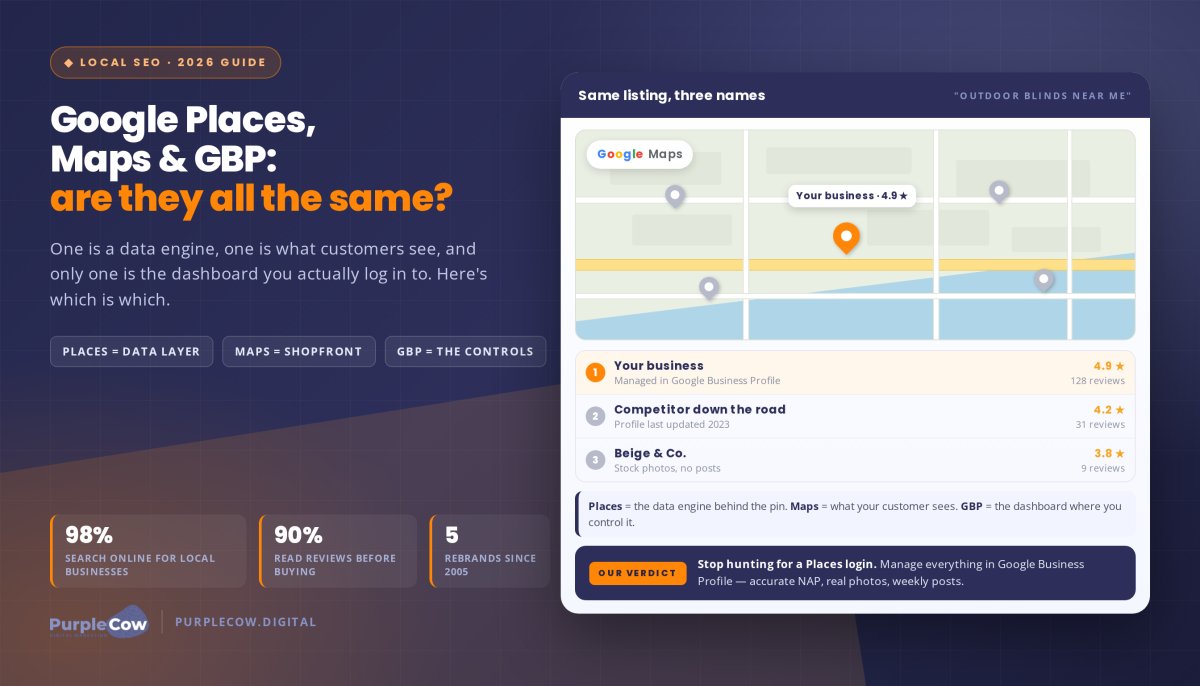
- Understand that while Google Places was once the primary name for business listings, it now refers to the technical data layer that feeds information to apps like Uber and TripAdvisor.
- Identify Google Business Profile as the essential dashboard you must use to manage how your business appears on Google Search and Maps.
- Learn the practical steps to optimise your listing with consistent contact details and authentic photos to ensure you don’t settle for a beige, forgettable presence.
- Discover how a strong map listing works with a high-performing website to build a strategic digital presence that drives real-world results and ROI.
The Google Branding Maze: Why Australian Business Owners are Confused
You aren’t alone if you’re scratching your head over Google’s naming conventions. At PurpleCow Digital, we’ve seen how the term Google Places was once the gold standard for getting your shopfront on the digital map. But as Google tinkered with its products, this clear label dissolved into a messy “beige” soup of rebrands. This left many busy Australian business owners behind, wondering where their listing went and how to manage it.
It’s vital to separate the tool from the display to keep your sanity. Google Maps is what your customers use on their phones to find the nearest plumber or cafe. Google Business Profile (GBP) is the actual dashboard where you control that information. While the names have shifted, the goal remains the same. You need to ensure you don’t stay invisible when a local lead is ready to buy.
To better understand how these pieces fit together, watch this helpful video:
The Evolution from Google Places to Google Business Profile
Tracing the history of Google’s mapping services reveals a dizzying path. The platform has undergone several major shifts to reach its current form:
- 2005: Local Business Center
- 2009: Google Places
- 2011: Google+ Local
- 2014: Google My Business
- 2021: Google Business Profile
Google claims these shifts simplify the user experience. We know they often just add more confusion to your busy schedule. If you set up a listing years ago, don’t panic. Your original data hasn’t vanished; it’s simply been migrated into the current GBP system. This migration happened automatically to keep the data layer consistent across the web.
Why the Correct Terminology Matters for Your Marketing
Precision saves you precious time. If you search for help with Google Places today, you’ll likely end up in developer forums looking at complex code for the Places API. That’s a trap for 99% of small-to-medium businesses who just want to get noticed. You need a Google Business Profile to manage your reviews, hours, and photos.
Using the right terms helps you optimise your listing and find the specific local SEO support you need without getting bogged down in technical fluff. This ensures you’re looking at the right login page instead of an old developer console. Don’t waste hours on outdated tools when you could be building your brand. Focusing on GBP allows you to manage exactly how you appear to local customers in real-time. This clarity is the first step toward a marketing strategy that actually grows your business.
What is Google Places in 2026?
Google Places has shifted from a user-facing tool into the invisible engine room of the internet. While you used to log in there to manage your shopfront, it’s now primarily a data layer known as the Places API. This engine acts as the source of truth for over 200 million points of interest globally, feeding information to apps you use every day.
Think about the last time you booked an Uber or checked a restaurant on TripAdvisor. Those apps aren’t guessing where a business is located. They’re pulling that data directly from the Google Places database. Even though you don’t have a specific “Places” password anymore, your business exists as a “place” within this massive digital registry.
The Technical Side: Google Places API and Data
The API acts as a digital bridge. It connects Google’s deep well of location data to third-party software and websites. If a customer finds your trade business through a local directory or a specialised service app, they’re likely seeing data served by this system. It’s the reason your business can get noticed on platforms you haven’t even visited.
You don’t need to be a developer to care about this. While you won’t be writing code, you must ensure the data in this engine is accurate. If your details are wrong here, you’ll appear incorrectly on dozens of platforms you don’t even manage directly. Most SMEs only need to worry about the technical side if they’re building their own custom app.
How Google Maps Uses Places Data to Show Your Business
Google Maps is the visual front-end that makes this data useful for humans. It pulls from the “Places” database to decide which red pin to drop on a user’s screen. A “Place” is the physical location and basic facts, while your profile is the tool you use to tell your story and manage your reputation.
To manage this effectively, you need to head to the official Google Business Profile page. This is where you feed the engine the right fuel. When your information is consistent across the web, Google builds trust in your business, making you more likely to get noticed by local leads. We see this as a foundational part of any local SEO strategy that aims for real results.
Accurate data in the Places engine is what helps you stand out on third-party sites. If you’re feeling invisible or confused by how your data looks online, it’s worth checking if your digital coordinates are working for you. You can always send us an enquiry if you want to make sure your business is properly mapped and ready to scale.
Google Places vs. Google Business Profile: Side-by-Side Comparison
Stop the confusion once and for all. Think of Google Places as the raw ingredients and Google Business Profile (GBP) as the finished meal. One is a database entry that tells machines where you are; the other is your digital shopfront where you talk to real people. You need both to work in harmony if you want to build a brand that stands out in the Australian market.
The distinction is simple but critical. Places provides the physical coordinates that drop a pin on a map. GBP provides the personality, the photos, and the reviews that convince a customer to click on that pin. If your coordinates are wrong in the database, your profile might as well be invisible. You cannot have a remarkable GBP without accurate data sitting in the engine room.
Features Comparison: Data vs. Management
Places handles the essential but dry facts of your business. It stores your latitude and longitude, your physical address, and your primary category. It’s a “point of interest” record designed for software to read. This is the digital anchor that ensures your trade business or service shop exists in the eyes of the algorithm.
GBP is where you add the “personality” to your business listing. This management tool gives you control over photos, customer reviews, service lists, and direct messaging. While the database knows your address, your profile tells customers why they should choose you over the bloke down the road. It’s the difference between being a data point and being a market leader.
- Places: Best for developers, data aggregators, and third-party apps like Uber.
- GBP: Best for business owners, marketing managers, and local customers.
Which One Should You Care About Most?
For the vast majority of Australian SMEs, your focus must remain squarely on GBP. This is your primary tool for driving local SEO and ensuring you get noticed by high-paying clients. While Google Places keeps the lights on in the background, your profile is what actually converts a searcher into a lead. Accurate data in the engine is the foundation, but your profile is the skyscraper you build on top of it.
Average businesses set up their listing once and let it gather digital dust. Remarkable ones recognise that their profile is a living part of their digital strategy. Unless you’re building a custom app or working with complex developer tools, you don’t need to spend your nights worrying about API documentation. Focus on the management tool that helps you grow, scale, and build real-world trust with your community.
Practical Steps to Optimise Your Australian Business Listing
If your shopfront looks like every other listing on the map, you’re settling for beige marketing. You want to be the obvious choice, not just a random pin. This starts with absolute consistency in your Name, Address, and Phone number (NAP) across the entire Australian web. It’s a simple task that most owners ignore, yet it’s the foundation of real results.
Accuracy builds trust with the algorithm. If your phone number is different on your website than it is in the Google Places data engine, Google gets confused. Confusion leads to lower rankings and lost leads. We focus on building a profile that acts as a beacon for high-paying clients, not just a digital placeholder.
Building a Remarkable Google Business Profile
Your category selection must be surgical. Don’t just pick “Plumber” if you’re actually a “Gas Fitter” or “Hot Water Specialist.” Being specific helps Google understand exactly which problems you solve for your local community. A compelling business description should then highlight how you fix your customer’s pain points rather than just listing your tools.
- Select primary and secondary categories that reflect your actual daily work.
- Write for humans, not just bots, by addressing why customers trust you.
- Link to specific service pages on your website design to guide leads toward a conversion.
- Upload authentic photos of your team and completed projects to prove you’re a real-world expert.
High-quality, original photos are a non-negotiable part of your strategy. Research shows that 72% of consumers state that positive reviews and authentic imagery increase their trust in a local business. Avoid stock photos at all costs; they look corporate and cold. Show your actual van, your actual team, and the results you’ve delivered for Aussie families.
Managing Reviews and Content to Get Noticed
Reviews are the lifeblood of your local reputation. Since 90% of people read online reviews before making a purchase, your response strategy must be aggressive and professional. Don’t just thank the five-star fans. Respond to every review to show you’re active and that you care about customer outcomes.
Use GBP Posts to keep your profile lüktető and fresh. Think of these as mini-ads that appear directly in search results. You can share recent project wins, seasonal maintenance tips, or special offers to grab attention. When you treat your profile as your best salesperson, it works for you even when you’re off the clock.
Beyond the Map: Building a Strategic Digital Presence
A Google Business Profile is a powerful tool, but it’s not a silver bullet. If you treat it as an isolated task, you’re missing the bigger picture of a remarkable marketing strategy. You need a cohesive presence that guides customers from a map pin to a confirmed booking without any friction.
Think of your digital presence as a connected ecosystem. While Google Places ensures your data exists in the technical engine room, your website and profile are the face of your brand. They must work in tandem to build trust and drive real results. Aiming for market dominance means looking beyond the basics and building a brand that’s impossible to ignore.
Why Your Website and GBP Must Work Together
Google looks at your website’s authority to decide how high to rank your map listing. If your site is slow or outdated, it sends a signal that your business might not be the best choice for the user. A high-performing website acts as a foundation that boosts your visibility across all search platforms.
Mobile-responsive design is essential because most customers clicking from Maps are on their phones. If they land on a beige website that’s hard to navigate, they’ll bounce back to the search results immediately. Don’t let a poor website kill the high-quality leads your profile generates. Your digital shopfront should be as professional as the work you do in the real world.
Partnering with PurpleCow Digital for Local SEO
PurpleCow Digital helps Australian SMEs escape the trap of mediocrity. We don’t just provide services; we act as a strategic partner to help you scale and build a dominant market position. Our approach is built on kőkemény data and a refusal to accept average performance in a competitive field.
We manage your SEO services with a focus on ROI and measurable growth. By ensuring your Google Places data is accurate and your profile is fully optimised, we position you as a leader in your trade. It’s time to build a presence that gets noticed and delivers the leads you need to grow.
Ready to move beyond being just another pin on the map? Let’s Chat about how we can help you get noticed and grow your business nationally. We’re here to help you leave your comfort zone and achieve the results your hard work deserves.
Take Control of Your Digital Shopfront
You’ve now unmasked the branding maze. You know that Google Places acts as the engine room data, while your Google Business Profile is the steering wheel. Managing this isn’t about chasing jargon; it’s about making sure your business is the most trusted choice when a local lead searches for your services.
PurpleCow Digital focuses on real results like leads and ROI, not vanity metrics. As specialists in Australian trades and service industries, we don’t use black-box tactics or hide behind hidden fees. We believe in building a digital presence that’s remarkable enough to dominate your market and scale your business.
Stop settling for a beige profile that leaves you invisible to potential clients. It’s time to build a presence that works as hard as you do. We’re ready to help you turn those map pins into high-paying customers.
Your growth is our priority. Let’s build something that stands out together.
Frequently Asked Questions
Is Google Places free to use for my business?
Yes, creating and managing your profile is entirely free. Google doesn’t charge subscription fees for you to appear in local search results or on the map. Costs only come into play if you choose to run paid advertising like Google Ads or Meta Ads. For most Australian SMEs, this free tool is the most cost-effective way to get noticed by local customers and build real-world trust.
How do I log into my Google Places account in 2026?
You no longer log into a separate Google Places dashboard. Instead, you manage your listing directly through Google Search or the Google Maps app while logged into your business Google account. Simply search for your business name or type “my business” into the search bar. This streamlined approach allows you to update hours, photos, and services in real-time without hunting for a retired login page.
What happened to Google My Business?
Google My Business was rebranded to Google Business Profile (GBP) in late 2021. This wasn’t just a name change; it was a shift toward managing your presence directly on the search results page. While the old mobile app was retired, all your data and reviews remained intact. We help businesses transition away from beige, outdated setups to modern profiles that actually drive leads and ROI.
How do I change my business address on Google Maps?
You can update your address by editing your “Business Information” within your profile dashboard. If you’ve moved your workshop, ensure the new details are accurate to maintain Name, Address, Phone (NAP) consistency across the web. Google may require a new verification process, such as a postcard or video, to confirm the change. Keeping this data current ensures you don’t send potential clients to the wrong location.
Do I need a professional agency to manage my Google Business Profile?
While you can manage basic updates yourself, partnering with a strategic agency like PurpleCow helps you dominate the market. We move beyond simple data entry to create a remarkable digital presence that focuses on leads rather than vanity metrics. Managing Google Places data and profile optimisations requires a results-obsessed approach to ensure your business stands out in a field of grey. Our team handles the technical heavy lifting for you.
How often should I post updates to my Google Business Profile?
We recommend posting updates at least once a week to keep your profile active. Regular posts about recent projects or seasonal offers show both Google and your customers that you’re open for business. Profiles updated frequently are more likely to get noticed by the 98% of consumers who search for local information online. It’s a practical way to keep your best salesperson working around the clock.
Can I have a Google Business Profile if I do not have a physical shop?
Yes, you can absolutely have a profile if you’re a “Service Area Business” without a physical shopfront. When setting up your profile, you simply list the areas you serve instead of a specific street address. This is a common strategy for mobile trades like plumbers or electricians. It allows you to build a local presence and appear in search results without needing a public office for customers to visit.
Why is my business not showing up on Google Maps even though I have a profile?
Visibility issues often stem from a lack of verification, poor optimisation, or high competition. If your profile isn’t fully completed with high-quality photos and specific categories, Google may not trust your data enough to show it. It’s also possible that your NAP details are inconsistent elsewhere on the internet. We help Australian businesses identify these hurdles through a free audit to ensure they aren’t left invisible to potential leads.

Article by
Angie Neal
Angie Neal is the founder and CEO of PurpleCow Digital, a full-service digital marketing agency based on Queensland's Redcliffe Peninsula. With deep expertise in SEO and web design, as well as a certification as a GoHighLevel Admin. Angie helps small-to-medium businesses build scalable growth systems through AI-powered automations, CRM workflows, and smart digital strategy. She's also passionate about building a community of like-minded agency owners at the After Party — sharing insights, solving real problems, and helping others grow. Whether it's search visibility, lead management, or end-to-end automation — Angie's focus is always on helping businesses scale sustainably.
Disclaimer
This page may contain affiliate links. If you sign up for software through our links, we may earn a commission at no extra cost to you. We only recommend tools we use and trust – software that is the backbone of our agency.