
More photos don’t automatically make a better Reel. If you’re wondering how many photos work best for an AI-generated video, there’s no magic number: use images that move the story forward, and leave out those that don’t. Creating Reels with AI can start with a simple prompt, a script, or a handful of visual references.
You already know short-form video can help your business get noticed, but finding time to plan, create, and polish every post can be a challenge. Give each image a clear role. For example, a tradie could build a Reel around a finished job, a close-up detail, and the result in context, rather than filling the video with near-identical shots.
This guide shows you how to turn prompts, scripts, and images into short-form videos, then choose a visual style, format, captions, hashtags, and posting times. You’ll find practical ideas for building a repeatable workflow that fits your business and helps your Reels stand out without making content creation a full-time job.
Key Takeaways
- Build each Reel around one clear idea, then use only the prompts, script lines and images that help tell it.
- Keep important visuals and text clear of the areas where Instagram’s captions and controls may sit.
- Choose a vertical 9:16 format and a visual style that suits the message, not just the latest trend.
- Adapt the creative approach to the subject: product details, travel scenes and everyday lifestyle moments each need a distinct story.
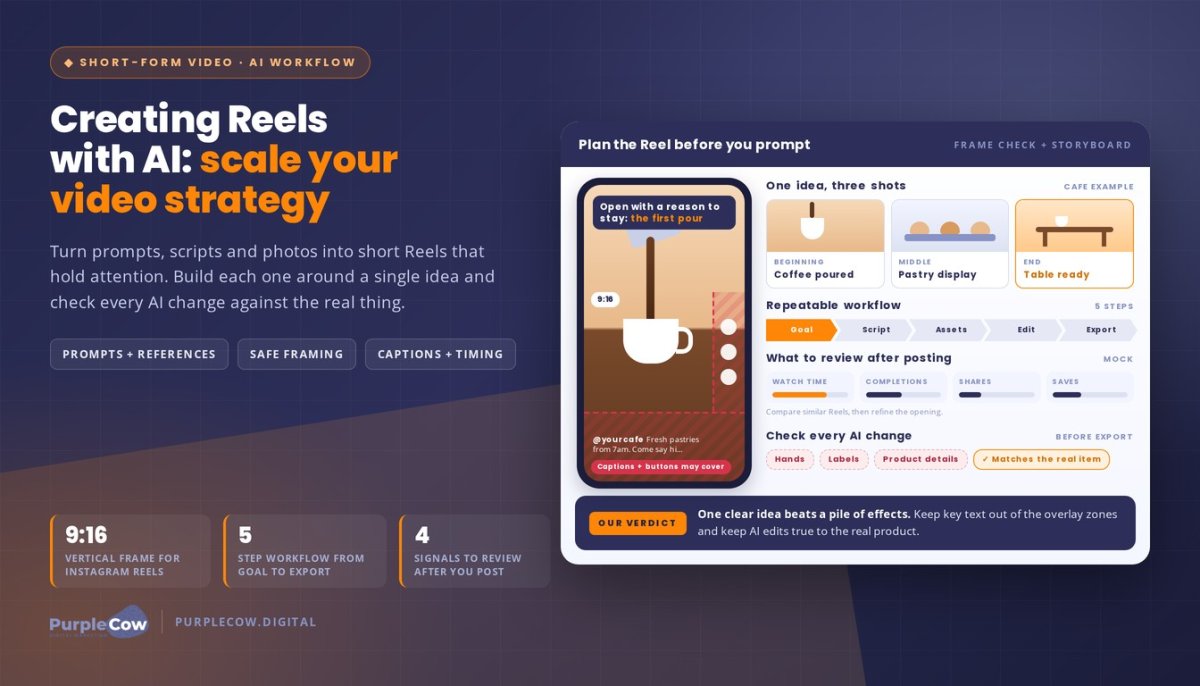
- Review watch time, completions, shares and saves to learn which creative choices are holding attention.
Turning prompts, scripts, or images into short-form videos
An AI Reel can start with a prompt, a script, existing footage, or selected photos. Creating Reels with AI works best when each input supports one clear message, rather than asking a tool to invent the whole story.
First, decide what viewers should understand: a product feature, a service, or a project result. For example, a home renovator could prompt a short kitchen transformation story and supply photos of the finished space. The prompt sets the direction, the script provides the sequence, and the images ground the visuals in a real project. That’s a practical starting point for Creating Reels with AI.
To combine photos and video clips, select assets that move the story along. A café could open with coffee being poured, show a pastry display, then finish with a table ready for customers. Arrange scenes into a beginning, middle, and end. Trim pauses, vary the shots, and keep transitions from distracting from the subject.
AI features can restyle or extend existing footage. For instance, a prompt might request warmer colours, a different visual treatment, or an additional scene that continues the original setting. Review every generated change against the source. Hands, labels, and product details can shift, so correct anything that misrepresents the real item or service.
For a product showcase, build each shot around one useful detail. A skincare business could show its packaging, texture, and use, with a short overlay explaining a genuine feature. Keep the product recognisable and the claims accurate. A focused sequence is more useful than effects that compete for attention.
Customising and Exporting Platform-Ready Videos
Customisation covers framing, pacing, text, sound and export settings. Instagram Reels use a vertical 9:16 aspect ratio, so compose the subject for that frame and preview interface overlays before exporting. Keep product names away from the lower edge, where captions or buttons may obscure them. Watch the final video with sound and without sound.
Tool Costs and Creation Workflows
The cost of AI video generators in Australia depends on the tool’s plan, generation limits, and export options. Compare the current price in AUD with the functions you need, such as text-to-video, photo animation, or footage editing. Tools for creating Reels from text, images, or video include AI video generators, template-based editors, and AI-assisted video editing software.
- Set one goal: choose a product, service or project message.
- Write a prompt or script: describe the subject, sequence and tone.
- Select source material: gather relevant photos and clips.
- Generate and edit: remove mismatched scenes and refine timing.
- Preview and export: check framing, accuracy and sound before posting.
Captions, hashtags and recommended posting times
A strong caption adds context after your Reel’s opening visual catches attention. For example, a tradie could show a completed bathroom and open with, “A practical upgrade for a busy family.” Follow with one useful service detail and a clear invitation to enquire. Put the most useful information first, and make the next step obvious without asking viewers to do several things at once.
AI can draft captions, subtitles, and voiceovers from a script, but review every line before posting. Check business names, trade terms, product details, and Australian spelling. Speech-to-text could mistake a place name or technical term, changing the meaning of your video. Make the caption sound natural when read aloud, and remove phrases that don’t sound like your business.
Automatic captions make spoken information easier to follow without sound. For accessibility, use clear contrast between text and its background, and break longer phrases into readable chunks. A short demonstration from a painter, for instance, can label the preparation step and the finish separately. That gives viewers useful context even if they miss part of the audio.
Use hashtags to label the actual topic, service, or audience, not to chase unrelated trends. For instance, a plumber could use relevant trade and service terms alongside a caption explaining a common maintenance issue. Treat hashtags as context, not a guarantee of reach. Choose tags that accurately describe the Reel, so viewers know what the video covers before they tap through.
No single posting time suits every Australian audience. Start with the activity information in your Instagram insights, then test publishing at different times that fit your customers’ routines. A service business might compare posts around lunch breaks with posts after work. Keep the subject and format comparable, then assess responses and enquiries rather than views alone. Use those patterns to guide your schedule.
Instagram’s requirements for AI-generated content, music, and disclosure labels can change. Use music you have permission to use, keep promotional claims accurate, and follow Instagram’s current prompts for AI disclosures when publishing.
AI-generated Reels can be monetised when the account and content meet Instagram’s current eligibility and monetisation policies. Using AI alone doesn’t establish eligibility, so assess each Reel against those requirements.
For a repeatable workflow that connects captions, creative and business goals, talk with our team about your content plans.
Plan a workflow that keeps important details clear. Keep key text, labels, and calls to action away from the bottom and right side of the frame, where Instagram Reel captions and buttons can cover content. Preview the Reel before publishing and adjust any obscured text.
Choosing visual styles, aspect ratios, and duration
Choose a visual style that helps viewers recognise the subject and understand its mood. A furniture maker might use clean lighting and measured camera movement to show timber grain, while a community event could use lively cuts and bold colours. Keep colour, pace, and treatment consistent across scenes. If every shot looks different, the visual changes can distract from the message.
Plan the composition for a phone screen before uploading footage. Keep the main action and essential details within the visible area, especially when cropping landscape clips into a vertical format. For example, a close-up of a handmade item may need repositioning so its defining feature stays in frame. Preview the crop to catch cut-off faces, signs, or product details.
Set the duration according to how much information viewers need. A quick reveal can move straight to the result, while a demonstration needs enough time for each meaningful action. A bike mechanic could show a gear adjustment in clear stages, cutting pauses between them. Remove repeated angles, but don’t trim so aggressively that the action becomes difficult to follow.
Audio-reactive visuals and beat syncing can give footage a stronger rhythm. An editing tool may align cuts, transitions, or animated elements with a music track. A dance teacher could match movement changes to musical accents, while a quiet studio tour may work better with restrained edits. Preview the result with sound and without it, checking that captions and key actions remain understandable.
A viral hook isn’t an effect. It’s an opening that gives viewers a reason to stay. A mechanic might begin with an unusual sound from a worn bicycle part, then reveal the cause. Use a close-up, movement, or visual contrast to support that opening. Avoid effects that hide the work or make a real result appear different from what customers receive.
- Match style to subject: use considered lighting for craftsmanship, or energetic edits for movement.
- Compose for mobile: keep the main action visible after cropping.
- Edit for clarity: use transitions only when they help explain a change.
- Strengthen the opening: lead with a useful question, reveal or sound.
These choices also help when adapting a Reel for TikTok or YouTube Shorts. Review each version in its platform preview, reposition text, and check that the key action remains clear. The same footage can support different edits, but each should suit the audience and purpose of the post.
AI reel use cases for products, travel and lifestyle
A product Reel should make choosing easier, not just make the packaging move. For a ceramic studio, describe the mug’s glaze, shape, and handmade finish in the prompt. Use close-ups of the rim and handle, then show the mug beside a familiar breakfast setting. Viewers see both its details and its place in everyday life.
AI can help turn product information into a visual sequence. Start with one benefit, select footage or product photos that support it, then add concise on-screen text. For a reusable water bottle, a Reel might show its lid, drinking spout, and place in a work bag. Check generated scenes against the actual item so its colours and features stay accurate.
Travel content works best when it conveys a place through specific moments. An Australian accommodation business could pair a room view with nearby walking tracks and a local breakfast stop. Use an AI voice to connect the scenes with practical context, such as what guests can experience. Don’t let generated scenery imply an attraction or view that the accommodation doesn’t offer.
Lifestyle Reels can show how a product or service fits into a routine. A home organisation business could build a short sequence around a cluttered pantry, the sorting process, and the finished shelves. Keep the transformation truthful. If AI adds a scene or changes an object, review the footage before posting so viewers aren’t shown a result the service didn’t create.
Choosing an AI Reel maker comes down to what you need it to do. Compare prompt-to-video tools for generating scenes, template-based makers for assembling existing assets, and video editors for controlling timing, voice, and captions. The easiest option is one that fits your source material and gives you enough editing control to correct mistakes.
- For products: show real features and accurate use, then add one clear benefit.
- For travel: connect recognisable scenes with useful, truthful details about the experience.
- For lifestyle: make the routine or transformation the story, not a pile of effects.
AI can also help adapt an approved Reel for YouTube Shorts, but each version still needs a platform-ready review. Check framing, text placement, sound, and generated details after export. A tool that creates an AI voice may save recording time, while a template reel maker may suit a simple product montage. Compare options with a small test using the same idea and assets, then review the edits for accuracy, clarity, and brand fit.
Creating reels from text ideas and image references
A text idea gives an AI Reel its direction; image references make that direction specific. For Instagram Reels, combine a clear message with real visual cues, such as a colour palette, product detail, or location. This helps the finished video feel connected to your brand instead of looking like a generic template.
Start by writing one sentence about what the viewer should understand. Then expand it into a sequence, such as problem, detail and outcome. A Newcastle cabinetmaker could start with “Make a small kitchen work harder,” then reference images showing clever storage, timber finishes and the completed space. Ask the AI tool to keep those visual features consistent across scenes.
Choose references for their purpose, not just their polish. A photo can guide colour and composition, while a camera clip can provide accurate product movement or show a real location. For a café Reel, use a genuine image of the counter, a close-up of the dish, and a reference for the desired lighting. Label each image in your prompt so the tool knows what to carry forward.
Templates can speed up the structure, but they shouldn’t dictate the story. Select a layout with space for your opening line, key visual, and final action. Replace stock wording with details only your business can provide. For example, a mobile dog groomer could use a simple service template, then add a real van, grooming setup, and finished coat. Review generated scenes for changes to logos, colours, or visible details.
Australian creators should consider copyright and privacy before uploading references. Use images, footage, music, and brand assets you own or have permission to use, and avoid placing personal or confidential information in prompts. If a person is identifiable, consider their permission and the AI tool’s data-handling terms before using their image.
Before publishing on Instagram, review the result against the original references. Check that people, products, uniforms, and locations remain accurate, and that the finished edit doesn’t suggest an event or result that never happened. Keep source files and approved assets organised so later edits can be traced back to the material you supplied.
- Write the message first: give the tool one clear idea to build around.
- Describe references: explain which image guides colour, setting or subject.
- Check the finished Reel: compare generated details with real products and approved assets.
Bring your text ideas and visual references together with support for your Reel content
PurpleCow Digital
PurpleCow Digital helps you connect short-form video with the wider digital strategy behind your business. Reels work best as part of a clear path from discovery to action, supported by a website that answers customer questions and Search Engine Optimisation that helps people find relevant information. When content planning becomes difficult to manage alongside daily operations, we can help you build a more organised digital approach.
For example, a service business could use a Reel to introduce a common customer problem, then direct viewers to a useful service page. That way, video supports more than visibility. It gives viewers a next step.
Make your next Reel a starting point
Your next video doesn’t need a complicated production plan. Choose one useful idea your customers care about, then use Creating Reels with AI to shape it into content that looks and sounds like your business. Keep the creative process focused on a real purpose: answering a common enquiry, showing how a service works, or helping people understand what makes your offer relevant.
Treat each Reel as a learning opportunity. Notice which topics prompt thoughtful responses and which formats feel natural to produce. Use those signals to refine your next idea, rather than chasing every trend or trying to make every post do everything. A steady, recognisable approach gives you room to build confidence and make your video strategy more intentional.
Ready to plan the next step for your digital marketing? We’d be glad to hear what you’re working towards.
Start with one clear idea, and build from there.
Frequently Asked Questions
How many photos work best for an AI reel?
Use enough photos to show the idea clearly, rather than aiming for a fixed count. For a florist’s Reel about a seasonal bouquet, choose images that show the arrangement, a detail such as the wrapping, and the finished bouquet in context. If two photos communicate the same thing, keep the stronger one. The best selection gives the video a clear visual progression without making each image feel rushed.
Which AI tools create captions, voiceovers, scripts, and music for Reels?
AI video editors and content creation tools may combine script drafting, voice generation, captions, and music, while other tools focus on one task. Check the features available in your chosen tool, then review each output separately. For a plumbing business, draft a script explaining a common maintenance issue, generate a voiceover, and edit captions against the spoken words. Choose music you have permission to use and keep it secondary to the message.
What video dimensions, length, and file formats does Instagram recommend for Reels?
Instagram Reels use a vertical 9:16 aspect ratio. Match the duration to the story: a single tip needs less explanation than a service walkthrough, so remove any scene that doesn’t help viewers follow the point. For file format, export using an option accepted by Instagram’s current upload flow, then review the in-app preview for cropping, playback and visual quality before publishing.
How can you improve AI-generated Reels for reach, accessibility, and engagement?
Open with a specific visual or statement that tells viewers what they’ll gain, such as “Three signs your hot water system needs attention.” Add accurate captions, use legible text with strong contrast, and keep essential information understandable without sound. Finish with one relevant next step. After posting, compare watch time, completions, shares, and saves across similar Reels, then use those signals to refine future topics and openings.
What are Instagram’s rules for AI-generated content, music, and disclosure labels?
Use music you have permission to use, keep promotional claims accurate, and follow Instagram’s current prompts for AI disclosures when publishing. Instagram’s requirements can change.

Article by
Angie Neal
Angie Neal is the founder and CEO of PurpleCow Digital, a full-service digital marketing agency based on Queensland's Redcliffe Peninsula. With deep expertise in SEO and web design, as well as a certification as a GoHighLevel Admin. Angie helps small-to-medium businesses build scalable growth systems through AI-powered automations, CRM workflows, and smart digital strategy. She's also passionate about building a community of like-minded agency owners at the After Party — sharing insights, solving real problems, and helping others grow. Whether it's search visibility, lead management, or end-to-end automation — Angie's focus is always on helping businesses scale sustainably.
Disclaimer
This page may contain affiliate links. If you sign up for software through our links, we may earn a commission at no extra cost to you. We only recommend tools we use and trust – software that is the backbone of our agency.