
What if the biggest risk isn’t spending too much on Google Ads, but paying for clicks that never become useful enquiries? Google ads costs can be hard to predict, especially when you’re weighing ad spend against management fees and deciding what to invest to get started.
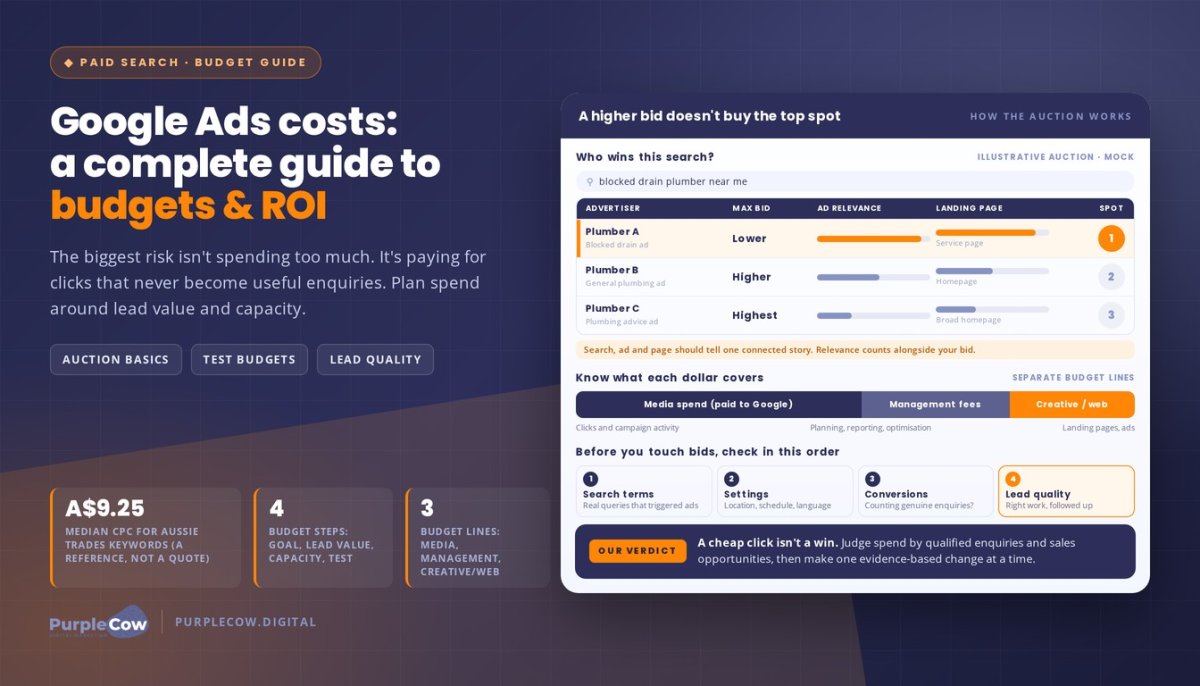
There’s no fixed price per click: costs vary with competition, your industry, and how relevant your ads and landing page are. For example, recent market data indicates a median cost per click of A$9.25 for Australian trades keywords. That’s a reference point, not a quote or a guarantee of what your campaign will pay.
In this guide, you’ll learn what makes up campaign costs, how to set a budget around your business goals and capacity, and how to judge results by lead quality and sales, not clicks alone. We’ll also cover how clear reporting and practical campaign decisions help you assess whether your spend is working. At PurpleCow Digital, we treat Google Ads as a partnership: your budget should connect to business outcomes, and every adjustment should have a reason.
Key Takeaways
- Separate click spend from management fees and other campaign investments so you know what your budget covers.
- Google ads costs vary because each eligible ad competes in an auction, where bids, relevance, and landing-page experience can influence placement.
- Set a practical test budget by defining your goal, estimating the value of a qualified enquiry, and checking how many new customers your business can handle.
- Review search terms, campaign settings, and conversion tracking before changing bids, then assess lead quality rather than clicks alone.
- Clear reporting helps you compare in-house management with agency support and connect campaign activity to meaningful business outcomes.
Google Ads costs: What are you actually paying for?
A click price is only one part of the picture. To understand Google ads costs, separate the money spent on advertising from the work and assets that support the campaign. Otherwise, a low cost per click can look like a low total investment, or you may end up judging performance without knowing what the budget was meant to cover.
Media spend pays for advertising activity; management and production fees pay for the work and assets that support it. These amounts may appear in separate budget lines, so review each one when planning and assessing your campaign.
Ad spend, management fees and other campaign costs
Ad spend is the amount allocated to Google for campaign activity. Many Search campaigns charge by the click, but Google Ads supports different campaign and pricing models. The Google Ads Wikipedia overview explains the platform’s history and includes context on models such as pay-per-click (PPC), where an advertiser pays when someone clicks an ad.
Management fees are separate from media spend. They cover services such as campaign planning, setup, monitoring, reporting, and optimisation, according to the agreement you have with your provider. Don’t assume a service fee is included in the amount paid to Google. Check how campaign spend and service charges appear in your agreement and reports.
You may also have separate costs for creative work, website updates, or a dedicated landing page. For example, a trades business might send ad traffic to a page that explains a specific service and makes it easy to enquire. The ad budget pays for campaign activity, while page or creative work may be a separate project cost. If that page needs a redesign, a considered website design approach can make the next step clearer for potential customers.
Before you start, map your budget into distinct categories: media spend, agreed management services, and any planned creative or website work. This makes it easier to see what each dollar is intended to do, without treating every campaign expense as a click charge.
Why there is no one-size-fits-all Google Ads price
There’s no fixed price for every click or campaign. Eligible ads enter an auction when someone makes a relevant search, and the result can vary with competition, bids, ad relevance, and landing-page experience. Campaign choices also matter: targeting, location settings, the search terms you want to reach, and your campaign objective all influence how the budget is used.
An industry average can offer context, but it can’t predict what your business will pay or what results you’ll get. Two service businesses may target different areas, promote different services, and attract people at different stages of decision-making. Their campaign costs and enquiry quality can differ as a result.
Assess more than clicks. Ask whether enquiries match the work you want, whether your team can follow up promptly, and whether those conversations progress towards sales opportunities. A campaign can attract activity without producing useful outcomes, so consider the full cost alongside lead quality and follow-up.
How the Google Ads auction shapes what each click costs
A click doesn’t have a fixed price tag. Each time someone searches, Google runs an auction to decide which eligible ads may appear and where. Your bid matters, but it’s only one part of the decision. Google also considers ad quality signals and the context of the search.
A higher bid alone doesn’t guarantee a stronger ad position: relevance and the search experience matter too. Google explains the process in its guide to How Google Ads Auction Works. Understanding the auction helps you interpret Google ads costs without assuming every click should cost the same.
What affects cost per click?
Cost per click (CPC) is the amount charged when someone clicks your ad. The actual CPC isn’t automatically the maximum amount you’re willing to bid. It can be lower because the auction considers factors such as competing ads, ad quality, and the search context.
Competition varies by search. A query from someone ready to book a service may attract different advertisers than a general research query. Your campaign settings also determine which searches can trigger your ads, including the services and locations you target. Your bidding approach determines how bids are set, whether manually or through automated bidding.
Imagine you run a plumbing business and someone searches for an urgent repair service in an area you target. Your ad may be eligible if its targeting and keywords match that search. Other advertisers may also compete, while a search for general plumbing advice could signal a different intent. The auction responds to each search, so one result can’t reliably predict what every click will cost.
Why ad relevance and the landing page matter
The search, your ad, and the page it leads to should tell one connected story. If someone searches for a blocked drain service, an ad about that service should lead to a page that explains it clearly and makes the next step easy to find. A broad homepage may make it harder for them to confirm they’ve found the right help.
Quality Score is Google’s diagnostic estimate of keyword-level ad quality, based on expected click-through rate, ad relevance, and landing-page experience. It can help you spot areas to improve, but it isn’t the auction itself. Google considers ad quality signals alongside bids and other factors when deciding how ads compete.
Make the destination page useful on mobile and desktop, with clear service information, relevant details, and an obvious enquiry path. Strong website design for service businesses can support a clearer landing-page experience, but it can’t guarantee a particular CPC or ad position.
Review the search terms triggering your ads, then check whether your ad and page genuinely match those searches. If you want a practical second perspective on how your campaign and landing pages fit together, talk with our team.
How to set a Google Ads budget around business goals
A useful budget starts with a business decision, not a number copied from another company. Before setting a spend target, ask: what is a qualified enquiry worth to your business, and how many can your team handle? Your answers help you decide what the campaign should achieve and what you can sensibly invest in learning.
Use this sequence to build a budget around your priorities:
- Define the goal. Choose the service, audience, and action you want the campaign to support, such as attracting enquiries for a specific service.
- Estimate lead value. Consider what a suitable enquiry could mean commercially, including how often enquiries become customers and the value of that work. Treat this as a planning estimate, not a promised return.
- Check capacity. Decide how many new enquiries your team can respond to and how much additional work you can deliver without affecting existing customers.
- Set a test budget. Choose an amount your business can sustain while the campaign gathers evidence, then decide what you’ll review before increasing, reducing, or reshaping the spend.
Start with enquiries, capacity and commercial goals
A campaign for a high-priority service may deserve attention before a broader campaign covering everything you offer. Be specific about who you want to reach and what you want them to do. A clear goal gives you a better basis for assessing whether the campaign is attracting relevant demand.
Capacity matters just as much. If your team can only respond to a limited number of enquiries, a budget designed to attract more than you can handle may create pressure rather than useful growth. Factor in staffing, response processes, and the work you can fulfil.
Your competitor’s spend isn’t your benchmark. Their services, margins, demand, and capacity may differ from yours. Place paid search alongside your other priorities in a small business marketing strategy, and focus on enquiries that support your commercial goals rather than matching another business’s activity.
Build a practical test budget and review rhythm
Separate the amount your business can afford from the amount a campaign may need to collect useful evidence. A very restricted budget can limit the activity available to assess, while spending beyond your capacity can create avoidable pressure. There’s no universal test amount: choose a level that fits your goals, market, and cash flow.
Set a planned review period and decide in advance what evidence will guide your next move. Track campaign spend alongside clicks, enquiries, and qualified leads. For example, if clicks are arriving but enquiries don’t match the service you’re promoting, investigate targeting and the offer before simply adding budget.
Google’s Google Ads Budget Management guide explains how average daily budgets work. Daily spend can vary, while Google applies a monthly spending limit based on the average daily budget and its billing rules. Keep that platform limit separate from your business’s total marketing budget, and don’t treat early campaign activity as a guarantee of leads or return.
When you review Google ads costs, connect every adjustment to evidence and business capacity. If you want a practical partner to help plan and assess a campaign, talk with our team about your goals.
How to control Google Ads costs and measure useful results
Lowering the cost of a click isn’t the same as improving a campaign. To make sound decisions about Google ads costs, trace what happens after someone clicks: did they enquire, was the enquiry relevant, and did it create a genuine sales opportunity?
A low click cost is only useful when it helps attract the right customers. Clicks and form submissions show activity, but neither automatically tells you whether the campaign is bringing in the work your business wants.
Track the actions that matter beyond clicks
A conversion is a valuable action you want a visitor to take, such as submitting a service enquiry or calling your business. Decide which actions matter before assessing performance, and make sure your tracking records them accurately. If tracking is missing or misconfigured, reports may give you an incomplete or misleading picture of what ads are contributing.
Measurement shouldn’t stop when someone submits a form. A form submission might be a duplicate, spam, or a request for a service you don’t provide. Follow the enquiry through your response process and record whether it’s relevant, whether your team connected with the person, and whether it progressed to a sales opportunity. This helps distinguish a recorded conversion from a lead that could support business growth.
Bringing advertising activity together with digital marketing services and campaign management can make tracking, reporting, and practical optimisation part of the same conversation. The goal is a clear line between campaign activity and meaningful business outcomes, not a report full of numbers without context.
Make informed adjustments without chasing cheap clicks
Before changing bids, check the evidence in a consistent order. A quick review can help you find the cause of weak results instead of reacting to one metric:
- Search terms: Look at the actual searches that triggered ads. Identify queries unrelated to the service or the type of customer you want, then refine targeting where appropriate.
- Campaign settings: Check that location, language, schedule, and other targeting choices still match your intended audience and operating capacity.
- Conversion actions: Confirm that the actions being counted represent genuine enquiries and that important steps aren’t missing from your tracking.
- Enquiry quality and follow-up: Compare incoming enquiries with the service offered, then check whether response delays or gaps in follow-up could be affecting sales opportunities.
For example, a campaign may generate form submissions from people seeking a service the business doesn’t offer. Reducing bids might lower spend, but reviewing search terms and the page’s message could address the mismatch more directly. Likewise, if suitable enquiries arrive but aren’t followed up, changing the ads alone won’t fix the process.
Where practical, make one informed adjustment at a time, then review the effect against relevant enquiries and sales opportunities, not just click volume. This keeps optimisation tied to your business goal without assuming any change will guarantee a particular return.
When Google Ads management support makes sense
Managing Google Ads in-house can work well if someone on your team has the time, skills, and a clear process to monitor campaigns and act on the data. If campaign decisions keep slipping behind customer work, or you’re unsure whether tracking and reports tell the full story, outside support can bring more structure. The right choice depends on your workload and needs.
Signs your business may benefit from expert support
Campaign management takes time. You need to review search activity, check settings, maintain accurate conversion tracking, and assess whether enquiries are relevant. You also need enough familiarity with the platform to understand what each campaign change is intended to achieve.
In-house management may suit you if these tasks fit comfortably into someone’s role and your campaigns are straightforward. Support can help if no one owns the ongoing work, results are difficult to interpret, or a growing campaign has several services, audiences, or objectives to manage. For example, a trade business might have someone able to set up a campaign but lack the time to assess regularly which service enquiries turn into sales opportunities.
A good working relationship connects strategy, campaign decisions, and reporting, while keeping your team involved in business priorities and lead quality. At PurpleCow Digital, we manage Google Ads as part of our Paid Advertising services, with your budget and measurable business outcomes in view. Support should solve a real gap in time, skills, or clarity.
What transparent campaign management should look like
Clear reporting should help you understand three things: what was spent, what activity the campaign generated, and what meaningful outcomes followed. That means looking beyond clicks to relevant enquiries and sales opportunities, while being clear about what the available data can and can’t show.
Campaign changes should come with a plain-English reason. If targeting is adjusted, for instance, the explanation should connect the change to search relevance, enquiry quality, or another agreed goal. Reviews should use evidence to guide the next decision, not promise a particular number of leads or a guaranteed return.
Ask how reporting connects advertising activity with what happens after an enquiry arrives. If enquiries are recorded but your team can’t tell whether they’re suitable or followed up, that gap matters to campaign decisions. We value clear communication about spend, changes, and outcomes, so you can make practical choices with your business priorities in view.
If paid search needs to sit alongside other channels, consider how it fits within your broader digital marketing services and strategy. The right mix depends on your audience, goals, and capacity, not a default formula.
Make your next advertising decision with confidence
Your next step doesn’t have to be a dramatic budget increase or a complete campaign overhaul. Start by choosing one business outcome you want advertising to support, then decide what evidence would help you judge progress. That gives you a clear reference point as you review Google ads costs and consider what to change next.
With Google Ads included in our Paid Advertising work, PurpleCow Digital focuses on transparent operations, clear reporting, and measurable business results. We work with you to make practical campaign decisions that reflect your goals, rather than treating more clicks as the finish line. The aim is progress you can understand and assess, not a promise of a particular return.
Keep asking what your spend is helping your business achieve. With a clear goal and thoughtful decisions, you can take the next step with confidence.
Frequently Asked Questions
How much do Google Ads cost in Australia?
There isn’t one fixed price for every Australian business. For an initial estimate, use campaign planning tools to explore likely search demand for the services you want to promote, then treat the figures as scenarios rather than promises. Note the assumptions behind your estimate, such as a new service launch or seasonal demand. Once a campaign is active, compare those assumptions with actual account data before revising your forecast.
What does a Google Ads budget include?
A useful budget should identify platform charges and any separately agreed campaign work, then show whether related inputs are one-off or ongoing. For example, a landing page created for a campaign launch may be a project expense, while reporting may form part of ongoing support. Record when each cost is expected and who approves it. This makes it easier to update your plan if the campaign scope changes.
Do you pay Google Ads when someone sees your ad or clicks it?
Many Search campaigns charge by the click, while other campaign formats may use different billing models. Check the billing details for the specific campaign rather than assuming every impression or interaction is charged in the same way. Compare those settings with the account’s billing activity to understand what generated charges. This gives you a clearer basis for reconciling platform activity with your business records.
Can I set a daily budget for Google Ads?
Yes, campaign budgets can be planned around a daily amount. Use that setting to allocate spend between campaign priorities, and keep a record of any budget changes and when they were made. That change log can help explain shifts in delivery during a review. Check the account’s reports against your agreed spending limit regularly, especially after edits, so your planning stays connected to actual campaign activity.
Why does my Google Ads cost per click keep changing?
Cost per click can move over time, so avoid judging a campaign from one day or a single search term. Compare like-for-like reporting periods and check that you’re looking at the same campaign, targeting, and reporting dates. Also allow for the time it may take an enquiry to become a recorded outcome. A consistent review window gives you a more useful basis for deciding whether a change needs investigation.
Is Google Ads management separate from the advertising budget?
Management may be agreed separately from platform advertising charges. Before work begins, clarify who has account access, which tasks are included, how campaign changes are approved, and what the reporting will cover. These details help you understand the support you’re receiving and keep decision-making clear. Review the arrangement if your campaign scope changes, so the agreed work continues to match what your business needs.

Article by
Angie Neal
Angie Neal is the founder and CEO of PurpleCow Digital, a full-service digital marketing agency based on Queensland's Redcliffe Peninsula. With deep expertise in SEO and web design, as well as a certification as a GoHighLevel Admin. Angie helps small-to-medium businesses build scalable growth systems through AI-powered automations, CRM workflows, and smart digital strategy. She's also passionate about building a community of like-minded agency owners at the After Party — sharing insights, solving real problems, and helping others grow. Whether it's search visibility, lead management, or end-to-end automation — Angie's focus is always on helping businesses scale sustainably.
Disclaimer
This page may contain affiliate links. If you sign up for software through our links, we may earn a commission at no extra cost to you. We only recommend tools we use and trust – software that is the backbone of our agency.