
A traffic chart can look healthy while your website quietly loses leads. Knowing what a proper SEO audit should check means looking beyond rankings to find what’s stopping the right people from finding you, trusting you, and taking action.
It’s easy to assume that more traffic means better SEO. But if a trades business attracts visitors to a service page and its enquiry form doesn’t work properly on mobile, extra clicks won’t fix the real problem. An effective audit connects search performance with the experience potential customers actually have.
This guide covers the essentials: technical health, on-page content, traffic patterns, audience needs, and competitor visibility. You’ll learn what to look for, why each check matters, and how to identify issues worth prioritising, so your SEO decisions are based on practical evidence rather than guesswork.
Key Takeaways
- Review crawl access, sitemap accuracy, indexing and server responses to find technical barriers that can keep valuable pages out of search results.
- Assess mobile usability, page speed and security alongside Core Web Vitals, so technical performance supports a better visitor experience.
- Check that each page’s title, headings, URL, images and content clearly match its purpose and the terms your customers use.
- Connect traffic and site structure data with audience needs, search demand and competitor visibility to spot gaps worth prioritising.
- Use audit findings to guide practical next steps, from targeted SEO improvements to website updates or supporting marketing activity.
Technical checks for robots.txt, sitemaps, indexing, and server settings
Start with access. Review robots.txt to see whether Google can crawl important pages, images, and scripts. A rule blocking a service-page folder can prevent search engines from discovering useful content, even when visitors can open it. Compare each directive with the site’s intended structure before changing anything.
Next, inspect the XML sitemap. Include canonical URLs that should appear in search, and confirm each returns a 200 OK status. Each sitemap should contain no more than 50,000 URLs; larger sites can use a sitemap index linking multiple files. Remove redirected, broken or excluded URLs, then compare the sitemap against indexed pages in Google Search Console.
Test indexability by sampling important pages, such as a core service page and an Australian location page. Check their status codes, canonical tags, robots directives and rendered content. A page can load for you yet remain unavailable to Google if its code blocks crawling or its main content appears only after scripts fail to render. For local search, the local SEO approach should also align location pages with the business’s actual service areas.
Check server responses and redirects. Important pages should return HTTP 200; redirect old URLs to relevant replacements, and fix 404 and 5xx errors. Check that the site consistently uses its secure version rather than leaving visitors on an insecure one. Consolidate HTTP, www and non-www versions into one canonical version using 301 redirects. A soft 404 returns HTTP 200 while showing an error or empty content, so inspect the page itself, not only its status.
What tools and costs are involved in an SEO audit in Australia? Google Search Console, analytics, server logs, and crawling software can each reveal different issues. Audit costs vary according to site size, platform, and scope, so the work is priced based on the project.
How do you audit backlinks and identify toxic links safely? Review backlink quality, quantity, referring pages, and anchor text patterns. Investigate suspicious links manually before taking action, because an unusual link alone doesn’t prove harm.
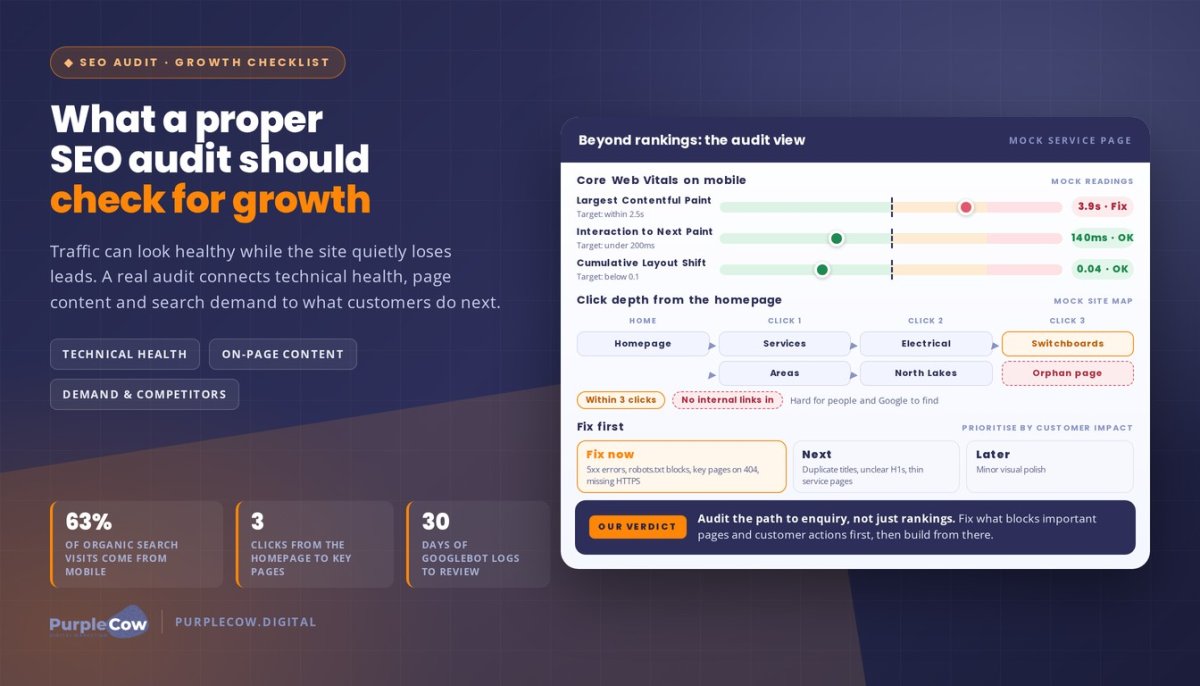
Which issues need urgent fixes? Prioritise 5xx errors, robots.txt blocks affecting essential pages, missing HTTPS and important pages returning 404 errors. If a 503 persists for more than two days, Google may evaluate it as a 404.
Finally, examine crawl budget through server logs. Review at least 30 days of Googlebot activity and look for repeated visits to filtered URLs rather than valuable pages. This analysis can expose crawl waste, broken internal paths and technical errors that keep priority content from being discovered, rendered and indexed.
Technical foundations, site speed and mobile responsiveness
A page can load on your laptop and still frustrate customers on mobile. Mobile devices account for 63% of organic search engine visits, so test the experience people actually use. Compare the mobile and desktop versions of key pages, including service details, navigation, phone links and enquiry forms.
Google’s mobile-first indexing makes mobile content and rendering central to how pages are assessed. Open priority pages on real devices, not just a desktop preview. Check that menus open, buttons respond to touch, text fits the screen and important content appears without horizontal scrolling. A hidden mobile-only section can leave visitors without the information they need.
Use Core Web Vitals to turn “the site feels slow” into specific checks:
- Largest Contentful Paint: aim for the main content to appear within 2.5 seconds.
- Interaction to Next Paint: look for a response under 200 milliseconds after a tap or click.
- Cumulative Layout Shift: keep movement below 0.1, so buttons and text don’t jump while loading.
Measure important page templates on desktop and mobile. A service page may load quickly on desktop but stall on a phone because of large images, unused scripts, or a heavy booking widget. Compare the same page under similar test conditions, then identify which files or elements contribute most to delays. A faster score matters when it helps customers reach useful content and complete an enquiry.
Review technical foundations alongside speed. Check that mobile pages return the intended content, internal links work, and robots directives don’t block resources needed for rendering. If a blocked script controls the mobile menu, for example, Google and visitors may see a different experience. Treat this as both a crawlability and usability issue.
Include security in the review. Confirm HTTPS works across key page versions, inspect certificate warnings, and look for outdated software or suspicious scripts. Test contact forms with sample submissions to ensure they work securely and show a clear confirmation. A security issue affecting a form can undermine trust, even when rankings appear stable.
Prioritise fixes by customer impact: repair a broken mobile enquiry button before polishing a minor visual detail. If your site’s performance needs a closer review, talk through your mobile and speed concerns.
On-page elements including titles, meta descriptions, headings, URLs and image alt text
A page can target the right keyword and still miss the mark if its title promises something the content doesn’t deliver. Audit each important page as a complete search result: check what Google may show, what visitors read, and whether both match the page’s purpose. For example, an electrician’s switchboard service page should make that service clear in its title, heading, and opening content.
Review page titles for clarity, distinctiveness and alignment with search intent. A title such as “Electrical Services” tells visitors little; a specific title describing switchboard upgrades gives a clearer expectation. Look for duplicate titles across pages, missing titles and wording that repeats keywords unnaturally. Then assess meta descriptions as accurate summaries, not ranking promises. A useful description tells an Australian customer what the page covers and gives a reason to click.
Check the heading structure next. Each page should have one H1 heading that clearly names its main topic. Supporting headings should organise the information in a logical order, rather than jump between unrelated subjects. If a page’s H1 says “Emergency Plumbing” but its sections discuss general renovations, the mismatch weakens clarity for readers and search engines.
Inspect URLs for concise, descriptive wording. A path such as /services/hot-water-repairs/ is easier to understand than a string of random characters. Keep URLs relevant to the page, use hyphens to separate words, and avoid changing established URLs without a clear reason. Check canonical tags when similar pages overlap, so search engines receive a clear signal about the preferred version.
Audit content for originality, relevance, and natural keyword use. Consider what a potential customer needs to know: does the page explain the service, area served, process, and next step? Remove duplicate or outdated sections, and add useful detail where obvious questions remain unanswered. A keyword should describe the topic, not appear in every sentence. Backlinks can bring visitors to a page, but relevant content helps them understand what to do next.
Review images and other page elements. Write alt text that describes an image’s purpose, such as “electrician inspecting a switchboard”, rather than stuffing it with keywords. Check that filenames and captions support the page and that large images don’t slow loading. Align titles, headings, URLs, meta tags, and content around one clear purpose, making each page easier to understand and act on.
Website traffic and structure analysis
Use Google Analytics and Search Console to assess organic traffic alongside meaningful actions. Compare landing pages, search queries, and enquiries across consistent date ranges. If a service page gains visits but enquiries fall, examine its search terms, calls to action, and navigation. Traffic alone doesn’t show whether visitors find what they need, so connect visits with actions such as calls or completed forms.
Map the site structure from the homepage to key service and location pages. Important pages should generally be reachable within three clicks of the homepage, so visitors and search engines can find them without digging through unrelated sections. Check menus, breadcrumbs, and contextual links. A page buried several layers deep may receive less attention than a prominent one, even if its content is valuable.
Review internal links and their destinations. Confirm that links work, point to relevant pages and use descriptive anchor text. Pages with more than 300 internal links can dilute the value passed through each link, so investigate unusually crowded pages. Look for orphaned pages with no internal links, too. For example, an important service page with no route from the navigation or related content can be difficult for people and search engines to discover.
Inspect heading hierarchy as part of your structure analysis. Headings should organise each page into clear topics, such as a service overview followed by process, service area, and enquiry details. If a page jumps from its main heading to unrelated sections, readers may struggle to scan it. A clear hierarchy helps visitors follow the information and gives search engines context about the page.
Structured data, also called schema markup, describes page details in a format search engines can interpret. Check that the markup matches visible content and the page’s purpose. A local business page should represent accurate business details, for example, while an article should describe its actual content. Don’t add markup for information visitors can’t see or that the page doesn’t support.
Validate structured data with Google’s Rich Results Test, then review relevant reports in Google Search Console. Fix syntax errors and warnings that affect eligible results, and retest after changes. Valid markup can help Google understand a page, but it doesn’t guarantee a special search result. Keep descriptions and business details consistent with what visitors see.
How often should a website have an SEO audit, and what are the priorities? Set the audit rhythm around site changes and performance shifts rather than a fixed calendar. Prioritise sudden drops in traffic or enquiries, major site updates, broken customer journeys, and structural issues affecting important pages.
Audience, search demand, and competitor research
Search visibility matters when it connects with the people you want to reach. Start by defining the audience, service, and locations behind each priority page. Someone searching “blocked drain repair” likely needs help sooner than someone researching how household drains work. Those searches signal different needs and call for different page content.
Use Google Search Console queries, enquiry records, and customer conversations to identify the language people use. Compare the searches bringing visitors with the questions they ask before booking. If searchers look for “hot water system replacement” but the page discusses maintenance, there’s a mismatch between demand and content. Group related queries by intent, then map each group to a page that answers the searcher’s need.
Review search demand in context, not as a list of popular terms. A broad phrase can attract visitors outside your service area, while a specific service-and-location query may better match your business. Compare “electrician” with “emergency electrician near me”, for example, and assess which reflects your services, audience, and capacity. Clear, relevant pages help search engines connect those needs with your business.
Study the results for your target searches and note what competing pages show. Compare their service details, location coverage, proof points, and calls to action, then identify gaps your business can address honestly. If competing pages explain how a job is handled but yours doesn’t, consider whether customers need that information. Use competitor research to guide useful improvements, not to copy another business’s wording or claims.
Test the visitor journey from search result to action. Someone looking for roof repairs should land on a relevant page, find service-area details, and reach an enquiry option without confusing navigation. Remove unnecessary pop-ups or repeated menu items if they obstruct that path. Check that calls, forms, and other enquiry routes work as intended, then compare completed actions with traffic sources.
Assess visibility across priority services and service areas. If a page attracts impressions but few clicks, its search result may not match the searcher’s need. If visitors arrive but don’t take action, review relevance, clarity, and navigation. This audience-led analysis turns search and competitor observations into focused content priorities.
PurpleCow Digital
PurpleCow Digital can turn audit findings into a practical plan to improve search visibility and the path to enquiry. The right next step depends on what the audit reveals: a technical fault calls for a different response than a page that misses customer needs.
If your website structure or visitor journey is holding important pages back, Website Design may address the underlying experience. A trades business, for example, might need clearer service navigation so visitors can move from a specific repair page to an enquiry. The aim is a site that communicates clearly and supports customer actions, not a redesign for its own sake.
Consider Search Engine Optimisation when the audit identifies ongoing gaps in search visibility, content relevance, or how pages address customer needs. PurpleCow can use those findings to shape priorities around your services, locations, and business goals. This keeps optimisation focused on qualified enquiries, rather than treating rankings as the only measure that matters.
Website Maintenance may suit you when the audit uncovers issues needing ongoing attention, such as outdated components or recurring technical problems. Maintaining a website supports its day-to-day operation, while audit findings help identify what to address first. The work depends on your website and the issues affecting it.
Meta Ads may support a broader marketing plan alongside organic search. A business promoting a seasonal service, for example, could use paid campaigns to reach potential customers while its organic pages build visibility. Paid promotion and SEO serve different roles, so the right approach depends on your audience, objectives, and campaign priorities.
Connect the evidence to decisions you can act on. That may mean improving existing pages, planning website changes, addressing maintenance needs, or considering how paid activity fits. You don’t need to tackle every audit finding at once. Focus first on issues affecting important pages, customer journeys, or the quality of your enquiries.
If you’re ready to discuss what your audit has uncovered, explore our SEO approach or contact PurpleCow to talk through your priorities.
Turn audit findings into your next move
An audit creates value when its findings shape clear decisions. Knowing what a proper SEO audit should check gives you a way to separate urgent barriers from improvements that can build over time. The next step is to connect each issue with a business outcome: clearer service visibility, a simpler path to enquiry or stronger alignment with what local customers need.
Choose a priority you can act on, assign responsibility, and track whether the change improves the visitor journey or search performance. This keeps SEO work focused on progress instead of producing a report that sits untouched. If several issues compete for attention, start with those affecting important pages and customer actions.
You don’t need to solve everything at once. A considered next step can make the work more manageable and keep your marketing connected to your goals.
Keep asking what will make it easier for the right people to find you and take action. Build from there, one practical improvement at a time.
Frequently Asked Questions
What Is An SEO Audit?
An SEO audit is a structured review of how well your website supports search visibility and customer actions. It connects issues across your site rather than treating each page in isolation. If a service page attracts relevant visits but few enquiries, for example, an audit can help identify whether its information, visitor journey, or search listing needs attention. The result is a prioritised set of practical recommendations.
What should a comprehensive SEO audit checklist include?
A comprehensive checklist should cover technical health, content, search performance, site structure, audience needs, and competitor visibility. What a proper SEO audit should check also depends on your business goals and the pages that matter most. Record each finding alongside its evidence, affected page, and likely business impact. This helps distinguish a cosmetic improvement from an issue that could interrupt enquiries or limit visibility for an important service.
How do you audit technical SEO, including crawling and indexability?
Begin with a sample of priority URLs and compare what visitors see with what Google can access. In Search Console, review URL inspection details and indexing reports, then investigate pages with unexpected exclusions. If an updated service page isn’t appearing in search, check its canonical selection, crawl access, and rendered content. Record each change so you can connect later indexing updates with the fix.
How to check Core Web Vitals and page speed in an SEO audit?
Use real-user performance data and controlled page tests, because they answer different questions. Field data reflects how visitors experience pages, while a lab test helps investigate a particular slowdown. Compare representative templates, such as a service page and an article, rather than testing only the homepage. If a form page performs poorly, inspect the form, images, and third-party scripts to identify what may affect responsiveness.
How do you audit on-page SEO, titles, headings, and metadata?
Match each page’s title, main heading, and description to one clear purpose. Then check whether the page delivers what its search listing suggests. A title promising installation information, for example, should lead to content about the installation service, not a general company overview. Review important pages together to spot overlap, missing details, and ways to make each result more useful to someone choosing a service.
How to assess content quality, search intent, and duplicate content?
Assess whether each page answers the reason someone searched, using customer enquiries and search queries as clues. Someone comparing service options needs different information from someone ready to book. Check whether similar pages serve distinct audiences or repeat the same material. If two pages compete for the same purpose, clarify their roles, combine overlapping information where appropriate, or revise one to serve a different need.
How to check website architecture, internal links, and XML sitemaps?
Trace the routes customers take from the main navigation to key information and contact options. Compare those routes with links between related pages: a useful article should guide readers towards a relevant service, not leave them at a dead end. Check that the sitemap reflects preferred pages after website changes. This can reveal outdated entries and gaps between the site’s intended structure and its published content.
How do you audit structured data and Google Search Console issues?
Check structured data against information visitors can see, validate the markup, and review Search Console reports for affected page types. After website changes, also check whether marked-up details remain accurate and whether errors affect relevant pages. If a service page’s markup describes details no longer shown, for example, update the page or its markup before relying on the report.

Article by
Angie Neal
Angie Neal is the founder and CEO of PurpleCow Digital, a full-service digital marketing agency based on Queensland's Redcliffe Peninsula. With deep expertise in SEO and web design, as well as a certification as a GoHighLevel Admin. Angie helps small-to-medium businesses build scalable growth systems through AI-powered automations, CRM workflows, and smart digital strategy. She's also passionate about building a community of like-minded agency owners at the After Party — sharing insights, solving real problems, and helping others grow. Whether it's search visibility, lead management, or end-to-end automation — Angie's focus is always on helping businesses scale sustainably.
Disclaimer
This page may contain affiliate links. If you sign up for software through our links, we may earn a commission at no extra cost to you. We only recommend tools we use and trust – software that is the backbone of our agency.