


Let’s be honest. When you hear the term website security, your mind probably jumps to two places: a soul-crushing IT meeting filled with jargon you don’t understand, or a surprise bill that makes you wince. It feels like a defensive chore, a necessary evil for your Australian business. What if we told you that’s the grey, boring, and dangerously outdated way to think?
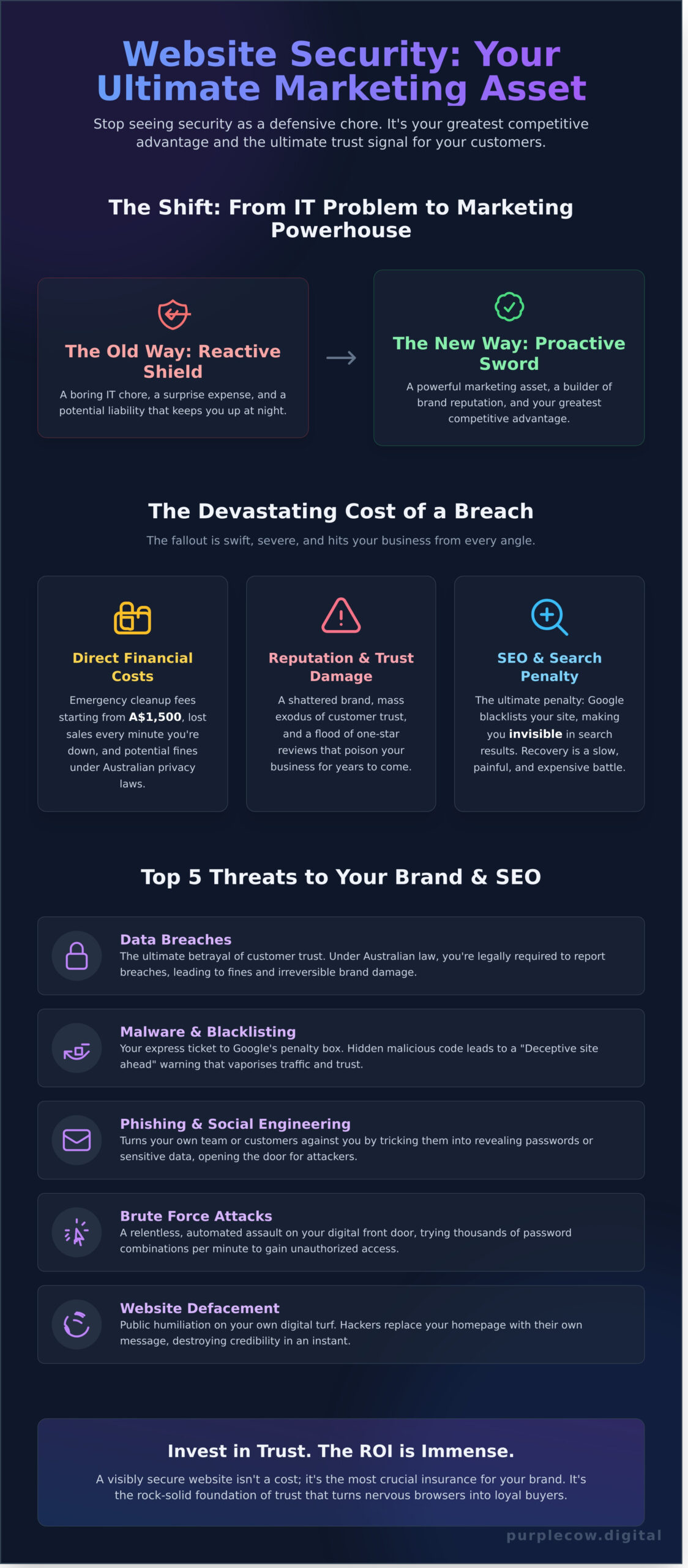
In 2026, world-class security isn’t just a shield-it’s a sword. It’s your most powerful, yet overlooked, marketing asset. It’s the ultimate trust signal that tells customers, “We’ve got your back,” turning nervous browsers into loyal buyers. It’s not about avoiding disaster; it’s about building an unshakeable brand reputation that your competitors can only dream of.
Forget the technical overwhelm. This is your un-boring, jargon-free guide. We’re handing you a simple checklist to see where you stand right now, a clear roadmap to making smart decisions (without the terrifying price tag), and the confidence to turn your website from a potential liability into your greatest competitive advantage.
Key Takeaways
- Discover how to reframe website security from a reactive IT chore into a proactive marketing asset that builds customer trust.
- Uncover the top digital threats that can get your Australian business blacklisted by Google and wreck your hard-earned SEO rankings.
- Get a simple, 10-point checklist you can use in 15 minutes to perform a basic audit of your site’s defences, no tech degree needed.
- Learn the 4-layer framework for building a digital fortress that protects your brand’s reputation and reassures your customers.
Why Website Security is a Marketing Problem, Not an IT Headache
Let’s be brutally honest. For too long, website security has been relegated to the bottom of the to-do list-a boring, reactive task for the IT department to handle when something breaks. That’s the old way. The grey way. The PurpleCow Digital Marketing way is to see it for what it truly is: a proactive, mission-critical marketing asset.
Your website isn’t just a collection of code; it’s your 24/7 digital storefront, your lead-generation engine, and the single most important representation of your brand online. While a comprehensive overview of computer security might seem like purely technical jargon, its real-world impact is felt directly in your sales figures. A secure site-one with HTTPS, that loads fast, and is free of malware-screams professionalism and builds immediate customer trust. A “Not Secure” warning from a browser? That’s the digital equivalent of a boarded-up window. It kills conversions on the spot.
This holds true for service businesses and highly specialized e-commerce platforms alike; a customer purchasing from a niche supplier such as Peptide Research AU needs to feel confident that their transaction and data are safe.
This is about ‘brand safety’. You can spend years and a fortune building a remarkable brand, only to have it vaporised overnight by a single hack. A defaced homepage or a customer data leak isn’t an IT headache; it’s a brand apocalypse that destroys years of hard-earned trust.
Building that remarkable brand in the first place requires a comprehensive approach to digital marketing. For insights into modern strategies that integrate branding, social marketing, and even AI, you can visit Buzz Media LTD.
The True Cost of a Security Breach
Thinking a breach is a minor inconvenience? Think again. The fallout is swift and severe, hitting you from every angle:
- Direct Costs: Expect emergency cleanup fees starting from A$1,500, lost sales for every minute your site is down, and potential fines under Australian privacy laws for data breaches.
- Indirect Costs: This is where the real damage lies. A shattered reputation, a mass exodus of customer trust, and a flood of one-star reviews that will poison your brand for years.
- SEO Impact: The ultimate penalty. Google can blacklist your site, instantly making you invisible in search results. Climbing back from that is a slow, painful, and expensive battle.
Shifting Your Mindset from ‘Expense’ to ‘Investment’
Stop viewing robust website security as a cost. It’s an investment-the most crucial insurance policy for your most valuable business asset. In a market crowded with competitors, a visibly secure website can become a unique selling proposition, a clear signal that you value your customers’ safety. This rock-solid foundation of trust is essential to any successful branding strategy. Without it, everything else you build is on shaky ground.
The Top 5 Threats That Will Wreck Your SEO & Reputation
Forget the dense jargon. Poor website security is not an IT problem; it’s a marketing catastrophe waiting to happen. It erodes trust, demolishes your search rankings, and can sink your brand overnight. The Australian Government even provides guidance on the common online threats to your business, because the stakes are far higher than just a broken website. Let’s focus on the real-world damage.
Here are the five threats that turn your biggest digital asset into your biggest liability:
- Malware & Blacklisting: Your express ticket to Google’s penalty box.
- Data Breaches: The ultimate betrayal of customer trust.
- Phishing & Social Engineering: Turning your own team or customers against you.
- Brute Force Attacks: A relentless, automated assault on your digital front door.
- Website Defacement: Public humiliation on your own digital turf.
These threats impact not just customer relationships, but also those with your business partners. For companies that rely on a network of resellers or distributors, a security failure can damage the entire channel. Managing these partnerships effectively is a key part of brand strategy, a topic explored in depth by experts like Computer Market Research.
Malware: The Silent SEO Killer
Hackers don’t just steal data; they hijack your hard-earned SEO authority. They inject malicious code and hidden links into your site, often pointing to spam or illegal websites. Google’s crawlers eventually find this, and the punishment is swift. Your potential customers will be met with a massive red warning screen saying, “Deceptive site ahead.” Climbing back from a Google blacklisting is a slow, painful, and expensive battle that many businesses never fully win.
Data Breaches and Australian Law
In Australia, the Notifiable Data Breaches (NDB) scheme means you can’t just sweep a breach under the rug. You’re legally required to report it. While the fines can be significant, the real cost is the irreversible damage to your reputation. Telling your entire customer base that you failed to protect their personal information is a brand-killer. In today’s market, robust website security isn’t a feature; it’s a fundamental promise to your customers.
The 4 Layers of a Remarkable Website Security Fortress
Website security can feel like a complex, technical nightmare. It’s not. Forget the jargon and the fear-mongering. To make your digital asset truly safe, you just need a simple, powerful framework. Think of it as building an impenetrable fortress, layer by layer. This isn’t about being average; it’s about being untouchable.
Layer 1 & 2: Secure Foundations & Access
Most businesses fail right here. They build their digital masterpiece on a foundation of sand: cheap, overcrowded shared hosting. It’s the digital equivalent of setting up shop in a bad neighbourhood and leaving the doors unlocked. Your foundation must be solid. This means:
This is where partnering with a professional web design agency makes all the difference. As an international example of best practice, award-winning studios like Insight Multimedia build this rock-solid security into a site’s DNA from the very first line of code.
This principle of securing entry points is universal. In the physical world, for example, the standard has evolved to using a modern digital door lock singapore to protect property, and the same mindset is needed to protect your digital assets.
- Choosing quality hosting, not the A$5/month special that crams your site next to thousands of others.
- Using a modern, consistently updated CMS like WordPress.
- Enforcing strict access control: strong, unique passwords, multi-factor authentication (MFA), and giving users only the permissions they absolutely need.
To see how a secure foundation is implemented in practice during the development of a professional WordPress site, you can read more.
Building on a secure base isn’t an afterthought; it’s a core part of our professional web design process from day one.
Layer 3 & 4: Defence & Recovery
With a solid base, it’s time to add your active defence and a bulletproof escape plan. This is where your fortress gets its alarm system and its emergency exit. A robust website security strategy includes a digital bouncer-a Web Application Firewall (WAF)-that blocks malicious traffic before it even reaches your site. It also needs a security patrol in the form of regular malware scanning to detect anything that slips through.
This mindset of layered, proactive protection mirrors best practices in physical security. Just as you’d protect your premises with comprehensive systems from a firm like Quartz Empire Fire & Security Ltd, your digital assets require the same level of professional vigilance.
But what if the worst happens? That’s Layer 4: Disaster Recovery. This is your non-negotiable ‘get out of jail free’ card-automated, daily backups stored off-site. It means you can restore a clean version of your site in minutes, not days. This constant vigilance and preparation is exactly what professional Website Maintenance is all about.
Your 10-Point Website Security Checklist (No Tech Degree Required)
Forget the impenetrable tech jargon. The gulf between a vulnerable website and a digital fortress starts with a few simple questions. Grab a coffee. You have 15 minutes. Let’s see if your site is just another face in the crowd or a genuine contender. Answer these with a simple ‘Yes’ or ‘No’.
Quick Security Wins You Can Check Now
- 1. Is there a padlock (HTTPS/SSL) next to your domain name?
Yes/No? That little lock isn’t just for show; it’s the universal digital symbol for ‘you can trust this site’. No lock means your visitors (and Google) are already backing away. It’s a non-negotiable. - 2. Are your WordPress, themes, and plugins all up to date?
Yes/No? Running outdated software is like leaving your front door wide open for hackers. Every update patches a vulnerability. Don’t be the low-hanging fruit. Update. Always. - 3. Are you using a strong, unique password for your admin account?
Yes/No? If your password is ‘Admin123’ or ‘YourBusinessName2024!’, you’re not secure; you’re a sitting duck. A strong password is your first wall of defence. Is yours a fortress wall or a flimsy picket fence? - 4. Do you have a website backup solution in place?
Yes/No? Attacks happen. Servers fail. A reliable, recent backup is your ‘undo’ button for disaster. Without it, you’re not running a business; you’re gambling with it.
Deeper Checks for a Safer Site
- 5. Is your website login page hidden from the default URL?
Yes/No? Every bot on the planet knows to check `yourdomain.com/wp-admin`. Leaving it there is putting a giant “Attack Here!” sign on your front door. A simple change makes you a much harder target. - 6. Are you using a security plugin like Wordfence or Sucuri?
Yes/No? You wouldn’t leave your office without an alarm system. A quality security plugin is your 24/7 digital guard, actively scanning for threats and blocking malicious attempts. - 7. Do you regularly remove unused plugins and themes?
Yes/No? Every piece of inactive code is a potential backdoor waiting to be exploited. It’s digital clutter that carries real-world risk. Clean house. Be ruthless. - 8. Do you have a Web Application Firewall (WAF) active?
Yes/No? A WAF is your proactive bodyguard, filtering malicious traffic *before* it even reaches your website. It’s the difference between having a security camera and having a bouncer at the door. - 9. Is your PHP version up to date (check with your host)?
Yes/No? Running your site on an old version of PHP is like building a skyscraper on a crumbling foundation. Check with your host; if it’s not a supported version (like 8.0+), demand an upgrade. - 10. Have you limited the number of admin users?
Yes/No? Every admin account holds the keys to the kingdom. The more keys you hand out, the higher the chance one gets lost or stolen. Keep your circle of power small and tight.
So, how did you score? A few ‘No’ answers are wake-up calls, not death sentences. But they reveal the cracks in your digital foundation. This audit is your starting line. The next step is building a proactive website security strategy that makes you formidable, not just lucky. If your list has more ‘No’s than ‘Yes’s, it’s time to stop reacting and start dominating. Because outstanding security isn’t an expense; it’s a competitive advantage.
Stop Worrying: How We Build Remarkable Security Into Your Site
You’ve read the checklist. You understand the threats. Now, are you going to become a part-time security analyst, or are you going to lead your business? The average business owner adds ‘check website security’ to their endless to-do list. The remarkable ones make it someone else’s mission.
At Purple Cow Digital, we don’t believe security is an afterthought or a pricey add-on. It’s the non-negotiable foundation of any website that’s built to win. We take a proactive stance because we know that prevention isn’t just better than a cure-it’s infinitely cheaper and smarter than the costly chaos of a data breach or a site-down emergency.
Security as Standard, Not an Optional Extra
For us, launching a website without a rock-solid security posture is like building a storefront with no locks on the doors. It’s unthinkable. Every single site we build is fortified from day one, integrating security best practices into its very DNA. This isn’t just about ticking boxes; it’s about protecting your investment and ensuring your primary marketing engine runs without interruption.
- Digital Fortress: We configure robust firewalls to block malicious traffic before it ever reaches your site.
- Constant Vigilance: Automated security scans run tirelessly in the background, hunting for vulnerabilities 24/7.
- Safety Net: Daily, off-site backups mean your data is always safe and restorable at a moment’s notice.
Focus On Your Business, We’ll Handle The Tech
Your genius is in running your business, not in deciphering security alerts or updating plugins at 10 PM. That’s our domain. Our Website Care Plans are designed for one purpose: to give you complete peace of mind and free you to focus on growth.
We handle all the critical updates, the relentless security monitoring, and the meticulous backups. And if the worst-case scenario ever unfolds? You don’t get a technical manual. You get a solution. We are the ones on call to restore your site, fast. Stop being your website’s unpaid IT manager. Let us handle the complexities of website security, so you can focus on what you do best: being remarkable.
Your Website Isn’t Average. Its Security Shouldn’t Be Either.
The days of treating security as an IT problem are over. For Australian businesses, a breach isn’t a glitch-it’s a marketing catastrophe that wrecks your SEO, shatters customer trust, and makes your brand invisible. But as you’ve seen, you don’t need to be a tech genius to build a fortress. A proactive, layered strategy is your ultimate competitive advantage.
Stop wasting energy on worry. True peace of mind comes from knowing your website security is relentlessly managed by experts. Our Website Care Plans are your digital shield, built on premium Managed WordPress Hosting, daily backups and security scans, and 24/7 uptime monitoring. All backed by our expert, Brisbane-based support team.
Don’t settle for being another vulnerable target in the herd. It’s time to build a digital presence that’s not just remarkable, but resilient. Secure your site and protect your growth. Explore our Website Care Plans. Your future is too important to leave unguarded.
Frequently Asked Questions About Website Security
How can I check if my website is secure for free?
Don’t just hope for the best. You can get a quick, surface-level check using free tools like Google’s Safe Browsing status or the Sucuri SiteCheck scanner. These tools will spot obvious malware, blacklisting issues, and out-of-date software. While it’s a great starting point, remember that a free scan is just a snapshot. Real security is a relentless, ongoing process, not a one-time check that lets you blend in with the vulnerable crowd.
What is the most common type of website security attack?
The most common attacks aren’t elaborate heists; they are automated, opportunistic strikes. Brute-force attacks, where bots relentlessly guess your login details, and the exploitation of known vulnerabilities in outdated plugins or themes are rampant. Hackers are simply looking for the easy targets-the businesses that treat security as an afterthought. Your job isn’t just to defend, but to make your website a hardened, unattractive target that forces them to move on.
How much does website security cost for a small business in Australia?
In Australia, proactive security is an investment, not an expense. Costs can range from A$150 – A$750 annually for premium security plugins and a firewall, to A$100 – A$300+ per month for a fully managed security and maintenance plan. The real question isn’t what it costs to be secure, but what it costs to be hacked. A single breach can cost you thousands in lost revenue, cleanup fees, and shattered customer trust. Choose to invest.
Does an SSL certificate make my website 100% secure?
Absolutely not. Thinking an SSL certificate is a magic bullet is a dangerously average mistake. An SSL encrypts data in transit between a user’s browser and your server-it’s like having a secure, private conversation. However, it does nothing to protect your website from being hacked due to a weak password, a vulnerable plugin, or a server-side exploit. It’s a non-negotiable first step, but it’s far from the complete picture.
What’s the difference between a firewall and malware scanning?
Think of a firewall as the elite bouncer at your club’s front door. It inspects all incoming traffic and blocks malicious requests *before* they can cause damage. A malware scanner, on the other hand, is the security team patrolling *inside* the venue, actively searching for threats that may have already slipped through or were present before. You don’t choose one or the other. You need both to create an impenetrable digital fortress.
How often should I update my website’s plugins and themes?
Immediately. Not weekly, not “when you get around to it.” As soon as a security update is released for your WordPress core, plugins, or theme, you must apply it. Hackers exploit known vulnerabilities within hours of them being publicly announced. Procrastination is an open invitation for disaster. Businesses that dominate their market don’t delay; they act with purpose and precision. Make updates a reflex, not a task on a to-do list.
Can a hacked website affect my Google search ranking?
A hack will completely torpedo your SEO. If Google detects malware, spam, or a compromised site, it will slap a warning on your search results or de-index your pages entirely to protect its users. All the hard work you invested in climbing the rankings vanishes overnight. Effective website security isn’t just an IT problem; it’s a non-negotiable pillar of any serious SEO and digital growth strategy. Anything less is just gambling with your brand.
What should I do if I think my website has been hacked?
Don’t panic-execute. First, contact your hosting provider to alert them and see if they can help. Immediately use a security scanner like Wordfence or Sucuri to find the infection. If you have a clean, recent backup, restore it. Most importantly, change every single password: WordPress admins, FTP, hosting panel, and database. This isn’t the time for a DIY fix; engaging a professional is the fastest, most effective way to reclaim your territory.