
In 2026, an unmeasured marketing strategy isn’t just a mistake; it’s a choice to remain invisible while your competitors dominate the market. Most businesses are currently flying blind, paralyzed by the fact that while Google Tag Manager holds over 94% of the market share, very few actually know how to wield it. You know the frustration of waiting days for a developer to install a simple pixel, only to find your data is still a mess of inaccuracies. You’re rightfully afraid of breaking your website code, yet you’re leaking growth every second you spend guessing. This Setting Up Google Tag Manager – Step by Step Guide is your definitive, no-nonsense roadmap to stopping the leaks and starting your evolution into a data-driven powerhouse.
We agree that the old way of “set it and forget it” is dead. Following the major May 2026 update that merged containers with the Google Tag, the rules of the game have changed. I promise that by the end of this guide, you’ll have full control over your marketing pixels and clean, actionable data that actually moves the needle. We’ll explore the brand-new visual event builder, navigate the mandatory Consent Mode v2 requirements, and set up the new built-in variables like Session ID to ensure your marketing execution is faster and sharper than ever before.
Key Takeaways
- Discover why manual coding is a “grey” marketing trap and how GTM gives you the agility to outpace competitors who are still stuck in the slow lane.
- Follow this Setting Up Google Tag Manager – Step by Step Guide to build a high-performance container hierarchy that scales with your business ambition.
- Eliminate the hidden costs of “leaky” data by replacing fragile hardcoded pixels with a secure, centralized, and scalable management system.
- Master the deployment of the new Google Tag and site-wide triggers to ensure your GA4 data is clean, accurate, and actionable from day one.
- Unlock advanced event tracking for Meta and LinkedIn to turn every “remarkable” user action into a measurable, data-driven competitive advantage.
Why Google Tag Manager is the Secret Weapon for Remarkable Growth
Average marketing is invisible. If you’re still manually hardcoding pixels or begging a developer to install a simple tracking code, you’ve chosen to be average. In a world where the majority of the web relies on this platform, the difference between the leaders and the laggards is how they use it. Google Tag Manager isn’t just a container for scripts; it’s the central nervous system for your website data, allowing you to bypass the technical “grey” and move straight to the “purple” results. Technically, it’s a Tag Management System, but for the ambitious business owner, it’s the engine room of a scalable empire.
The “Boring” way of managing data involves messy code, slow site speeds, and constant delays. The approach we take at PurpleCow Digital Marketing uses this Setting Up Google Tag Manager – Step by Step Guide to gain total agility. By centralizing your tracking, you ensure your digital marketing services are fueled by high-octane insights rather than guesses. It’s the difference between shouting into a void and having a targeted conversation with your most profitable customers.
To better understand this concept, watch this helpful video:
GTM is non-negotiable for 2026 for three reasons. First, it offers unmatched speed; you can deploy a new campaign in minutes, not weeks. Second, it provides data integrity; by using the visual event builder, you eliminate the human error inherent in manual coding. Finally, it’s built for privacy. With Consent Mode v2 now a legal prerequisite, GTM is the only way to stay compliant without losing your ability to track conversions.
Breaking the Developer Bottleneck
Waiting for code updates is where ROI goes to die. Every day you wait for a developer to “get around” to your tracking request is a day of lost data and wasted ad spend. PurpleCow Digital Marketing believes in giving power back to the marketing team, allowing you to test, deploy, and refine strategies in real time. It effectively turns your website into a lab where you can experiment without fear of “breaking” the foundation. GTM is the central nervous system for your website data, coordinating every signal into a coherent growth strategy.
Future-Proofing Your Measurement Strategy
The digital world is shifting toward server-side tagging and a cookie-less future. By Setting Up Google Tag Manager – Step by Step Guide today, you’re building a fortress around your data. Whether you’re optimizing SEO, scaling Meta Ads, or refining your email marketing, clean data is your only real competitive advantage. When your tracking is precise, you don’t just reach people; you attract high-paying clients who value the professional, data-backed approach you bring to the table. Don’t settle for “good enough” data when remarkable growth is just a container away.
Step-by-Step: Setting Up Your GTM Account and Container
Most digital setups are a “grey” mess of tangled code and forgotten pixels. If you want to build a brand that actually stands out, your data foundation must be immaculate. This Setting Up Google Tag Manager – Step by Step Guide begins with a clean slate. Head over to the Google Tag Manager homepage and sign in with your business account. Don’t use a personal email; you’re building an asset, not a hobby. Click “Create Account” and give it a name that reflects your company identity. This is the top of your hierarchy, the master folder for everything that follows.
Once your account is live, it’s time to create your first Container. Think of the container as the actual bucket that holds your tracking tags. For most of you, “Web” is the starting point. However, in 2026, remarkable brands are increasingly looking at “Server” containers to bypass ad blockers and improve site speed. Choose your platform, name it after your specific domain, and hit create. You’ll have to accept the terms and conditions. It’s the only boring part of this process, but it’s the legal bridge to owning your data destiny.
Organization is what separates the elite from the invisible. Use a strict naming convention from day one so your workspace doesn’t become a chaotic “Grey Cow” disaster. We recommend a structure like [Category] - [Type] - [Specific Action]. For example, “GA4 – Event – Contact Form Submission” is clear, searchable, and professional. If you find the technicalities of data structure overwhelming, our digital marketing services can help you build a roadmap that makes sense.
Account vs. Container: Getting the Hierarchy Right
Don’t make the mistake of creating a new account for every website. If you own three different brands, create one account for the parent company and separate containers for each site. This keeps your billing and user management centralized. If you’re working with an external website maintenance team, you can grant them “Publish” or “Edit” permissions at the container level without giving them keys to your entire kingdom. This structure ensures your data remains secure while your team stays agile.
Generating Your Tracking Snippets
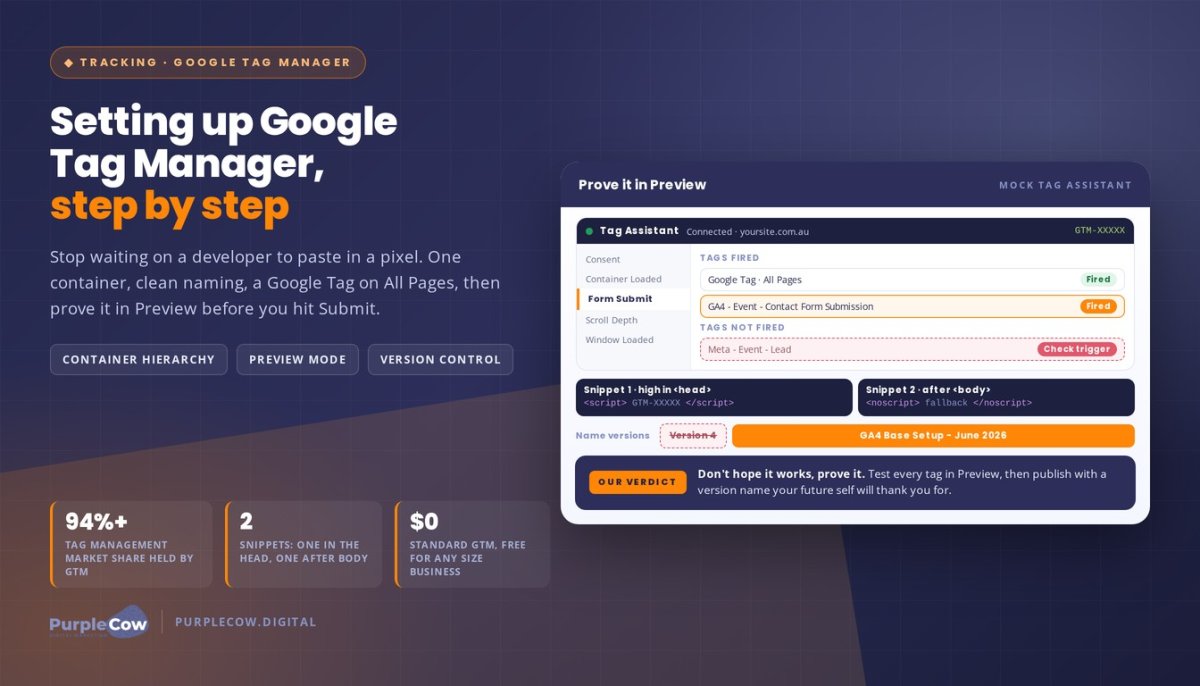
After creating the container, GTM will present you with two snippets of code. The first block belongs as high in the <head> of your website as possible. Placement matters here because you need your tracking to initialize before a user has the chance to bounce. The second block is a “noscript” fallback that goes immediately after the opening <body> tag. You’ll find your GTM-XXXXX ID prominently displayed at the top of your workspace next to the “Preview” and “Submit” buttons. Copy these snippets carefully; they are the digital glue that connects your website’s behavior to your marketing strategy.
GTM vs. Manual Hardcoding: Stop Leaking Data (and Money)
Hardcoding your tracking pixels is a legacy move for the uninspired. It’s like building a house where you have to tear down a wall every time you want to change a lightbulb. Every manual script you inject into your site’s header is a potential failure point. These scripts don’t just sit there; they conflict, they break, and they slow down your entire user experience. When your tracking is broken, you aren’t just losing numbers; you’re losing the ability to see where your money is going. This Setting Up Google Tag Manager – Step by Step Guide is your exit ramp from that technical debt. If you want to stop guessing and start scaling, you must plug the holes in your “leaky bucket” web funnel. Precise data is the only way to ensure you are actually building a web funnel that works instead of just burning your ad budget.
GTM provides three pillars of advantage: Speed, Security, and Scalability. By using a single container, you reduce the number of external requests your site makes. This keeps your site agile and your data secure. You don’t need to touch the source code every time you launch a new campaign. This agility is what separates the remarkable brands from the invisible ones. GTM turns your measurement strategy from a chore into a competitive weapon.
Risk Management and Site Speed
Bloated manual code is the silent killer of high-converting web design. If your site takes more than three seconds to load, half your audience is already gone. Manual hardcoding often leads to “code bloat,” where old, unused scripts continue to fire long after a campaign has ended. GTM solves this with its “Undo” button. Version control allows you to roll back to a previous workspace in seconds if a new tag causes a conflict. It’s a safety net that prevents catastrophic site crashes during your most critical marketing launches.
The Comparison: Efficiency at Scale
Manual tracking is high maintenance and high error. It requires constant developer oversight and is prone to human mistakes that skew your results. GTM, by contrast, offers instant deployment and high accuracy. It’s an essential tool for modern seo services because it allows you to track micro-conversions without touching a single line of CSS or HTML. When you can deploy a Meta Pixel or a LinkedIn Insight Tag in two clicks, you have more time to focus on the strategy that actually drives growth. Stop being a spectator in your own business and take control of the data that defines your success.
Your First Victory: Deploying the Google Tag and Testing
Now that your container is live, it’s time for your first real win. In the 2026 landscape, the unified Google Tag has replaced the old Configuration Tag, streamlining how you send data to GA4 and beyond. This Setting Up Google Tag Manager – Step by Step Guide wouldn’t be complete without establishing this foundation. Create a new tag, select “Google Tag,” and enter your Tag ID. This single tag acts as the lighthouse for your measurement strategy, ensuring every interaction is accounted for. It’s the end of guessing and the beginning of knowing.
You must pair this tag with the “All Pages” trigger. It’s the most basic instruction you’ll give GTM, telling it to fire on every single URL of your site. It ensures that no matter where a visitor lands, your tracking is active. This isn’t just about collecting numbers; it’s about eliminating the blind spots that keep your brand invisible. Once this is set, you’re ready to see the magic happen in real time. Testing is where the amateurs quit and the professionals take control.
Mastering GTM Preview Mode
Don’t just hope it works; prove it. Click the “Preview” button to launch Tag Assistant and enter your website URL. This opens a debug window that shows you exactly what’s happening under the hood as you click through your site. You’ll see a list of “Tags Fired” and “Tags Not Fired” for every single page load. If a tag refuses to fire, check your trigger conditions against the actual data layer values shown in the Preview window summary to identify the mismatch. This real-time feedback loop is your greatest weapon against inaccurate data and broken funnels.
Publishing and Version Control
A workspace left in “Draft” mode is a strategy left on the table. Nothing goes live until you hit that “Submit” button. When you do, name your version with precision. “GA4 Base Setup – June 2026” is a gift to your future self, while “Version 4” is just more grey noise. This level of discipline is exactly what we preach in our SEO Brisbane pillar strategy. Documenting your changes ensures you can always roll back if needed, giving you the confidence to experiment and grow without fear of breaking your site’s foundation.
If you’re ready to stop playing small and want a measurement setup that actually drives revenue, explore our digital marketing services to see how we turn raw data into market dominance.
Beyond the Basics: Turning Data Into a Competitive Advantage
Congratulations. You’ve escaped the graveyard of manual coding and established a clean foundation. But simply having a container isn’t enough to dominate your market. Most businesses stop after the basic setup, content to watch a trickle of page view data. That’s a grey cow move. To truly stand out, you need to track Remarkable actions. We’re talking about the behaviors that actually signal intent: form submissions, specific button clicks, and video engagement. By following this Setting Up Google Tag Manager – Step by Step Guide, you’ve built the framework. Now it’s time to weaponize it.
Advanced Event Tracking
Page views are a vanity metric. If you want to win, you need to measure engagement. Are people actually reading your content, or are they bouncing? Setting up scroll depth tracking and click-based heatmaps allows you to see exactly where your audience loses interest. This data is vital for proving the ROI of your local SEO efforts. When you can show that a local lead didn’t just find you, but spent four minutes watching your case study video, you’ve moved from visibility to authority. As your business scales, your tracking needs will grow more complex. When you reach the point of needing custom data layers, that’s when you call in the experts to ensure your data remains a competitive weapon.
The PurpleCow Digital Marketing Method: Data Meets Strategy
Tracking is a waste of time if your destination is boring. You can have the most sophisticated GTM setup in the world, but it won’t save a mediocre web design. The approach at PurpleCow Digital Marketing is about the marriage of creative rebellion and rock-solid data. We use GTM to find the friction points in your funnel and eliminate them. For our monthly retainer clients, this means constant optimization. We don’t just set it and forget it; we use your data to pivot, scale, and crush the competition. Ready to stop being boring and start being remarkable? Let us build your remarkable strategy today. Don’t let your growth be limited by average tools and invisible data. It’s time to lead.
Stop Watching the Sidelines and Start Leading
You’ve moved past the “grey” noise of manual coding and established a measurement engine that actually works. By following this Setting Up Google Tag Manager – Step by Step Guide, you’ve secured the agility needed to deploy marketing campaigns in minutes rather than weeks. You now have the power to track remarkable user actions, verify them in real time, and turn raw data into a genuine competitive advantage. Your competitors are likely still waiting for developer help while you’re already optimizing for ROI. This isn’t just about technical setup; it’s about a mindset shift toward total market dominance.
Since 2016, we’ve helped Australian SMEs escape the trap of the average and claim their place as industry leaders. As specialists in custom WordPress development, we know that a website is only as strong as the data driving it. We focus on delivering results that are backed by hard numbers, not just pretty designs. It’s time to stop guessing and start growing. Stop Blending In. Build a Remarkable Website Strategy with PurpleCow. Your future as a market leader starts with the very first tag you fire today.
Frequently Asked Questions
Is Google Tag Manager free to use in 2026?
Yes, the standard version of Google Tag Manager is completely free for businesses of all sizes. While Google offers a paid enterprise version called GTM 360 for massive corporations, the free version provides all the firepower you need to outpace your competition. Just remember that if you opt for server-side tagging, you’ll need to account for cloud hosting costs, which usually range from $100 to $120 per month.
Does Google Tag Manager replace Google Analytics 4?
No, GTM and GA4 are two different tools that work together as a power couple. GTM is the messenger that captures and sends data, while GA4 is the brain that stores and analyzes it. Following this Setting Up Google Tag Manager – Step by Step Guide ensures that your messenger is delivering the exact data GA4 needs to produce remarkable, actionable insights for your business.
Will Google Tag Manager slow down my website?
No, GTM actually helps your site stay fast by loading tags asynchronously. This means your tracking scripts won’t block the rest of your page from appearing to your visitors. It’s a significant upgrade from the “grey” method of manual hardcoding, which often results in bloated code and sluggish performance. GTM keeps your user experience crisp while your data collection remains robust.
Do I need to know how to code to use GTM?
You don’t need to be a programmer to use GTM effectively. Since the major update in May 2026, the platform features a visual event builder that lets you set up tracking through a simple point-and-click interface. This Setting Up Google Tag Manager – Step by Step Guide is designed to help you bypass the technical “grey” and take full control of your marketing without writing a single line of code.
What happens if I accidentally delete a tag in GTM?
You can simply use the version control feature to roll back your workspace to a previous state. GTM acts like a time machine for your tracking setup, saving every version of your container before you publish it. If you make a mistake or a tag breaks your funnel, you can restore a working version in seconds. It’s the ultimate safety net for ambitious marketers.
Can I use GTM for my Meta (Facebook) Pixel setup?
How do I give someone else access to my GTM account?
You can grant access through the User Management settings in the Admin section of your account. GTM allows you to set specific permission levels, such as “View Only” or “Publish,” for different team members or agencies. This ensures your website maintenance team can do their job without you ever having to hand over your master password or ownership rights.
Is GTM compliant with privacy laws like GDPR or Australian Privacy Principles?
Yes, GTM is a critical tool for staying compliant with modern privacy regulations. By integrating Google Consent Mode v2, which became mandatory in March 2024, you can ensure your tags only fire when a user has given their explicit permission. It’s the only way to respect user privacy while still capturing the high-quality conversion data you need to scale your business in a “purple” way.

Article by
Angie Neal
Angie Neal is the founder and CEO of PurpleCow Digital, a full-service digital marketing agency based on Queensland's Redcliffe Peninsula. With deep expertise in SEO and web design, as well as a certification as a GoHighLevel Admin. Angie helps small-to-medium businesses build scalable growth systems through AI-powered automations, CRM workflows, and smart digital strategy. She's also passionate about building a community of like-minded agency owners at the After Party — sharing insights, solving real problems, and helping others grow. Whether it's search visibility, lead management, or end-to-end automation — Angie's focus is always on helping businesses scale sustainably.
Disclaimer
This page may contain affiliate links. If you sign up for software through our links, we may earn a commission at no extra cost to you. We only recommend tools we use and trust – software that is the backbone of our agency.